Activity summary
- downloads · 24h
- 3
- downloads · 7 days
- 10
- best Hot rank
- #953
- best Rising rank
- #407
Retail status unknown
Retail files
- 12.0.7 released Jun 19, 2026 no required dependencies
From the author
Excerpt from the author's description on CurseForge
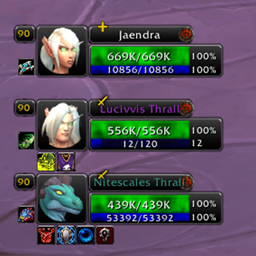
Simpleilvl is a World of Warcraft addon designed to display the Item Level (iLvl) of the player and their group members (Party or Raid) in a lightweight, movable window.
- Real-Time Tracking: Automatically tracks and updates the iLvl of players in your current group.
- Sorted Display: Lists group members based on their iLvl, typically sorting from highest to lowest.
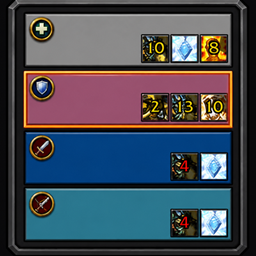
Screenshots 1
Recent downloads
Downloads per hour over the last 48 hours.
Latest 0/h Oct 18, 7 PM
Peak 1.99/h Oct 18, 3 PM
Average 0.11/h last 48h
Recorded history
| List | Now | 24h | 7d | 30d |
|---|---|---|---|---|
| Hot | #953 | #2836 | #4005 | #1934 |
| Rising | #407 | #1301 | #2126 | #454 |
Daily figures, Sep 19, 2026 – Oct 18, 2026
| Day | Downloads | Lifetime | Hot | Rising |
|---|---|---|---|---|
| +3 | 1,691 | #3839 | #2482 | |
| +1 | 1,688 | #5015 | #4021 | |
| +3 | 1,687 | #3026 | #1472 | |
| +1 | 1,684 | #3893 | #3426 | |
| +0 | 1,683 | — | — | |
| +0 | 1,683 | — | — | |
| +4 | 1,683 | #4238 | #2947 | |
| +1 | 1,679 | #3732 | #2837 | |
| +0 | 1,678 | #3560 | #2556 | |
| +1 | 1,678 | #3680 | #2604 | |
| +2 | 1,677 | #2697 | #1392 | |
| +1 | 1,675 | #3662 | #2044 | |
| +4 | 1,674 | #4399 | #2800 | |
| +3 | 1,670 | #2004 | #832 | |
| +9 | 1,667 | #4226 | #3020 | |
| +3 | 1,658 | #2214 | #1012 | |
| +2 | 1,655 | #3247 | #1817 | |
| +5 | 1,653 | #3436 | #1833 | |
| +6 | 1,648 | #2578 | #1167 | |
| +3 | 1,642 | #4041 | #2737 | |
| +1 | 1,639 | #3559 | #2223 | |
| +1 | 1,638 | #3991 | #2986 | |
| +2 | 1,637 | #3871 | #2536 | |
| +2 | 1,635 | #3812 | #2570 | |
| +2 | 1,633 | #4100 | #2961 | |
| +3 | 1,631 | #4024 | #2651 | |
| +3 | 1,628 | #4420 | #2927 | |
| — | — | #4390 | #2964 | |
| — | — | #4524 | #3186 | |
| — | — | #4132 | #3386 |
Downloads is the change in CurseForge's lifetime download total since the previous recorded day. Ranks are the last Now rank published that day; a dash means none was recorded.