Trend Explorer
Recent download momentum
Estimated downloads/hour over observed intervals in the last 48 hours.
Lines connect interval estimates, not hourly measurements. Unobserved time is not counted as zero or extrapolated to now.
About this addon
What it does
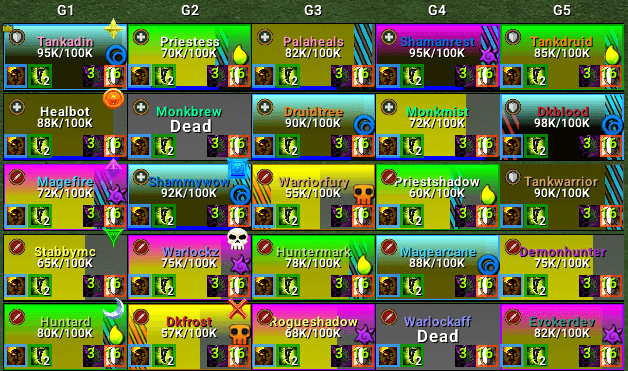
DandersFrames is a fully custom party and raid frame addon — built from the ground up for WoW Midnight (12.0). Total control over every aspect of your group frames, with a powerful Aura Designer, built-in Click Casting, automatic raid layouts, and deep customization.




🔮 Aura Designer
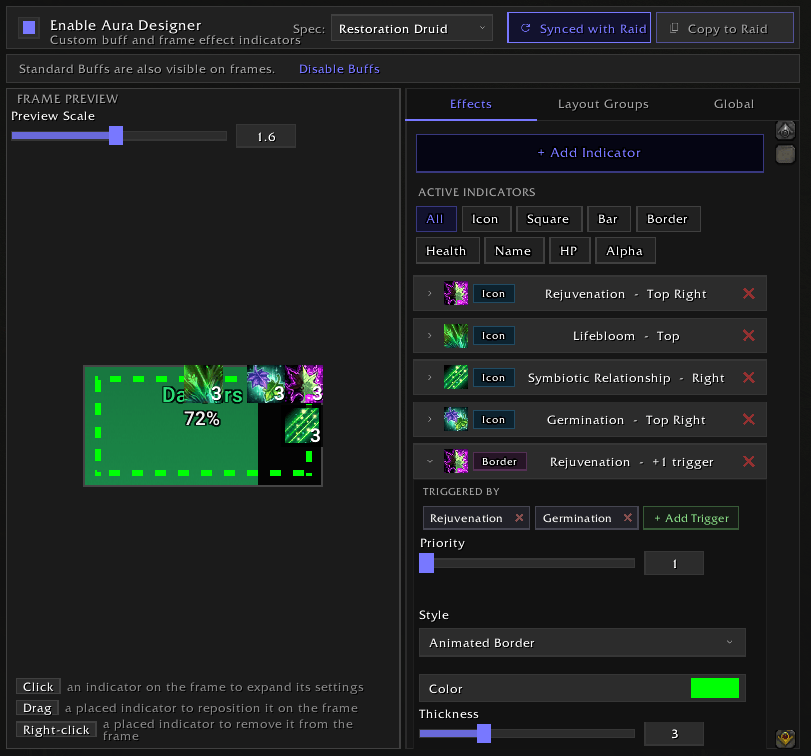
A full visual indicator system built right into the addon — track buffs and defensives directly on your frames without any external tools.
- 8 indicator types — Icons, Squares, Bars, Border Effects, Health Bar Color, Name Color, Health Text Color, and Frame Alpha
- Drag-to-place on 9 anchor points with pixel-perfect offset control
- Frame effects — Change health bar color, name color, or frame transparency when specific auras are active
- Multi-trigger effects — One effect triggered by multiple auras (OR logic)
- Layout groups — Grouped indicators that automatically collapse when inactive
- Priority stacking — Set priority per aura so the most important one always wins
- Per-spec configurations — Different setups for each specialization, auto-swapping on spec change
- Curated aura lists for all healer specs + Augmentation Evoker to get started fast
- Live preview with adjustable zoom and click-to-select editing
🖱️ Built-in Click Casting
Full click-casting built right in — no extra addons needed.
- Bind spells and macros to any mouse button + modifier combo
- Per-spec profiles that auto-switch when you change spec
- Works on party, raid, pet, boss, target, and focus frames
- Smart resurrection detection and spell transform support
- Tooltip shows active bindings and usability on hover
- Import/export profiles to share setups
⚙️ Auto Layouts (Raid)
Automatically switch raid frame settings based on content type and group size — no manual profile swapping.
- Three content categories: Instanced, Mythic (20-man), and Open World
- Size-range profiles — different layouts for 1-10, 11-20, 21-40 players
- Override-only storage — only your changes are saved, everything else inherits from your base profile
- Visual override indicators so you always know what's customized
- Copy layouts between content types and size ranges
📌 Pinned Frames
Create custom frame groups for specific players — pin your co-tank, co-healer, or priority targets into their own movable group.
- Multiple independent pinned sets
- Auto-populate by role (tanks, healers, DPS)
- Per-set sizing, growth direction, and positioning
- Keep offline players option
🧪 Test Mode
Configure everything without needing a group.
- Preview 1–5 party or 1–40 raid frames on demand
- Animated health, absorbs, auras, dispels, range fading — all simulated
- Quick-link buttons jump directly to relevant settings
- Collapsible panel with active element badges
✨ Core Features
🎨 Health Bars
- Dynamic gradients — Color shifts green → yellow → red as health drops
- Class colors, custom colors, or hybrid mode
- 15+ built-in textures + SharedMedia support
- Smooth bar animations with exponential easing
- Missing health overlay with gradient coloring
- Health threshold fading — Fade frames above a health % to focus on damaged players
🛡️ Absorbs & Heal Prediction
- Absorb overlay or floating bar with full positioning control
- Heal absorb tracking (Necrotic, etc.)
- Incoming heal prediction — See heals in flight from you, others, or all
- Overheal display with overflow threshold
⚡ Resource Bars
- Healer-only mode — Only show mana for healers
- Full positioning, sizing, and color control
🎯 Aura Control
- Two filtering modes: Blizzard (automatic) or Direct API (granular control)
- Direct mode filters: Player-cast, Raid, Defensives, External Defensives, Important Spells
- Defensive Bar — Shows all active defensives simultaneously with wrappable layout
- Boss Debuffs (Private Auras) with highlight borders
- Missing buff indicator — Detects missing raid buffs, works in combat
- Buff deduplication — auras shown in Aura Designer or Defensive Bar are hidden from the buff bar
- Expiring indicators with pulsating borders
🎯 Highlights & Indicators
- Target, Hover, Selection, Aggro highlights — each with 4+ styles (Solid, Corners, Glow, Dashed)
- Dispel overlay — Border, gradient glow, or icon per debuff type (Magic, Curse, Disease, Poison, Bleed)
- Role, Leader, Raid Target, Ready Check, Resurrection, AFK, and Phased icons — all repositionable
- Status text for Dead, Offline, AFK, Vehicle, and Phased states
📊 Sorting & Layout
- Sort by Role, Class, or Name
- Separate Melee/Ranged DPS option
- Player position control (First, Last, or sorted normally)
- Flat raid mode (combined grid) or grouped layout
- Custom growth directions and groups-per-row
⚙️ Profiles & Settings
- Separate Party/Raid configurations
- Per-spec auto-switching — Load different profiles per specialization
- One-click import/export with compression
- Global font options — apply one font across the entire addon
- Settings search bar — find any option instantly
- Copy-to-Raid / Copy-to-Party buttons on every settings section
- Section sync toggles to keep party and raid settings linked
🔌 Compatibility
- SharedMedia — Custom fonts and textures from other addons
- Masque — Button skinning support
- External API — Developers and UI pack creators can query frames, export/import profiles and click casting configs programmatically
How to Use
- Install the addon (remove the old version if upgrading)
- Access Settings: Click the minimap icon or type
/df - Preview Changes: Use Test Mode (
/df test) to see your frames without a group
Feedback & Support
Found a bug or have a feature request? Join the community!

If DandersFrames has improved your gameplay, consider supporting development:

At-a-glance numbers
Performance highlights
- Peaked at Hot #12 on Aug 23, 2026.
- Featured on the Hot list across 5 distinct weeks.
- Shipped 20 releases in the last 30 days.
- Averaging 1.2K new downloads per day over the past week.
Visuals
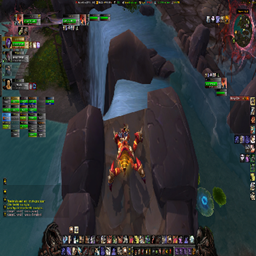
Screenshots 9
Use real gameplay shots to assess the addon before installing.