Trend Explorer
Recent download momentum
Hourly download deltas for the last 48 hours.
About this addon
What it does

Nemesis Chat - The event-driven, targeted message framework.
Join our Discord
Get Support | Contribute | Make Suggestions
Key Features
Reports and Announcements for M+
- Reports can be configured to display shout-outs (high performers) and/or call-outs (low performers)
- Damage dealt reports (requires Details!)
- Avoidable damage taken reports (requires GTFO)
- Affix handling reports, affix mob announcements (casting, cast success, etc)
- Neglected heals announcements (non-healer players at or below 60% health for 2 seconds or longer)
- Highest deaths reporting
- And more!
Dynamic, Targeted, Event-Driven Messaging
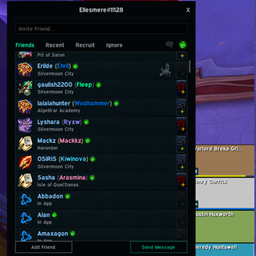
- Define Nemeses by entering your friend's character names in the Nemeses list. You may also enable Flag Friends as Nemeses in the options.
- Event-driven, triggered messages based on who triggered the event: You, a Nemesis, or a Bystander (someone in the group who is not a Nemesis).
- Currently, there are over 20 events you can choose from: Bosses (start, fail, success, player death), Dungeons (start, fail, success), Group and Raid (join, leave), General (spell cast, current feast placed, old feast placed, feast placed within 30s of another feast being placed (re-feast), unit kill, player death, heal, etc), and more.
- Triggered messages can have conditions, such as "Nemesis Role is DPS", "Nemesis DPS > my DPS", "players in group > 3", etc.
- Messages including a [NEMESIS] replacement tag will be treated as conditional, requiring a Nemesis to be present in the group.
- Messages including a [BYSTANDER] replacement tag will be treated as conditional, requiring a Bystander to be present in the group.
- Smart Nemesis: When a random Nemesis is chosen (an event triggered by a non-Nemesis, where a message contains conditions and/or replacement tags referring to a Nemesis), if the message's conditions cannot be satisfied, NC will loop through party Nemeses until either the conditions can be met, or all Nemeses are checked. This allows you to set very specific and granular conditions. Example: You're playing with 3 friends, one is a DPS, another is a healer, and the last is a tank. If you setup 3 separate messages for a Nemesis interrupt event, your messages could differentiate between DPS, heals, and tanks. Maybe the DPS message says something like, "Well I guess if [NEMESIS] isn't going to DPS, at least they'll interrupt!", with conditions of your DPS being greater than theirs. The next could be, "[NEMESIS] decides to finally act like a tank and interrupt [TARGET]'s [SPELL]! Woot!". The possibilities are endless, and the more granular you get, the more spicy/fun the messages can be.
- Smart Bystander: Everything stated above ("Smart Nemesis") applies to bsytanders as well. Nemesis-based messages will take priority.
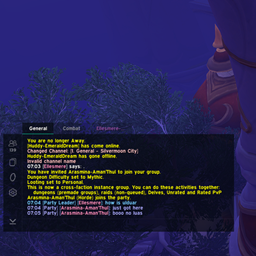
- Messages can be whispered (target is dynamic -- either the Bystander or Nemesis), sent to party/raid/instance, said (/s), and emoted.
Getting Started with Nemesis Chat
To get up and running, just open up the configuration (you can access the configuration screen through options -> addons, or by typing /nc in chat). All triggered messages will be checked prior to attempting to send them, so if (for example) you have 10 messages configured to reference a Nemesis, and there is no Nemesis in your group, it will not fire. This allows you a high level of configuration, enabling you to set a vast array of messages for different situations. When you're pugging, all group members will be considered Bystanders. Inversely when you run with someone who is configured as a Nemesis, they'll be considered a Nemesis.
Note: Nemesis Chat affords a tremendous amount of customizability, which inherently puts a large amount of control in the players' hands. If this tool becomes abused, I may need to add more guardrails and safety precautions. Just be cool, and don't use this to facilitate outright abuse / harassment.
Commands
/nc - Shows the Nemesis Chat configuration and reference screen. Can also be viewed by going to Options -> Addons -> Nemesis Chat.
/nc showinfo - Shows the NC quick metrics window (V2.0 preview, I know it's currently fairly limited but it will be much better soon!).
/nc hideinfo - Hides the NC quick metrics window (same as clicking the X to close the window).
Doesn't WeakAuras Do This?
WeakAuras does everything! A very large portion of the functionality offered in Nemesis Chat could be accomplished with WA. However, Nemesis Chat offers built-in frameworks to make specific flows much easier. If you were looking to do something similar in WA, it'd require building all the smaller pieces out and would likely take weeks just to mimic functionality that would take a small moment to setup in Nemesis Chat. There is no claim here that Nemesis Chat is more powerful or open-ended, and in fact the two work very well together. For example, in WeakAuras (with Nemesis Chat installed + configured) you can see if someone is a nemesis by using the custom code player = NCRuntime:GetGroupRosterPlayer(<player name>) and then checking player.isNemesis. This affords a high degree of customizability while maintaining the easier flow offered by Nemesis Chat!
Furthermore, Nemesis Chat is built to be expanded. If you had a very specific set of text replacements you wanted to implement, for example, you could very easily do that with custom code in WA or as an addon, leveraging the Nemesis Chat API (NCAPI:AddAPI("MY_COOL_API", "My Cool API"):AddTextReplacement([...]) -- it's really that easy). You can even add configuration toggles in NemesisChat's interface through the API, and those can be referenced by WA or any other addon: NCAPI:GetAPI("MY_COOL_API"):GetOption("EXTRA_STUFF_ENABLED")
Bottom line: Nemesis Chat and WeakAuras work very well together, and Nemesis Chat does not aim to replace anything in WeakAuras but rather augment your own flow. I personally use both, and often augment my own NC functionality with WA. Think of it similarly to how it works with GTFO + Details!: It relies upon them for some functionality, because frankly I'm not looking to re-invent the wheel, but it absolutely does not aim to encroach on what they do. They do a much better job than what I could come up with, so the idea is that they co-exist together, offering the end-user an incredible amount of functionality and power.
Quick Note on Healing Metrics
Current Stance in TWW
I currently main as a healer and am highly considering some healing functionality / tracking. I have no interest in measuring HPS or similar, for example, but rather real performance. I'd like to see if the healer with less healing overall managed their mana better, and was substantially lower on overhealing for example. I'd like to see who had clutch heals when someone was down bad. I'd like to see if someone is dispelling properly. Etc.
The bottom line is, for this season, healing metrics are not off the table and are in fact in ideation.
Old Stance from Dragonflight Below
Due to the current state of healing in M+ dungeons, I won't be adding any healing metrics, events, or reports (HPS, Overhealing, etc.). A lot of things end up falling squarely on the shoulders of healers currently, with PUG groups being notorious for refusing to mitigate affix mechanics. That coupled with healing being frantic and thankless, I've decided to completely steer away from adding anything within NC which may attempt to identify perceivably "bad" healers. There are a lot of things I could implement that could do this, and if Blizzard makes changes to healing within M+ I'll gladly add them. In the meantime, however, don't expect it.
At-a-glance numbers
Performance highlights
- Peaked at Hot #2547 on May 29, 2026.
- Peaked at Rising #5184 on Jun 3, 2026.
- Featured on the Hot list across 2 distinct weeks.
- Shipped 1 release in the last 30 days.
- Averaging 3 new downloads per day over the past week.
Visuals
Screenshots 4
Use real gameplay shots to assess the addon before installing.