
Trend Explorer
Recent download momentum
Hourly download deltas for the last 48 hours.
About this addon
What it does
Stop wasting crests on upgrades you can get for free.
UpgradeHelper tells you which of your items can be upgraded using only gold — no crests required. WoW's upgrade system tracks your highest item level per slot (the "high-watermark"), and items below that threshold can be upgraded for free. UpgradeHelper makes those free upgrades visible at a glance.
How It Works
- Visit any upgrade vendor — UpgradeHelper automatically scans your equipped and bag items.
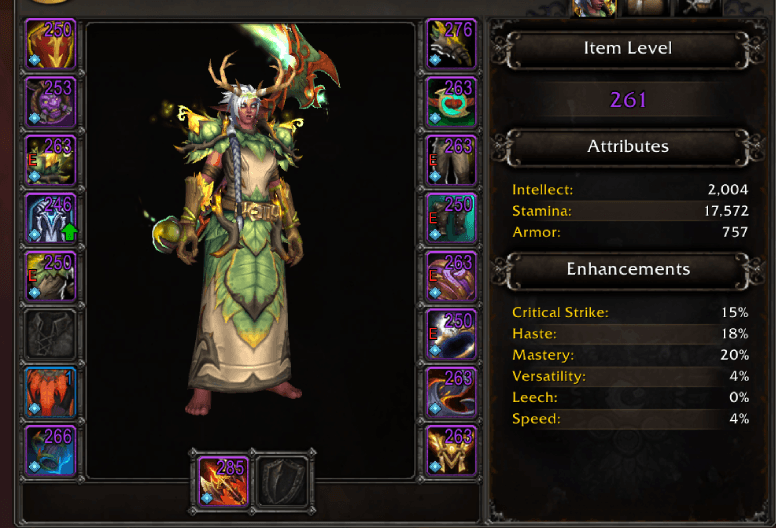
- Items with free upgrades are highlighted everywhere: character pane, bags, and tooltips.
- Go upgrade your gear and save your crests for items that actually need them.
Features
- Automatic scanning at the upgrade vendor — no button clicks needed (can also be triggered manually)
- Green arrow overlays on character pane equipment slots with free upgrades
- Green arrow overlays on bag item buttons with free upgrades
- Tooltip integration — hovering over any item shows its free upgrade potential (current ilvl, max free ilvl, and number of free levels)
- Baganator support — registers a corner widget so free upgrades show up natively in Baganator
- Scan results persist between sessions so you can check your character pane without being at a vendor
- Slash commands —
/uh statusto list all free upgrades,/uh scanat a vendor to rescan,/uh resetto clear cached data
Settings
All features can be toggled individually in the addon settings panel (/uh settings or ESC > Options > Addons > UpgradeHelper):
- Show Tooltip Info
- Show Character Pane Overlays
- Show Scan Message
- Auto Scan at Vendor
Slash Commands
| Command | Description |
|---|---|
/uh or /uh status |
List all items with free upgrades |
/uh scan |
Rescan items (must be at upgrade vendor) |
/uh reset |
Clear cached scan data |
/uh settings |
Open the settings panel |
Requirements
- World of Warcraft: The War Within (or any expansion with the current upgrade system)
- No library dependencies — pure WoW API, zero bloat
FAQ
Why do I need to visit a vendor first?
The C_ItemUpgrade API that provides upgrade cost data is only available when the upgrade vendor UI is open. UpgradeHelper caches the results so you only need to visit once per session (or after getting new gear).
Does it detect upgrades for items I've deleted or disenchanted? The high-watermark is tracked server-side and includes all items you've ever had. UpgradeHelper reads this data from the upgrade vendor API, so yes — even if you deleted the original high-ilvl item, your other items in that slot may still qualify for free upgrades.
Does it work with Baganator? Yes. If Baganator is installed, UpgradeHelper registers a corner widget that shows a green arrow on items with free upgrades directly in the Baganator bag view.
At-a-glance numbers
Performance highlights
- Peaked at Hot #5028 on Jun 28, 2026.
- Peaked at Rising #3827 on Jul 20, 2026.
- Featured on the Hot list across 6 distinct weeks.
- Shipped 1 release in the last 30 days.
- Averaging 0 new downloads per day over the past week.
Visuals
Screenshots 2
Use real gameplay shots to assess the addon before installing.