Trend Explorer
Recent download momentum
Hourly download deltas for the last 48 hours.
About this addon
What it does
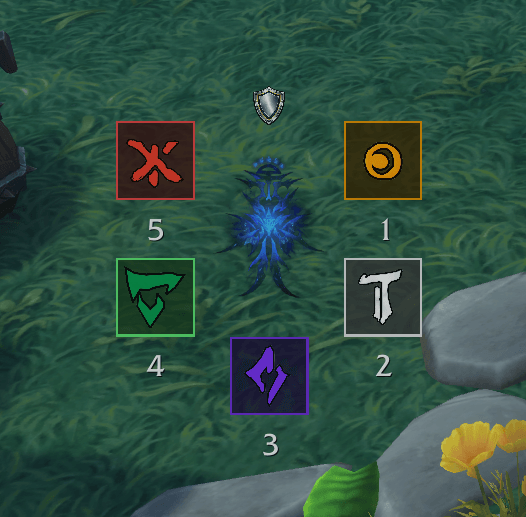
A polished fork of PugaHelper by Vaelhys — a World of Warcraft addon that displays L'ura symbol sequences in real-time during the Midnight Falls.
Why Fork?
The original PugaHelper nails the core functionality — symbol detection from raid chat events works flawlessly, even in combat. But it ships as a single monolithic file with no settings UI, no keybindings, hardcoded values, French-only strings, and an always-visible command frame that clutters the screen.
PugaHelper Extended keeps all the battle-tested combat logic intact and wraps it in a proper addon shell.
What Changed
New Features
- WoW Settings Panel — all options accessible via the native Settings UI (Esc > Options > Addons > PugaHelper Extended)
- Keybindings — bindable shortcuts for Toggle Diagram, Toggle Solo Mode, and Toggle Test Mode (Options > Keybindings > PugaHelper)
- Test Mode — press your macros outside of an encounter to fill the diagram and practice (
/puga test) - Frame Locking — prevent accidental repositioning (
/puga lock) - Opacity Control — adjustable transparency with hover-to-full-opacity effect
- UI Scale — scale all frames from 50% to 200%
- Full Slash Command System —
/puga [toggle|solo|template|test|clear|heroic|normal|macro|lock|reset|settings|help]
Polish
- Tooltips on every interactive element — hover anything for an explanation
- English strings throughout (original was French)
- Proper SavedVariables — settings, frame positions, and visibility state persist correctly across sessions
- Clean frame position saving — stored as compact tables instead of flat key sprawl
- Diagram hidden by default — respects your saved enabled/disabled state on login
- Command frame removed — replaced by slash commands and the settings panel
- Icon and categories in the addon list
Code Quality
- Multi-file architecture —
Core.lua(init, events, commands),PugaHelper.lua(UI),Settings.lua(options panel),Bindings.xml(keybindings) - Consolidated symbol definitions — single
SYMBOLStable instead of three separate lookup tables - De-duplicated frame builders — diagram and template frames share parameterized constructors
- Removed unnecessary pcall wrapping around safe API calls
- Extracted constants — addon path, media path, color prefixes defined once
Unchanged
- Symbol detection logic — the chat event buffer system (yell + ping = triangle, etc.) is untouched
- Encounter timing windows — the three timed input windows with their open/close/reset/sound timers
- Solo mode — clickable symbol template for practice
- Macro creation — same 5 macros with the same icons and chat commands
Installation
Copy the PugaHelperExtended folder into your Interface/AddOns/ directory. The original PugaHelper folder is included in this repo for reference but is not needed to run the extended version.
Commands
| Command | Description |
|---|---|
/puga |
Toggle the diagram |
/puga solo |
Toggle solo practice mode |
/puga template |
Toggle the macro template bar |
/puga test |
Toggle test mode (macros fill diagram without encounter) |
/puga clear |
Clear the diagram |
/puga heroic |
Heroic mode (5 symbols) |
/puga normal |
Normal mode (3 symbols) |
/puga macro |
Create/update the 5 symbol macros |
/puga lock |
Lock/unlock frame positions |
/puga reset |
Reset positions and scale to defaults |
/puga settings |
Open the settings panel |
Credits
- PugaHelper by Vaelhys — original addon and all combat mechanics
- PugaHelper Extended — UI overhaul, settings panel, test mode, and code cleanup
At-a-glance numbers
Performance highlights
- Peaked at Hot #671 on Jul 12, 2026.
- Peaked at Rising #365 on Jun 29, 2026.
- Featured on the Hot list across 6 distinct weeks.
- Shipped 1 release in the last 30 days.
- Averaging 56 new downloads per day over the past week.