Activity summary
- downloads · 24h
- 7
- downloads · 7 days
- 62
- best Hot rank
- #152
- best Rising rank
- #125
Retail status unknown
Retail files
- 12.1.5 released Oct 15, 2026 no required dependencies
From the author
Excerpt from the author's description on CurseForge
WoW Forever Compatible
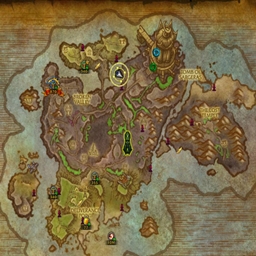
Take clean, memory-worthy screenshots with your character details baked right in - name, class, guild, level, item level, zone, and a date/time stamp. Remember all the good days.
The info overlay stays hidden while you play and only appears at the moment a screenshot is taken. Take a normal screenshot with your usual key and the overlay rides along automatically, or use /ts for a clean, UI-hidden character card. The overlay position is saved between sessions.
Screenshots 3
Recent downloads
Downloads per hour over the last 48 hours.
Recorded history
| List | Now | 24h | 7d | 30d |
|---|---|---|---|---|
| Hot | #152 | #1482 | #3310 | #4152 |
| Rising | #125 | #413 | #1708 | #2175 |
Daily figures, Sep 19, 2026 – Oct 19, 2026
| Day | Downloads | Lifetime | Hot | Rising |
|---|---|---|---|---|
| +1 | 1,552 | #3657 | #2521 | |
| +9 | 1,551 | #2942 | #1396 | |
| +9 | 1,542 | #2079 | #882 | |
| +18 | 1,533 | #3721 | #1997 | |
| +13 | 1,515 | #2585 | #1013 | |
| +13 | 1,502 | #1478 | #898 | |
| +0 | 1,489 | — | — | |
| +0 | 1,489 | — | — | |
| +0 | 1,489 | — | — | |
| +1 | 1,489 | #3313 | #2353 | |
| +0 | 1,488 | — | — | |
| +2 | 1,488 | #2783 | #2064 | |
| +0 | 1,486 | #3322 | #2286 | |
| +3 | 1,486 | #3651 | #2596 | |
| +3 | 1,483 | #3378 | #2457 | |
| +0 | 1,480 | — | — | |
| +3 | 1,480 | #3979 | #2781 | |
| +18 | 1,477 | #3900 | #2644 | |
| +0 | 1,459 | — | — | |
| +3 | 1,459 | #2724 | #1507 | |
| +2 | 1,456 | #3021 | #1948 | |
| +0 | 1,454 | #2488 | #1134 | |
| +4 | 1,454 | #2661 | #1314 | |
| +0 | 1,450 | — | — | |
| +3 | 1,450 | #3489 | #2440 | |
| +0 | 1,447 | #3152 | #2134 | |
| +1 | 1,447 | #3168 | #2218 | |
| — | — | #3273 | #2330 | |
| — | — | #2798 | #1363 | |
| — | — | #3110 | #1587 | |
| — | — | #1377 | #446 |
Downloads is the change in CurseForge's lifetime download total since the previous recorded day. Ranks are the last Now rank published that day; a dash means none was recorded.