Trend Explorer
Recent download momentum
Hourly download deltas for the last 48 hours.
Latest hour +0 Jul 26, 12 PM
Peak hour +2 Jul 28, 2 AM
Average +0 per hour
About this addon
What it does
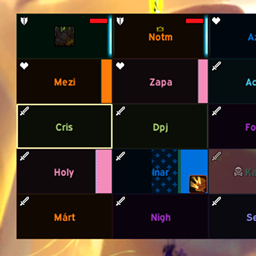
Simple Raid Frames is built around Blizzard’s own raid frames. The idea is to keep Blizzard settings as the base, then add a small layer of extra customization where the default UI is missing a few useful options.
I personally use the buff-focused layout, but most features should work across the Blizzard raid frame layouts.
Current functionality:
- Remove realm names from player names
- Shorten player names
- Customize player name font, size, color, outline, and shadow
- Class-color player names
- Customize health bar color, background color, class-colored backgrounds, and dead unit background color
- Customize role icons, including pixel icons, Blizzard icons, size, position, and optional class coloring
- Add custom status icons for AFK, disconnected, dead, ghost, and DND
- Customize leader and assist icons, including position and optional class coloring
- Add optional ready-check icon placement and size controls
- Replace native buff icons with compact Aura Bars
- Track selected HoTs/buffs as bars, with custom colors and class-organized spell management
- Hide raid frame tooltips
- Hide the player frame in party groups
- Show the party frame while solo
This addon is intentionally small. It is not meant to become a full raid-frame replacement with every possible option. If you want deep frame customization, another raid frame addon is probably the better choice.
At-a-glance numbers
Performance highlights
- Peaked at Hot #3009 on Jul 18, 2026.
- Peaked at Rising #740 on Jun 27, 2026.
- Featured on the Hot list across 6 distinct weeks.
- Shipped 1 release in the last 30 days.
- Averaging 2 new downloads per day over the past week.
Visuals
Screenshots 3
Use real gameplay shots to assess the addon before installing.