Bagnon Extra

Bags & Inventory

Bagnon Extra - A small companion for Bagnon / Bagnonium that adds: tints (different colors) on unusable items, text on charges, text on openable and learnable items.

WoW 12.1.0 Actively Maintained

Trend Explorer

Recent download momentum

Estimated downloads/hour over observed intervals in the last 48 hours.

Latest interval +1 /h 0.998h observed interval · ending Sep 11, 6 PM
Peak estimate +2 /h 1h observed interval · ending Sep 10, 10 AM
Average estimate +0.3 /h Time-weighted · 47.1h covered of 48h

Lines connect interval estimates, not hourly measurements. Unobserved time is not counted as zero or extrapolated to now.

About this addon

What it does

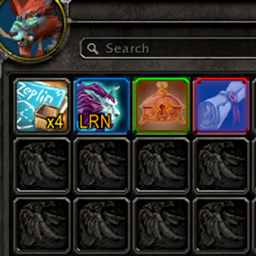
* NEW FEATURE: The ability to add favorite items with starred yellow, while opening the bag hover on an item that you would like to favorite, then type the command "/bagnonextra fav" -- to unfavorite an item do the same steps.   * NEW FEATURE: All consums will have purple star on top-left, if you would like to ignore a consumable hover on it and type "/bagnonextra ignore" - to add an item as a consums if the game doesn't detect it, hover on the item then type "/bagnonextra add"   A small companion for Bagnon / Bagnonium that adds:   1) Locked containers (lockboxes, chests, anything you don't currently    have the key/skill/tool to open) get a red tint.   2) Items with charges, not stacks (e.g. "Charges: 3 in the tooltip") get a    yellow "x3" label in the bottom right corner.   3) (Bagnonium only, when Bagnon isn't loaded) Profession recipes    for a profession you haven't learned get a blue tint. Bagnon    already does this natively; Bagnonium doesn't, so it's added to Bagnonium only.   4) (Same condition as #3) Class-restricted tokens whose tooltip    "Classes:" doesn't include your class get the same blue tint.   5) Equippable gear (weapons, armor, trinkets, etc.) whose tooltip    shows a requirement you don't meet -- profession skill, zone,    faction, level, and so on -- gets a pink tint.   6) Openable containers (caches, chests, anything with a "Right    Click to Open" tooltip, or a name suggesting the same) get    a yellow "OPN" text in the bottom left corner.   7) Learnable mounts, companion pets, and toys get a orange "LRN"    text in the same bottom-left corner.   8) Consumables (potions, elixirs, flasks, food, throwables, etc.)    get a purple'ish star icon in the top-left corner, on by default    for every item the game itself classifies as a Consumable.   9) For consumables, it can be overridden per item: "/bagnonextra ignore"    while hovering a consumable removes its star; "/bagnonextra add"    while hovering a non-consumable forces one on (or if the game doesn't detect it, example juju power on     classic because in reality this is a quest item, but usability its a consumable). Running either    command again on the same item undoes it.   10) "/bagnonextra favorite" or you can also use "/bagnonextra fav"     while hovering any item marks it with a yellow star instead      -- independent of whether it's a consom or not.      A favorited item always shows the yellow star rather     than the purple one.  

At-a-glance numbers

Performance highlights

  • Peaked at Hot #813 on Aug 22, 2026.
  • Peaked at Rising #197 on Aug 11, 2026.
  • Featured on the Hot list across 5 distinct weeks.
  • Shipped 3 releases in the last 30 days.
  • Averaging 10 new downloads per day over the past week.

Visuals

Screenshots 1

Use real gameplay shots to assess the addon before installing.

Discover more

Keep exploring

Similar addons you might also want to check out.

More by pawnzee

Same creator, different utilities.

Similar in Bags & Inventory

Comparable addons in the same lane.