ItemInfoOverlay

Bags & Inventory

Sanluli36li's Item Info Overlay

WoW 12.1.0 Actively Maintained

Trend Explorer

Recent download momentum

Estimated downloads/hour over observed intervals in the last 48 hours.

Latest interval +36 /h 1h observed interval · ending Sep 11, 5 AM
Peak estimate +66.8 /h 1h observed interval · ending Sep 11, 2 AM
Average estimate +10.2 /h Time-weighted · 47h covered of 48h

Lines connect interval estimates, not hourly measurements. Unobserved time is not counted as zero or extrapolated to now.

About this addon

What it does

ItemInfoOverlay

Feature

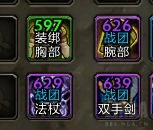
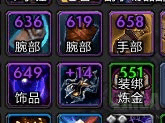
Displays item level (including Keystone level), binding type (BoE/WuE), and item type (equipment slot, profession recipe, mount, toy, pet) above item icons.
imageimage

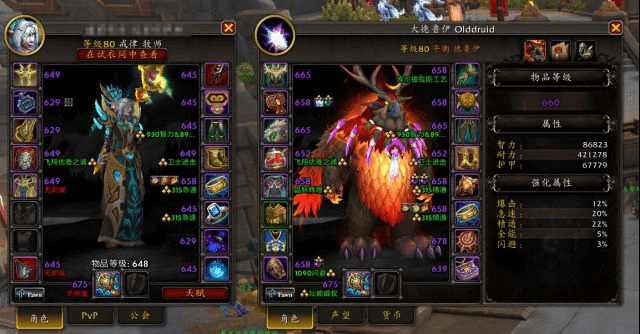
Shows item level, enchants, gems, and missing enchant alerts on equipment icons in the Character Frame and Inspect Frame.
Adds a total item level display at the bottom of the Inspect Frame.
image

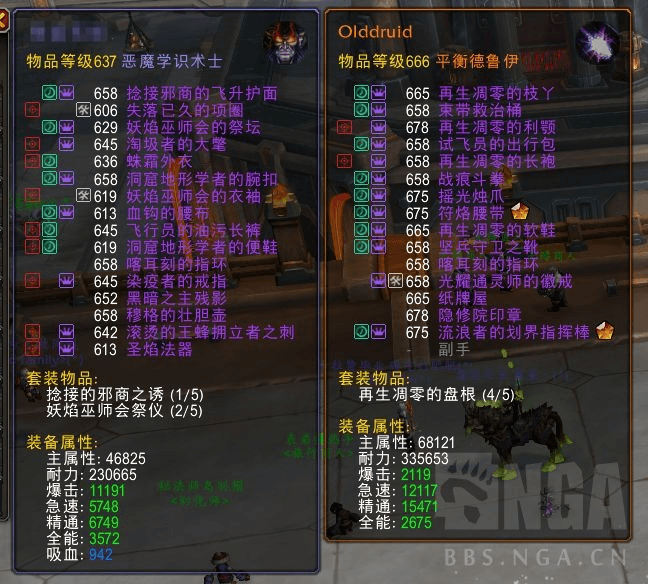
Adds an equipment summary panel on the right side of the Character Frame and Inspect Frame for quick access to gear stats, set bonuses, and other details. image
Chat Link Enhancements
image

Compatibility

The following addons have been tested for compatibility and generally work as expected:
|Category|Addon|Compatibility| |-|-|-| |Inventory|Baganator|Compatible. Go to Baganator Settings → Icons → Item Corners and disable Item Level to avoid overlapping displays.| |Inventory|Bagnon|Compatible| |UI Overhaul|ElvUI|Compatible. Disable the following to prevent overlap:
ElvUI Settings → General → Blizzard UI Improvements → Item Level → Show Inspect/Character Info
ElvUI Settings → Bags → General → Item Level → Enable| |UI Overhaul|NDui|Compatible. Disable the following:
NDui Settings → Convenience → Show Gem/Enchant Info
NDui Settings → Bags → Show Item Levels
NDui Settings → Chat → Show Item Levels in Chat Links| |Inventory|NDui Bags|Compatible. Disable NDui_Bags → Show Item Levels in addon settings.| |||| |Database|Battle Pet Breed ID|If enabled, the item icon of caged pets will also display their BreedID.|

At-a-glance numbers

Performance highlights

  • Peaked at Hot #28 on Sep 5, 2026.
  • Peaked at Rising #588 on Aug 20, 2026.
  • Featured on the Hot list across 5 distinct weeks.
  • Shipped 26 releases in the last 30 days.
  • Averaging 267 new downloads per day over the past week.

Discover more

Keep exploring

Similar addons you might also want to check out.

More by Sanluli36li

Same creator, different utilities.

Similar in Bags & Inventory

Comparable addons in the same lane.

Titan Panel [Currencies] Multi #5
2.5M downloads

Display 100+ different currencies in Titan Panel!

SpecBisTooltip Spec Bis List Tooltip #11
3.1M downloads

Shows if the item is BIS

Warband Nexus #14
157.1K downloads

All your alts in one window: account-wide item search, Great Vault & raid lockouts, currencies, reputations, professions, gold, mount try counter, collections, and weekly to-do plans. The alt manager built for Midnight warbands.

XLoot #16
5.2M downloads

Core module for Loot and Looting-related UI improvements

Outfitter (Retrofit) #23
702.8K downloads

Outfit/equipment manager with quick swap toolbar and scripting. This is a unified version of Outfitter that will work in all flavors of WoW.

Simple Item Levels #43
5.0M downloads

Show item levels in the character frame

MoveAny (Edit Mode, Windows and Ui) #53
20.4M downloads

Move any Blizzard Ui Element

Decor Vendor: Housing & Decor Emporium #54
4.7M downloads

Your ultimate tool for discovering and organizing WoW housing decor vendors.

Plumber #60
19.1M downloads

Quality-of-life features including Expansion Summary UI, Loot Window, Instance Difficulty Selector and more.

KeystoneLoot #66
4.5M downloads

Shows the items from the Mythic instances in a compact overview

Can I Mog It? #72
6.9M downloads

Adds tooltips and overlays to items showing if you have learned a transmog appearance.

Midnight Cheat Sheet #74
65.7K downloads

Gearing reference tool for the Midnight expansion — item levels, upgrade tracks, crest costs, consumables, enchants, and wishlists.