Activity summary
- downloads · 24h
- 12
- downloads · 7 days
- 353
- best Hot rank
- #23
- best Rising rank
- #287
Retail status unknown
Retail files
- 12.1.0, 12.1.5 released Oct 11, 2026 no required dependencies
From the author
Excerpt from the author's description on CurseForge
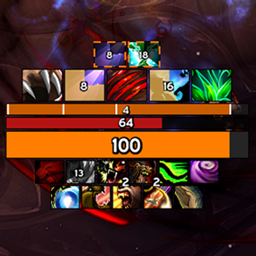
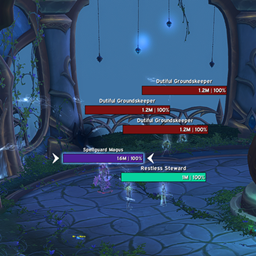
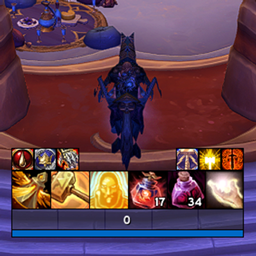
Displays cooldowns for Interrupt and Stun skills.
<For Mouseover Target>
- Recommended to use alongside asTargetCastBar
Displays interruptible skills right above the cast bars of your target or focus target. If a mouseover target exists, the icon will display directly over your mouse cursor.
Screenshots 2
Recent downloads
Downloads per hour over the last 48 hours.
Latest 1.99/h Oct 19, 12 PM
Peak 2.97/h Oct 18, 9 AM
Average 0.663/h last 48h
Recorded history
| List | Now | 24h | 7d | 30d |
|---|---|---|---|---|
| Hot | #23 | #131 | #384 | #1160 |
| Rising | #287 | #426 | #1414 | #2255 |
Daily figures, Sep 19, 2026 – Oct 19, 2026
| Day | Downloads | Lifetime | Hot | Rising |
|---|---|---|---|---|
| +5 | 20,554 | #2155 | #2797 | |
| +20 | 20,549 | #2261 | #3104 | |
| +26 | 20,529 | #3833 | #4865 | |
| +23 | 20,503 | #3329 | #4303 | |
| +58 | 20,480 | #3668 | #4816 | |
| +52 | 20,422 | #2356 | #2853 | |
| +43 | 20,370 | #1576 | #1923 | |
| +139 | 20,327 | #1277 | #1454 | |
| +161 | 20,188 | #310 | #534 | |
| +11 | 20,027 | #4441 | #4356 | |
| +7 | 20,016 | #2395 | #2922 | |
| +8 | 20,009 | #4285 | #4055 | |
| +7 | 20,001 | #2536 | #2554 | |
| +5 | 19,994 | #2515 | #3180 | |
| +5 | 19,989 | #4346 | #4072 | |
| +15 | 19,984 | #2539 | #3040 | |
| +16 | 19,969 | #1904 | #2576 | |
| +1 | 19,953 | #4430 | #4178 | |
| +17 | 19,952 | #3044 | #3084 | |
| +11 | 19,935 | #2768 | #3095 | |
| +3 | 19,924 | #4247 | #4031 | |
| +4 | 19,921 | #4297 | #4100 | |
| +10 | 19,917 | #4246 | #4051 | |
| +10 | 19,907 | #3062 | #3190 | |
| +7 | 19,897 | #4233 | #3985 | |
| +7 | 19,890 | #4451 | #4319 | |
| +5 | 19,883 | #3958 | #3611 | |
| — | — | #2057 | #2975 | |
| — | — | #4714 | #4596 | |
| — | — | #3576 | #4015 | |
| — | — | #2863 | #3794 |
Downloads is the change in CurseForge's lifetime download total since the previous recorded day. Ranks are the last Now rank published that day; a dash means none was recorded.