Browse WoW addons
833 addons

Disenchantry
Disenchant bag items from a compact window, with material previews, price estimates, and disenchanting statistics.

TradeFill
Simplifying trades with AutoFill and tradelog

gmDurability
A minimal LDB plugin that displays durability, sells your junks (grey items) and auto-repairs (with guild funds or not).

BigWigs Voice(CN)-Yoda(Healer)
BigWigs voicepack healer version
MarcoPolo: Junk Sell and repair
Merchant automation
Auctionator, TSM and Vendor price, Base UI and in Baganator
Shows the TSM, Auctionator, and/or vendor price of an item, in base UI and Baganator. 10+ gold items only, except for vendor price tries to ignore soulbound only equipment.

Sweet Sound of Auction House
Enchant your default Auction House notifications with a little extra groove!

Warband Accountant (now includes Savings Goals and Gold Graphs)
Manages your gold and tracks it across all your characters

Auto Payout
Quickly send out gold to many characters at once.
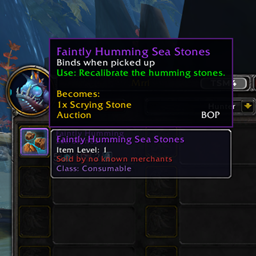
Mrrls Item Information
Shows what the item sold by Mrrl in Nazjatar actually is.

Magic Button
Macros for keybinds to buy, post, and cancel on the auction house
Portal Seller
Chat monitor detector for players who need portals from kind mages
AdiBags - Legion
Adds multiple (optionally colored) categories for the most common Legion items in AdiBags

Currency Transfer Helper
Transfer your currencies in your warband faster and enhance the currency panel

Grind Tracker
A lightweight session tracker for grinders and gatherers. Tracks kills, XP, coin, and item loot value in real-time using Auctionator pricing. Remove mispriced items from the loot log with instant recalculation. Toggle any stat on or off to suit your style.

LootAssist
LootAssist allows for quicker looting especially when multiboxing.

Token Price Notifier
Addon that check for token price every minute (can be changed by a command) and if price changed since last check it prints on chat.

Spam Message Board
Global spam collector and organizer for WoW Classic

Default Current Expansion
Automatically select "Current Expansion Only" filter in the Auction House and Crafting Orders interfaces.

Grey Vendor Trash
Items of poor (grey) quality (vendor trash) will have their icons greyed out for easy identification