Trend Explorer
Recent download momentum
Hourly download deltas for the last 48 hours.
About this addon
What it does
WHAT'S LEFT?
When scrolling through the new Legion Remix vendors, one question always comes to mind: “What’s Left?”
So I built a super lightweight addon that answers exactly that.
What’s Left? makes it easy to filter vendor and collection tabs by hiding items you’ve already learned, mounts, pets, appearances, and toys, so you can focus on what’s still missing from your collection.
Why What's Left?
This addon was made because I didn’t want to juggle multiple addons just to see how much bronze I still needed or what I hadn’t collected yet. This addon combines everything I wanted, a simple breakdown, unlearned total, and clean filtering, all in one lightweight package.
FEATURES
SMART ENSEMBLES NOW ADDED! If an ensemble fails to give you every appearance it contains, despite being marked as known, it WILL NOT hide with other fully completed ensembles when you filter them. If you experience any issues / mismatches with this let me know asap please!
NOW SUPPORTS EVERY LOCALIZATION NATIVE TO WOW CLIENT! This includes English, Chinese (Traditional and Simplified), Russian, Spanish (Mexican and EU), French, Italian, German, Korean, and Portuguese!
Hide Categories: Whether it be mounts, toys, pets, or appearances, toggle between which of these you want or don't want to see on your screen. (hiding currently unavail. items also updates your necessary bronze cost in real time)
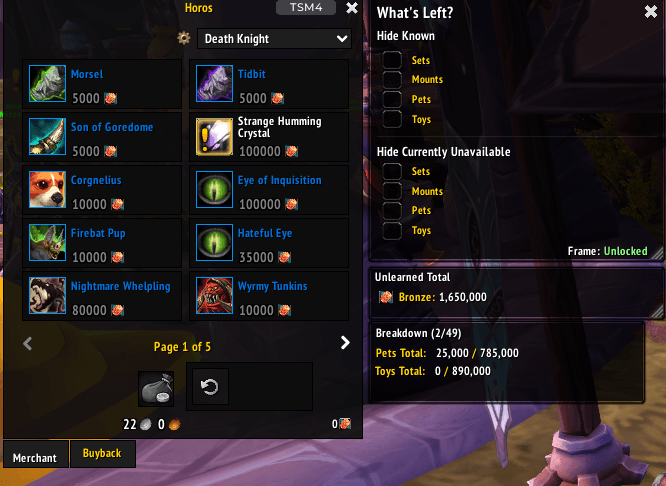
Unlearned Total: Quickly calculate how much more bronze you’ll need to complete everything the vendor has to offer.
Breakdown: See a clear comparison of learned vs. unlearned items and their total Bronze cost, helping you track progress and spending at a glance. (Click the bronze icon within "Unlearned Total" for the breakdown container to appear)
Super Light Weight: Built for speed, minimal code, maximum clarity.
Legion Remix Ready: Designed around Legion Remix vendors, simple plug-and-play setup that works with the default UI, ElvUI, and most custom reskins.
HOW TO USE IT- Just open any vendor that sells mounts, pets, toys, or appearances.
- Click the gear icon to the left of the default vendor filter
- Use the toggle buttons on the side panel to hide anything you’ve already collected.
- Hover over the Breakdown section to see your learned vs. unlearned totals.
- That’s it, simple, quick, and ready to go.
SLASH COMMANDS
/wl - Opens the filter menu if the gear icon isn't appearing
/wl reset - resets all enabled filters
/wl changes - opens the changelog
/wl settings - opens the settings menu
/wl dumpvendor - dumps vendor table (use it to get vendor data if something is lagging or not updating right)
CREDIT TO THOSE WHO HAVE HELPED ME
Translation: Kamusis (zhCN & zhTW) , Metrus (ruRU) , Angelpunk18 (esES & esMX) , and Lex794 (frFR)
KNOWN BUGS
Quest item bang doesn't follow quest item
Please report any known bugs OR translations issues to me to me! I've worked to try to fix any issues I've come across. This is my first addon so I'm sure I did something wrong somewhere.
Find a vendor that doesn't update properly?
If you find a vendor that doesn't update properly, let me know in the comments!
All feedback is appreciated and encouraged!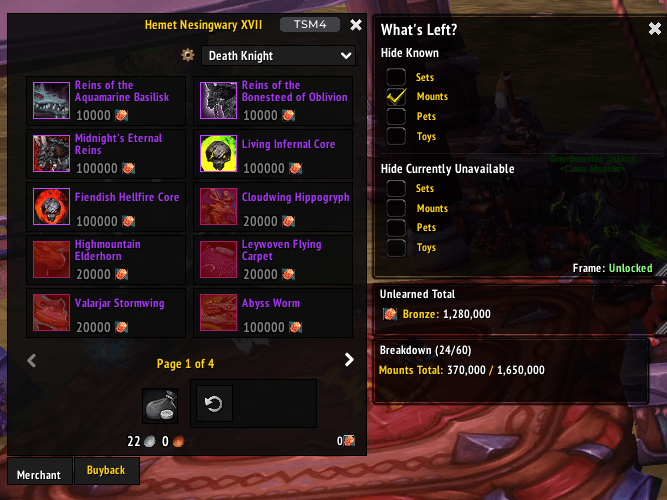
At-a-glance numbers
Performance highlights
- Peaked at Hot #1734 on Jul 15, 2026.
- Featured on the Hot list across 6 distinct weeks.
- Shipped 1 release in the last 30 days.
- Averaging 2 new downloads per day over the past week.
Visuals
Screenshots 8
Use real gameplay shots to assess the addon before installing.