Activity summary
- downloads · 24h
- 38
- downloads · 7 days
- 21
- best Hot rank
- #46
- best Rising rank
- #210
Retail status unknown
Retail files
- 10.0.0 released Oct 29, 2022 requires DataStore_Containers, DataStore, DataStore_Auctions, DataStore_Inventory, DataStore_Mails
From the author
Excerpt from the author's description on CurseForge
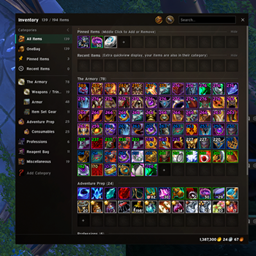
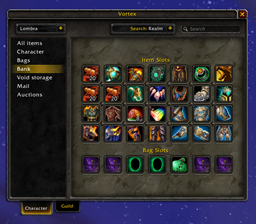
Vortex lets you view the inventories of all of your characters at any time. The user interface is designed to be quick and easy to use, and to look similar to the default interfaces. Suitable for people who aren't interested in one bag-solutions or replacing the default interfaces. The base addon includes modules for all items; equipped, backpack, bank, void storage, mailbox, auction house and guild bank items.
Screenshots 9
Recent downloads
Downloads per hour over the last 48 hours.
Latest 0/h Oct 19, 3 PM
Peak 36.8/h Oct 19, 2 PM
Average 0.818/h last 48h
Recorded history
| List | Now | 24h | 7d | 30d |
|---|---|---|---|---|
| Hot | #46 | #1311 | #4857 | #3148 |
| Rising | #210 | #886 | #5017 | #5591 |
Daily figures, Sep 20, 2026 – Oct 19, 2026
| Day | Downloads | Lifetime | Hot | Rising |
|---|---|---|---|---|
| +37 | 5,992 | #58 | #227 | |
| +2 | 5,955 | #5028 | #5044 | |
| +0 | 5,953 | — | — | |
| +2 | 5,953 | #5156 | #4792 | |
| +0 | 5,951 | — | — | |
| +13 | 5,951 | #1025 | #1315 | |
| +3 | 5,938 | #4378 | #4217 | |
| +1 | 5,935 | #4096 | #3634 | |
| +0 | 5,934 | — | — | |
| +0 | 5,934 | — | — | |
| +0 | 5,934 | — | — | |
| +0 | 5,934 | — | — | |
| +3 | 5,934 | #4232 | #3423 | |
| +2 | 5,931 | #2991 | #2793 | |
| +1 | 5,929 | #3628 | #2624 | |
| +2 | 5,928 | #4514 | #4017 | |
| +0 | 5,926 | — | — | |
| +1 | 5,926 | #4212 | #3619 | |
| +0 | 5,925 | — | — | |
| +1 | 5,925 | #3999 | #3466 | |
| +0 | 5,924 | — | — | |
| +0 | 5,924 | — | — | |
| +1 | 5,924 | #4183 | #3660 | |
| +1 | 5,923 | #3794 | #3204 | |
| +0 | 5,922 | — | — | |
| +3 | 5,922 | #4388 | #3749 | |
| +2 | 5,919 | #2731 | #2372 | |
| — | — | #3237 | #2942 | |
| — | — | #3192 | #2981 | |
| — | — | #4238 | #3751 |
Downloads is the change in CurseForge's lifetime download total since the previous recorded day. Ranks are the last Now rank published that day; a dash means none was recorded.