Trend Explorer
Recent download momentum
Hourly download deltas for the last 48 hours.
About this addon
What it does
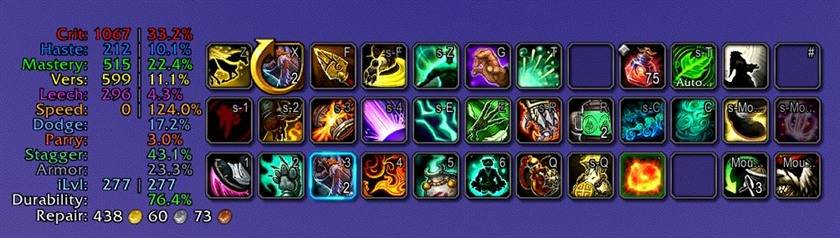
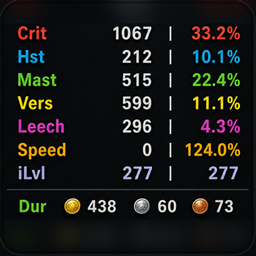
StatsPro is a configurable stats and gear HUD for World of Warcraft Retail: Midnight (12.x). It keeps the numbers you use visible in clean, draggable panels: secondary stats, item level, defensives, durability, and repair cost.
Profiles switch automatically for each character and specialization. Hover Crit, Haste, Mastery, or Versatility for bundled Archon Mythic+ or Raid reference snapshots—no companion app or in-game web access required.
Retail 12.x • Character & Spec Profiles • Archon M+ / Raid Snapshots • 6 Appearance Presets • 11 WoW Locales
What StatsPro gives you
- Useful stats at a glance — keep the Character-panel numbers you care about on screen during normal play
- Archon reference context — compare secondary-stat ratings with bundled M+ High Keys or Raid Mythic snapshots
- Automatic character/spec profiles — change spec or character without rebuilding the HUD
- Profile Manager — create, duplicate, rename, assign, swap, reset, delete, or copy selected setting groups
- Six appearance presets — preview Default, Classic, Clean Dark, Midnight, Monochrome, or High Contrast before applying
- Flexible layouts — use one compact panel, section headers, or two independently movable panels
- Retail 12.x reliability — designed around Midnight's restricted values and modern tooltip data
Flexible layouts
Choose Flat, Sectioned, or Split. Panels resize around enabled rows, rating and percentage columns stay aligned, and Split mode lets you route selected stat or gear blocks to a second panel.
Profiles and appearance
Every visited character and specialization can use its own profile, or intentionally share one. The Profile Manager can copy only Stats, Layout, or Appearance settings when you want part of one setup without replacing everything else. Tank, Healer, and Damage role templates can seed future specializations, and bulk actions help organize already visited characters.
Appearance presets change presentation only. They leave visible stats, panel routing, positions, scale, language, refresh rate, and profile assignments intact. When panels are unlocked, temporary outlines and drag handles make placement clear; they disappear with the editing state and are not part of the saved HUD.
Archon reference snapshots
Choose Mythic+ — High Keys / All Dungeons / This Week or Raid — Mythic / All Bosses in /ss.
Hover a secondary-stat row to see the reference target and snapshot date. When a clean live or cached comparison is available, StatsPro also shows the current rating, its Missing, Over, or Matched delta, and an approximate stat percentage from rating conversion. If Retail temporarily restricts the read, target metadata remains available; cached comparisons are clearly marked Last known.
Snapshots cover all 40 current Retail specializations and ship inside the addon. They provide useful context, not hard stat caps or a replacement for simulating your own character.
What you can show
| Area | Available rows |
|---|---|
| Offensive | Crit, Haste, Mastery, Versatility |
| Character | Main stat (automatic), Stamina |
| Tertiary | Leech, Avoidance, Movement |
| Defensive | Dodge, Parry, Block, Brewmaster Stagger, Armor damage reduction |
| Gear | Equipped / overall item level, durability, worst-slot durability, repair cost |
Every row is optional. Rated stats can show rating, percentage, or both. Build a small secondary-stat strip, a tank dashboard, or a split setup that keeps gear information separate.
Localization
The HUD, Settings, profile tools, target hovers, snapshot dates, and normal slash confirmations follow the selected output language. Auto uses the WoW client locale; every current Retail addon locale is supported.
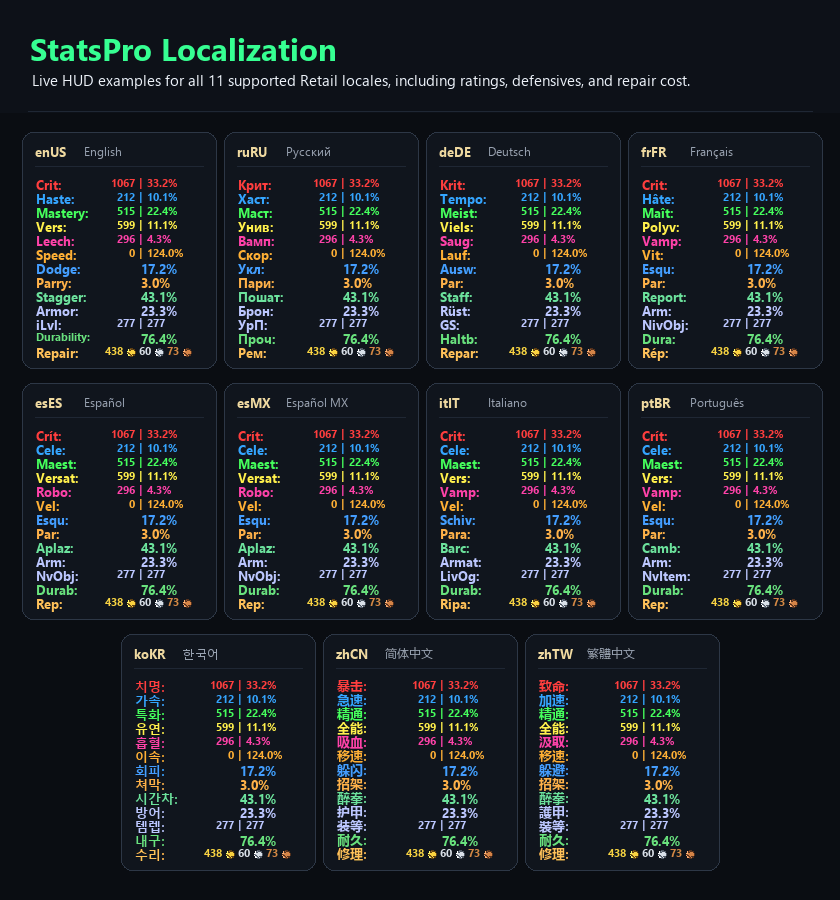
Language and refresh rate are account-wide. Labels, visible rows, layout, colors, and the rest of the HUD presentation follow the active assigned profile.
Quick start
- Install and enable StatsPro for Retail.
- Type
/ssto open Settings. - Choose the rows, layout, and appearance preset you want.
- Unlock the panels and drag them into place.
Out of combat, right-click the HUD to reopen Settings. To bind visibility to a key, create a macro containing /ss toggle and bind that macro in WoW's keybindings.
Commands
| Command | Action |
|---|---|
/ss or /statspro |
Open Settings |
/ss show, /ss hide, /ss toggle |
Control HUD visibility |
/ss reset |
Confirm and reset the active profile; shared assignments are identified in the warning |
/ss wipe or /ss reset all |
Confirm and reset all profiles, assignments, role templates, account settings, and saved positions |
/statspro import |
Import compatible SwiftStats settings into a new profile |
/ss debug |
Print support state for a bug report |
/ss help |
Show the command summary |
Moving from SwiftStats
On a fresh install, StatsPro carries forward compatible SwiftStats settings when both addons are loaded for the first login. If StatsPro has already started, enable both addons, run /reload, then use /statspro import.
The confirmed import creates a new SwiftStats Import profile for the current character and specialization. Existing StatsPro profiles, other assignments, account settings, and the original SwiftStatsDB remain unchanged.
Compatibility and support
StatsPro supports World of Warcraft Retail — Midnight 12.0.7 and 12.1.0. Classic clients are not supported.
- Source and releases
- Bug reports, translation corrections, and feature requests
- Changelog
- Support development on Ko-fi
StatsPro is free and MIT-licensed. It was originally inspired by SwiftStats by TaylorSay. Bundled libraries keep their upstream licenses; exact notices and provenance are in THIRD-PARTY-NOTICES.md.
At-a-glance numbers
Performance highlights
- Peaked at Hot #187 on Jul 21, 2026.
- Peaked at Rising #169 on Jun 27, 2026.
- Featured on the Hot list across 6 distinct weeks.
- Shipped 27 releases in the last 30 days.
- Averaging 231 new downloads per day over the past week.
Visuals
Screenshots 15
Use real gameplay shots to assess the addon before installing.