Trend Explorer
Recent download momentum
Hourly download deltas for the last 48 hours.
Latest hour +0 Jul 26, 3 AM
Peak hour +4 Jul 26, 5 PM
Average +1 per hour
About this addon
What it does
SlickFPS
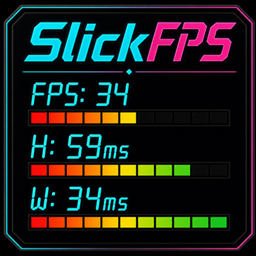
SlickFPS is a lightweight, highly customizable FPS and latency HUD for World of Warcraft. It gives you a sleek, draggable performance display for frames per second, Home latency, and World latency, with multiple bar styles, color themes, fonts, profiles, and layout controls so it can match almost any UI.
Features
- Real-Time Tracking: Displays FPS, Home Latency (H), and World Latency (W) directly on your UI.
- Smart Status Bars: Visual performance bars change color and fill behavior based on FPS and latency thresholds.
- Multiple Bar Styles: Choose from Classic Blocks, EQ Meter, Fluid Flow, Fluid Solid, Neon Pulse, Signal Sweep, Status Marker, Thin Line, or None.
- Appearance Profiles: Save, rename, delete, and switch between different HUD looks. Includes a protected Default profile.
- Row Visibility Toggles: Show or hide FPS, Home, and World rows individually.
- Persistent & Draggable: Left-drag to move the HUD, right-click to lock or unlock it.
- Low Footprint: Built to stay lightweight while updating performance data in real time.
Rename Note: SlickFPS was formerly FPSView. If both FPSView and SlickFPS appear in your AddOns list after updating, disable or remove FPSView to avoid duplicate HUDs.
How to Use
/slickfps: Opens the Options & Customization menu./fpsv: Legacy shortcut for opening the Options menu./slickfps reset: Resets the window position and all settings to default.- Left-Drag: Move the HUD to your preferred location.
- Right-Click: Toggle locking and unlocking the HUD.
- Shift + Right-Click: Open or close the Options menu.
- Mouseover: Hover over the HUD to see lock status and quick control tips.
Customization
- Theme Engine: Includes 30+ color presets to match different UI styles.
- Style Engine: Multiple bar styles ranging from clean minimal lines to animated and segmented meter styles.
- Profile System: Save different looks for different UI setups, characters, or preferences.
- Font Control: LibSharedMedia support plus built-in fonts like Digital-7, Alarm Clock, Dot Matrix, and LL Pixel.
- Font Outline Options: Choose None, Outline, or Thick Outline.
- Bar Controls: Adjust bar background color, border color, opacity, width, height, row spacing, and dimmer.
- Frame Controls: Customize HUD scale, label color, value color, background color, border color, and opacity.
- Stay-On-Top Options Menu: The options window stays above action bars and other UI elements for easy configuration.
Latest Updates
2.3.4 - 2026-07-25
- New: Added the Sunshine Meadow status bar theme.
- Fixed: Azure Gold, Joyful Farm, and Sunshine Meadow now progress from their darkest color to their lightest.
- Removed: Removed the Jungle Sunbeam status bar theme.
At-a-glance numbers
Performance highlights
- Peaked at Hot #1120 on Jul 25, 2026.
- Peaked at Rising #148 on Jul 26, 2026.
- Featured on the Hot list across 6 distinct weeks.
- Shipped 13 releases in the last 30 days.
- Averaging 24 new downloads per day over the past week.
Visuals
Screenshots 20
Use real gameplay shots to assess the addon before installing.