Activity summary
- downloads · 24h
- 30
- downloads · 7 days
- 136
- best Hot rank
- #17
- best Rising rank
- #458
Retail status unknown
Retail files
- 10.0.0 released Oct 28, 2022 no required dependencies
From the author
Excerpt from the author's description on CurseForge
- Updated for 7.0.
- Added configurable labels for bars.
- Vengeance was removed. You should delete any bars with Vengeance tracking.
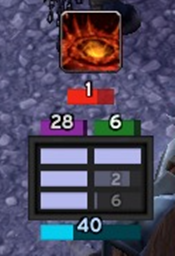
Shield Tracker allows you to create highly-configurable bars to track shields / absorbs on:
- You
- Your target
- Your focus
- Your mouseover
- Your pet
- Named players in your group.
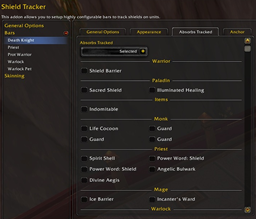
There are three modes for each bar. Select which one you prefer under the "Absorbs Tracked" tab.
Screenshots 7
Recent downloads
Downloads per hour over the last 48 hours.
Latest 3.06/h Oct 18, 1 PM
Peak 4.99/h Oct 16, 5 PM
Average 1.2/h last 48h
Recorded history
| List | Now | 24h | 7d | 30d |
|---|---|---|---|---|
| Hot | #17 | #415 | #829 | #749 |
| Rising | #458 | #1158 | #2954 | #5027 |
Daily figures, Sep 18, 2026 – Oct 18, 2026
| Day | Downloads | Lifetime | Hot | Rising |
|---|---|---|---|---|
| +18 | 65,741 | #2261 | #3869 | |
| +22 | 65,723 | #2243 | #4457 | |
| +31 | 65,701 | #2336 | #4236 | |
| +20 | 65,670 | #2418 | #4763 | |
| +15 | 65,650 | #3992 | #5585 | |
| +27 | 65,635 | #2258 | #3860 | |
| +10 | 65,608 | #2484 | #3873 | |
| +12 | 65,598 | #4454 | #4545 | |
| +94 | 65,586 | #1736 | #3344 | |
| +21 | 65,492 | #1467 | #2849 | |
| +15 | 65,471 | #4372 | #4406 | |
| +19 | 65,456 | #2471 | #3590 | |
| +214 | 65,437 | #2627 | #3924 | |
| +24 | 65,223 | #2832 | #3837 | |
| +21 | 65,199 | #3364 | #4122 | |
| +15 | 65,178 | #3046 | #3900 | |
| +18 | 65,163 | #2647 | #3553 | |
| +21 | 65,145 | #1618 | #3001 | |
| +33 | 65,124 | #2557 | #3590 | |
| +15 | 65,091 | #2011 | #3315 | |
| +23 | 65,076 | #2477 | #3534 | |
| +13 | 65,053 | #2927 | #3854 | |
| +30 | 65,040 | #2855 | #3640 | |
| +19 | 65,010 | #1741 | #3072 | |
| +20 | 64,991 | #3165 | #4255 | |
| +44 | 64,971 | #206 | #1358 | |
| +64 | 64,927 | #274 | #1416 | |
| — | — | #1608 | #3045 | |
| — | — | #2334 | #3738 | |
| — | — | #3589 | #5069 | |
| — | — | #1805 | #3089 |
Downloads is the change in CurseForge's lifetime download total since the previous recorded day. Ranks are the last Now rank published that day; a dash means none was recorded.