Trend Explorer
Recent download momentum
Hourly download deltas for the last 48 hours.
About this addon
What it does
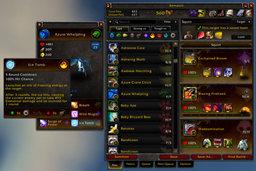
This addon adds the /select macro command you can use instead of /use or /cast to use an item or spell among a list. Right-clicking your macro from the bars will pop out a menu where you can change the item or spell to use.
This version works on Retail/Shadowlands, Classic Era and The Burning Crusade Clients clients.
How to Use
- Create a macro with this line: /select item or spell, item or spell, etc
- Drag the macro to your bars.
- The first item or spell will be the default action when you hit the macro.
- Right-click the macro to on your bars to change it to a different item or spell.
For instance, warriors may find this useful:
/select Battle Shout, Commanding Shout
When you create that macro it will cast Battle Shout every time it's hit. If you join a group with a death knight and want to use Commanding Shout instead, right-click the macro on your bars and choose Commanding Shout. Now the macro will display and cast Commanding Shout.
You can also embed the /select within a larger macro. For mages:
/focus [@focus,noexists][@focus,dead][mod:alt]
/select [@focus,exists][] Polymorph(Sheep), Polymorph(Turtle), Polymorph(Rabbit), Polymorph(Black Cat)
This is a standard focus-sheep macro. When you want to change what polymorph spell to use, right-click the macro on your bars and pick another. It will use that new polymorph until you decide to change it again.
You can also shorten the above macro by using a search:keyword to find all Polymorph variants:
/focus [@focus,noexists][@focus,dead][mod:alt]
/select [@focus,exists][] spell:Polymorph
Search:Keywords
To help add items and spells to your /select macros, search:keywords are usable in place of an item or spell name. These search through your bags and spellbooks to fill the flyout with items and spells that match the keyword(s).
The officially supported searches are:
item:id or partial name
Add an item by its item:id or all items in your bags or worn that contain the partial name.
Examples: item:1234, item:Bandage, item:Ore
spell:id or partial name
Add a spell by its numerical id or all spells that contain the partial name.
Examples: spell:1234, spell:Shout, spell:Polymorph
type:ItemType
Add all items that contain the keyword in one of its type fields. See www.wowpedia.com/ItemType for a full list.
Examples: type:Quest, type:Food, type:Herb, type:Leather
equipslot:slot
As with the /equipslot command, this lets you equip items into the given slot. See the in-game options for a table of slot numbers and what goes there.
Examples: equipslot:13, equipslot:19
The following work in the current modern version of WoW, but not the Classic Era or The Burning Crusade Classic clients:
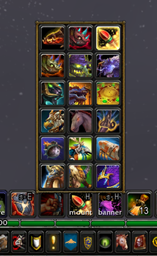
mount:flying, land, favorite*, favflying*, favland* or partial name
Add all flying, land, favorite, favorite flying, favorite land mounts or mounts that contain the partial name.
Examples: mount:flying, mount:Raptor, mount:favflying
profession:primary, secondary, any or partial name
Adds all primary professions, secondary professions or any professions.
Examples: profession:Primary, profession:Any, profession:Herb
toy:favorite, any or partial name
Adds favorite toys, all toys or toys that contain the partial name.
Examples: toy:Crash, toy:favorite, toy:any
The following works in the Classic Era or The Burning Crusade Classic clients but not the current modern version of WoW:
ranks:partial name
Adds all ranks of a spell in your spellbook that contain the partial name. (Remember to turn on the option Show Subtext on Spell Tooltips to ranks display in tooltips!)
Examples: ranks:Light Heal, ranks:Blessing, ranks:Curse
[condition] support
Just like /cast and /castsequence, /select can use [conditions]. Every [condition] used by the macro system is supported. Some examples:
/select [flyable] Name of flying mount, Another flying mount; Name of land mount
/select [@focus,exists][] spell:Polymorph
/select [combat] Master Healing Potion, Healthstone; [nocombat] item:Food & Drink
/select [spec:1] Conjured Mana Cake, Cobo Cola; Conjured Mana Cake, Frybread
/select [nopet] spell:Summon Demon; Grimoire of Sacrifice
Macro length "tax"
To do its magic, Select needs to add a line like this to all macros that contain a /select command:
/click [btn:2]S001M;S001A
It will do this on its own and it will recreate this line if it's accidentally deleted or altered. You don't need to worry about it except to remember that when writing your /select macros your macro needs at least 26 characters free for it to add this line (if it's not already there).
Limitations
- Only the first /select in a macro will be recognized. Any others in the same macro will be ignored.
- When you create or edit a macro in combat (you should be fighting!) it will wait until you leave combat to turn the macro on or make changes from your edit.
- If you gain an item or spell that wasn't available as you entered combat, that item or spell won't be in the flyout until you leave combat.
Frequently Asked Questions
Q: What action bar addons does this support?
A: All of them! Default too, of course. If you can drop a Blizzard macro onto the button then Select should work with that button. However, if the macros are outside the game's standard macro slots, Select won't be aware of them.
Q: Can I add companion pets to /select?
A: Yes and no. There's a game limitation that prevent changing the icon easily. That said, pet:name, pet:favorite and pet:any work. But be aware it uses one icon for all pets.
Q: Can I change the order that items or spells list in the menu?
A: If you want certain items to list before others, add them manually. ie: /select x-51 nether-rocket x-treme, mount:flying will list the x-51 rocket first.
Q: Tyrael's Charger is missing from my land mounts!
A: Tyrael's Charger can fly so it's grouped with the flying mounts. But if you want to add it to your land mounts you can add it manually: /select tyrael's charger, mount:land
Q: Can you make the popout menu align to the action/macro button?
A: No, sorry. The secure methods to get the menu working in combat prohibits anchoring willy nilly.
If you have any suggestions, comments or bugs to report, feel free to post them in comments here. Thanks!
At-a-glance numbers
Performance highlights
- Peaked at Hot #231 on Jul 26, 2026.
- Featured on the Hot list across 6 distinct weeks.
- Shipped 1 release in the last 30 days.
- Averaging 28 new downloads per day over the past week.
Visuals
Screenshots 2
Use real gameplay shots to assess the addon before installing.