Trend Explorer
Recent download momentum
Hourly download deltas for the last 48 hours.
About this addon
What it does
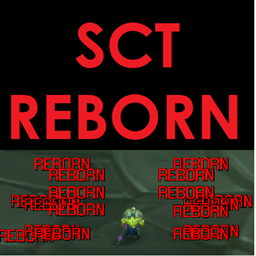
A fairly simple but very configurable mod that adds damage, heals, and events (dodge, parry, windfury, etc...) as scrolling text above you character model, much like what already happens above your target. This makes it so you do not have to watch (or use) your regular combat chat window and gives it a "Final Fantasy" feel.
This is the continuation of the addon "ScrollingCombatText" originally maintained by Picpok (owner): ScrollingCombatText - Addons - World of Warcraft - CurseForge (last version v7.1 from Oct 26, 2016)
What can it do?
- Damage messages
- Heals (incoming and outgoing) and Overhealing (with healer ID's), with filtering for small heals.
- Spell Damage/Resists and Damage Type
- All "Miss" events (dodge, block, immune, etc...)
- Custom Colors for all text events
- Config file to setup custom events (self and target), capture data, and display it.
- Debuff/Buff gain and loss Messages
- Low Health and Mana Warnings with values, and optional sounds
- Rage/Mana/Energy Gains
- Activation of Runes
- Enter and Leave Combat Messages
- Rogue Combo Points, 5 CP Alert Message
- Cooldowns
- Class Skill alerts (Execute, Overpower, CounterAttack, etc...)
- Honor, Reputation, Skill Gain
- Eight Animation Types (Verticle, Rainbow, Horizontal, Angled Down, Angled Up, Sprinkler, Curved HUD, Angled HUD)
- Four Fonts
- Two seperate Animation frames, each with their own settings. Assign any Event to either.
- Ability to flag any event as critical or as a text messages
- Sliders for text size, opacity, animation speed, movement speed, and on screen placement (with custom editbox)
- Lightmode, for when you care most about performance (at the loss of a few features).
- Now Based in Ace2.
- CTMod, MyAddons, Cosmos, Cosmos2 support
- Settings saved per character by default, but supports all Ace2 Profiles
- Load/Delete settings from another character. Load built in Profiles.
- Localized to work in almost all WoW clients.
How do I use it?
First unzip it into your interface\addons directory. For more info on installing, please read install.txt. Now just run WoW and once logged in, type /sctmenu to get the options screen.
SCT_EVENT_CONFIG.LUA is used to setup custom message events. Please open up the file (notepad, etc...) and read the opening section to understand how to use it all. PLEASE NOTE - THIS IS THE MOST IMPORTANT FILE IN SCT. IF YOU DON'T READ IT AND USE IT, THEN YOU ARE MISSING OUT ON A TON OF WHAT SCT HAS TO OFFER IN CUSTOMIZATION.
/sctdisplay is used to create your own custom messages. Useage: /sctdisplay 'message' red(0-10) green(0-10) blue(0-10) Example: /sctdisplay 'Heal Me' 10 0 0 - This will display 'Heal Me' in bright red
FAQ
How do I get My Crits or My Hits to show? - I would suggest you get SCTD: SCT - Damage Reborn - Addons - World of Warcraft - CurseForge
My custom event doesn't work. What's wrong? - Make sure you have the text exactly right, punctuation and capitalization matters. If you need help learning how to capture data, please see the examples or try this site http://lua-users.org/wiki/PatternsTutorial. If it's still not working, please read about SCT_Event_Debug and SCT_Event_List in the bottom half of SCT_EVENT_CONFIG.LUA to learn how to add almost any chat event to SCT's search capabilities
How do I change the text for parry, block, etc...? - Open up the localizations.lua file and look for the event you want to change. Then change the text to whatever you like. As of 4.1, you may also now add a custom event for these. As of 5.0 you will get notifications automatically for event specfic skills like Overpower, CounterAttack, etc...
How do I get get text to scroll? I only see numbers! - Make sure the "Show Events as Message" option is unchecked. This is only if you want events to appear as static text (not scrolling/animated).
I don't understand what the 2 frames are for! - Each frame lets you set different features. So you can set frame one using Sprinker animation and Default font, while frame 2 can be using Veritcle animation and Adventure font. You can then assign each event to a specfic frame using the radio buttons next to the events.
There's too many options. Help someone new see how things work! - Try out some of the new built in profiles. While on the options screen, click the "Profiles" button. At the top of the window will be a listing of some default profiles to try out. Maybe you'll fine one you like or it will spark some ideas for you to try.
How do I change the fonts? - You can now select from four fonts on the options page. You can also change the font of message and apply the font to the in game damage font used for your damage (requires relog).
I don't like friendly nameplates on. How do I make my heals appear over who I heal? - Friendly nameplates have to be on in order to show your heals. SCT will turn them on if you turn on the option, but you must manually turn them off if you don't like it (see Target keybindings).
I don't like the new spell icons, how do I turn them off? - There is an option to turn them off under the animation tab.
This project would be DEAD but thanks to Frozn45, it now lives on. Thank you for your work on fixing this!
At-a-glance numbers
Performance highlights
- Peaked at Hot #1194 on Jul 12, 2026.
- Featured on the Hot list across 6 distinct weeks.
- Shipped 1 release in the last 30 days.
- Averaging 17 new downloads per day over the past week.
Visuals
Screenshots 5
Use real gameplay shots to assess the addon before installing.