Trend Explorer
Recent download momentum
Hourly download deltas for the last 48 hours.
About this addon
What it does
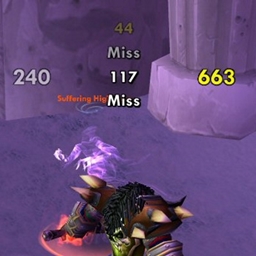
A mod that adds your damage to SCT. It provides a way for you to see your damage in a static location. This can be useful against large mobs like those in MC, Bosses, etc...Can use SCT animations or its on built in style.
This is the continuation of the addon "SCT - Damage" originally maintained by Picpok (owner): SCT - Damage - Addons - World of Warcraft - CurseForge (last version v7.1 from Oct 26, 2016)
What can it do?
- Your Melee, Spell, Skill, Periodic, and Pet Damage
- Spell Damage/Resists and Damage Type (by color)
- Can show damage at enemy nameplates
- Target and Spell ID's
- All "Miss" events (dodge, block, immune, etc...)
- Custom Colors for all text events and crits.
- Ability to show only target damage
- Ability to Turn SCTD on/off in PvP
- Four Fonts to choose from
- Can disable built in WoW damage
- Sliders for text size, fade speed, and on screen placement (with custom editbox)
- CTMod, MyAddons, Cosmos, Cosmos2 support
- Localized to work in almost all WoW clients.
How do I use it?
First you must have SCT installed already. Next, unzip SCTD it into your interface\addons directory. For more info on installing, please read install.txt. Now just run WoW and once logged in, type /sctdmenu to get the options screen or you can click the SCTD button on the SCT options menu.
FAQ
How do I remove the damage the scrolls above my targets head? - WoW itself does this. You can turn it off by checking the the "Disable WoW Damage" option, or by going to the Advanced Options under Interface options.
My Wow Damage won't turn back on, even after I turn off SCTD! - You need to turn this back on manually in WoW. Go to Advanced Options under Interface Options and you will see a checkbox to enable damage. Also, it is highly recommended you don't use the "Enable Wow Damage in PvP" option if you are on a PvP server.
My periodic damage is not showing up in the combat log or on the screen! How do I fix it? - You have turned off periodic damage on the Advanced Options under Interface Options. Make sure the "Periodic Damage" check box is checked, even if you have Damage unchecked.
SCTD is on top of my SCT messages, how do I fix this? - I highly suggest you move SCT's message using the sliders on the SCT option menu. You can also move SCTD using the sliders on its menu. Consider placing it over you target bar.
How do I reset SCTD or load another users settings? - SCTD is tied directly to SCT. You can reset SCTD using SCT's reset button or typing /sctreset. You can load another users SCTD settings by loading them from the SCT option menu.
How do I change the fonts? - You can select from four fonts on the options page.
I don't like enemy nameplates on. How do I make my damage appear over who I hit? - Enemy nameplates have to be on in order to show your hit over the enemy heads. SCTD will turn them on if you turn on the option, but you must manually turn them off if you don't like it (see Target keybindings).
At-a-glance numbers
Performance highlights
- Peaked at Hot #1386 on Jul 22, 2026.
- Featured on the Hot list across 6 distinct weeks.
- Shipped 1 release in the last 30 days.
- Averaging 17 new downloads per day over the past week.
Visuals
Screenshots 3
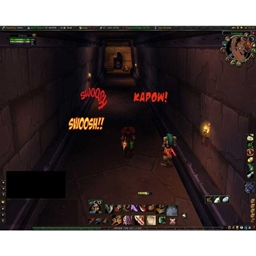
Use real gameplay shots to assess the addon before installing.