Trend Explorer
Recent download momentum
Estimated downloads/hour over observed intervals in the last 48 hours.
Lines connect interval estimates, not hourly measurements. Unobserved time is not counted as zero or extrapolated to now.
About this addon
What it does
Combat Alerts • CC • Interrupts • Smart Dispel • Enemy Cooldowns • Dangerous Debuffs • Survival Awareness
Classic Era • TBC Classic Anniversary • Midnight
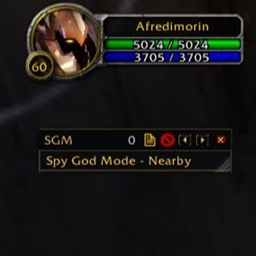
SafeGuard GODMODE is an advanced combat-awareness and survival addon built to help you recognize danger quickly and react when it matters.
Designed for PvP, Arenas, Battlegrounds, Dungeons, Heroics and Raids, SafeGuard combines crowd-control detection, interrupts, dangerous debuffs, defensive cooldown tracking, survival warnings and group intelligence into one configurable system.
Less spam. Better awareness. Faster reactions.
Open the control center with:
/safeguard or /sg
⚠️ Crowd Control Alerts
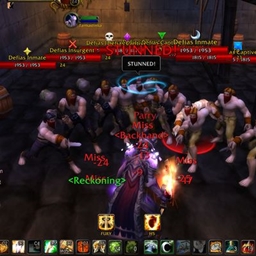
Instant alerts for dangerous crowd-control effects affecting you.
Stun • Fear • Silence • Root • Slow • Disarm • Blind • Sap • Polymorph • Gouge • Repentance • Sleep • Horror • Mind Control / Charm
Supported dungeon and raid control mechanics are also detected.
When available, SafeGuard displays the effect and remaining duration so you immediately know what happened and how long it will last.
⚔️ Interrupt Detection
Track successful interrupts involving your group using Blizzard combat information.
Player • Party • Raid
SafeGuard can display important interrupt events on screen and optionally announce them to your group.
Built-in filtering and anti-spam logic prevents unnecessary interrupt notifications.
✨ Smart Dispel
Quickly identify dispellable effects affecting your group.
Smart Dispel can show the affected player, debuff icon, remaining duration and range status in a dedicated compact window.
Supported dispels are determined automatically from your class and available abilities.
Real Debuff Icons • Player Identification • Remaining Time • Range Detection • Priority Handling • Right-Click Dispel
For combat safety and to avoid interfering with normal WoW mouse controls, secure right-click dispelling is performed directly through the debuff icon.
🛡️ Enemy Cooldown Awareness
Recognize important enemy defensive and escape abilities as they happen.
Ice Block • Divine Shield • Blessing of Protection • Vanish • Cloak of Shadows • Evasion • Shield Wall • Last Stand • PvP Trinket • And More
This makes it easier to recognize when an enemy becomes protected, escapes, or commits an important defensive cooldown.
☠️ Dangerous Debuff Alerts
SafeGuard monitors dangerous effects and warns you when something requires attention.
Alerts can include:
Spell Icon • Debuff Name • Debuff Type • Target • Remaining Duration
Smart throttling prevents the same effect from repeatedly flooding your screen or sounds.
❤️ Survival Awareness
Get immediate warnings when important survival thresholds are reached.
Low Health • Critical Health • Low Mana • OOM • Tank Critical • Tank Down
SafeGuard includes dedicated survival intelligence for both personal and group situations.
Screen alerts, sounds and supported announcements can be configured independently.
🧠 Raid & Group Intelligence
SafeGuard goes beyond personal alerts by monitoring important group conditions during PvE encounters.
Depending on your settings and WoW version, the system can provide awareness for:
Tank Status • Healer Mana • Player Mana • Dangerous Debuffs • Deaths • Defensive Usage • Encounter Events • Fight Information
Role-aware logic helps prioritize information that actually matters during group content.
🧠 Smart Alert System
SafeGuard is designed to provide useful information without constantly shouting at you.
Anti-Spam Protection • Alert Throttling • Duplicate Prevention • Reduced Repeated Sounds • Context-Aware Notifications
The goal is simple: important information should stand out instead of disappearing inside notification spam.
🎨 Fully Customizable
Use only the systems you actually want.
Alert Filters • Flash Effects • Sounds • Alert Scale • Movable Alerts • Lock / Unlock • Minimap Button • Profiles • Chat Announcements
Announcement options include supported:
Party • Raid • Instance • Say • Yell
The control center organizes the different systems into dedicated settings pages for easier configuration.
🎯 Built for Every Role
SafeGuard GODMODE is designed for:
Tanks • Healers • DPS
Across:
PvP • Arena • Battlegrounds • Dungeons • Heroics • Raids
Whether you are watching enemy cooldowns in PvP, tracking dangerous debuffs in a dungeon, or monitoring survival conditions during a raid, SafeGuard can be configured around your playstyle.
🌍 Supported WoW Versions
✔ Classic Era • ✔ TBC Classic Anniversary • ✔ Midnight
SafeGuard uses a multi-version architecture so each supported WoW client can use the systems appropriate for that version.
🐞 Built-In Error & Addon Inspector
SafeGuard includes internal diagnostic tools designed to make troubleshooting easier.
They can help identify recorded addon problems, compatibility issues and runtime errors while keeping debugging information available for testing and bug reports.
⚙️ Commands
/safeguard — Open SafeGuard GODMODE
/sg — Quick command
See the danger. React faster. Survive.
SafeGuard GODMODE is built around one goal:
Give you the combat information that matters, when it matters, without covering your screen in unnecessary noise.
Lightweight, configurable and continuously developed for supported WoW versions.
❤️ Support Development
Support helps fund continued development, compatibility updates, new features and bug fixes.
PayPal: paypal.me/afredimorin
Revolut: revolut.me/gyorevg
Every donation helps support:
New Features • Faster Updates • Future WoW Support • Bug Fixes • Ongoing Development
Thank you for supporting the project. ❤️
More Addons by Afredimorin
Plater MobHealth — Modern nameplates and combat UI.
AvoidanceStats TBC — Character statistics and raid-readiness analysis.
OmniCC GODMODE — Cooldown and crowd-control tracking.
OmniRaidAlerts — Dungeon and raid encounter alerts.
SafeGuard GODMODE
Fight smarter. React faster. Survive longer.
At-a-glance numbers
Performance highlights
- Peaked at Hot #193 on Aug 26, 2026.
- Peaked at Rising #399 on Sep 9, 2026.
- Featured on the Hot list across 5 distinct weeks.
- Shipped 13 releases in the last 30 days.
- Averaging 184 new downloads per day over the past week.
Visuals
Screenshots 15
Use real gameplay shots to assess the addon before installing.