Recount - Revived

Combat

Recount is a graphical damage meter written by Cryect. Recount (Preservation) is an attempt to preserve it and keep it running moving forward

WoW 12.1.0 Actively Maintained

Trend Explorer

Recent download momentum

Estimated downloads/hour over observed intervals in the last 48 hours.

Latest interval +2.01 /h 0.994h observed interval · ending Sep 11, 10 AM
Peak estimate +25 /h 1h observed interval · ending Sep 9, 5 PM
Average estimate +7.33 /h Time-weighted · 47.8h covered of 48h

Lines connect interval estimates, not hourly measurements. Unobserved time is not counted as zero or extrapolated to now.

About this addon

What it does

Recount - Damage & Healing Meter for All WoW Versions

Now working on Retail Midnight (12.0)! Recount's bars show live damage, DPS, healing, damage taken, absorbs, and deaths again during combat on the Midnight client — including mid-fight in raids and dungeons. Turn the in-game Damage Meter on (Options > Gameplay Enhancements > Damage Meter) so the data is there for Recount to read. Classic Era and every other Classic flavor are unchanged.

Recount is the definitive damage and healing meter for World of Warcraft. Whether you're optimizing your DPS rotation, tracking healer throughput, or reviewing a wipe, Recount gives you the data you need in a clean, customizable interface — on every modern WoW client.

Overview

Originally created by Cryect and ported through multiple expansions, Recount records detailed combat statistics and presents them as sortable bar lists with optional time-based graph overlays. It supports Classic Era, TBC, Wrath, Cata, and MoP Classic, plus retail through Midnight (12.0), and is built on the external Ace3 framework for compatibility and stability.

Using the Window

The window appears on its own and starts recording the moment you enter combat. From there:

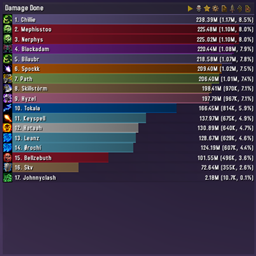
  • Click a bar — opens that player's breakdown: the abilities behind the number, who they hit, and the spread of hits, crits, misses and resists
  • Shift+click a bar — a time graph of their damage or healing across the fight
  • Ctrl+click a bar — pops out a small live graph tracking just that player
  • Right-click a bar — per-player actions
  • Right-click the title bar — change what the meter is showing
  • Alt+mouse wheel over the title bar — page through the display modes
  • Drag the bottom corners to resize, drag the title bar to move

The title bar also carries buttons for resetting the data, browsing previous fights, reporting to chat, and opening the comparison graph. If the window is in your way, /recount hide — or pin it down with /recount lock.

Display Modes

Switch between modes using the dropdown on the main window:

  • Damage Done — Total damage with per-player breakdown
  • DPS — Damage per second over the active combat window
  • Friendly Fire — Damage dealt to friendly targets
  • Damage Taken — Incoming damage per player
  • Healing Done — Total effective healing output
  • Absorbs — Absorb shield consumption
  • Healing Taken — Healing received per player
  • Overhealing Done — Wasted healing output
  • Deaths — Death count with event log drill-down
  • DOT Uptime — Damage over time application tracking
  • HOT Uptime — Heal over time application tracking
  • Activity — Time spent actively attacking or casting
  • Threat — Threat generated per player, with peak threat and a threat-per-second graph

The tracker modules below add further modes to the same dropdown — Interrupts, Dispels, Dispelled, CC Breakers, Ressers, Damage Prevented, a mode for each power type gained (Mana, Energy, Rage, Runic Power, Astral Power, Maelstrom, Fury, Pain), and Mana Given. Each can be switched on or off individually in the settings.

Pets are merged into their owner by default, so a hunter's bar is the hunter plus the pet — and the pet's own abilities are listed in that bar's breakdown, named like Claw (Fluffy), so the numbers under the bar add up to the bar. Prefer the pet on a bar of its own? Untick Merge Pets w/ Owners in the Filters settings. The pet has its own record either way, so switching applies to fights you have already recorded.

Tracker Modules

Additional combat event modules extend Recount beyond basic damage and healing:

  • CC Breakers — Tracks who broke crowd control effects
  • Dispels — Counts dispels and purges per player
  • Interrupts — Logs spell interrupts with target and ability detail
  • Damage Prevented — Works out how much damage a mitigation buff stopped and credits the player who cast it
  • Power Gains — Tracks mana, energy, and rage gains from external sources, and adds a Mana Given mode showing who granted the mana rather than who received it
  • Resurrections — Records combat resurrections cast
  • Threat — Samples your threat on your target once a second, tracking peak threat and threat per second

Drill-Down & Graphs

  • Click any player bar to open a detailed breakdown of abilities, targets, hit types, resists, and timing
  • Shift+Click any player bar to open a time-series graph of their damage or healing over the fight (requires "Record Time Data" enabled in settings)
  • The graph window uses LibGraph-2.0 to render smooth, zoomable DPS/HPS curves
  • Graph display options — show running totals instead of per-second rates, normalise series to a common scale, or stack them on top of each other
  • Compare Graph — the button on the main window's title bar opens a comparison window where you can plot several players and metrics against each other on one graph. Pick a player and a metric, add the series, and repeat; you can mix metrics (one player's damage against another's healing), limit the plot to a single recorded fight, and toggle normalising and running totals per graph.
  • Death log — clicking a player in the Deaths mode shows the events leading up to each death, with a health graph plotting incoming hits and heals over the final seconds

Fight History

  • Recount automatically segments data by combat encounter
  • Browse previous fights from the fight button on the title bar — review any individual pull, or go back to the overall totals for the session
  • Configurable fight history depth
  • Keep Only Boss Segments — an option to segment on bosses only, so a run of trash pulls cannot push a boss attempt out of the list

Reporting

  • Report the current mode to Say, Party, Instance, Raid, Guild, Officer, RealID, a whisper (by name or to your current target), or any chat channel you are joined to — from the report button on the title bar, /recount report, or a keybinding
  • You choose how many lines go out
  • Destinations you cannot currently use are left out of the list, so Raid only appears when you are in one

Live Meter Windows

Small always-on windows that track one number in real time, separate from the main meter. Open them from Settings > Realtime or with /recount realtime; each remembers its own size and position.

  • Per playerCtrl+click any bar (or pick it from the bar's right-click menu) to pop out a live graph of just that player, in whichever of Damage Done, DPS, Damage Taken, Healing Done or Healing Taken you are currently viewing
  • Raid-wide — the whole group's DPS, HPS, DTPS or HTPS on one graph
  • Client stats — FPS, latency, upload and download traffic, and how much addon-message bandwidth is left

Customization

  • Addon Language — pick the language for Recount's own text from a dropdown, independent of your game client's language. All 14 bundled translations are selectable, plus "Auto" to follow the client as before. Takes effect after a /reload; in-game item, spell and unit names still come from your client.
  • LibSharedMedia-3.0 support — use any installed font or statusbar texture
  • Fully configurable window colors: title, background, bar text, and per-class colors
  • Color picker integration for fine-grained customization
  • Adjustable bar height, padding, and font size
  • Class color bars with support for custom class colors (CUSTOM_CLASS_COLORS)
  • Pet merging — optionally roll pet damage/healing into owner totals
  • What gets recorded — filter by who (yourself, your group, pets, mobs, bosses) and by where (raids, dungeons, battlegrounds, the open world). Optionally hide the window entirely while it is not collecting
  • Automatic clearing — wipe the data when you enter a new instance or join a group, with or without a confirmation prompt first
  • Pause — stop and resume recording without losing what is already there (/recount pause or a keybinding)
  • Minimap button — LibDBIcon-1.0 button on the minimap; left-click toggles the main window, Shift+click opens the config panel, right-click opens the WoW addon settings page; position and visibility persisted per-profile; can be shown or hidden from the Recount settings panel
  • Titan Panel / LibDataBroker — Data source plugin for Titan Panel, Bazooka, DockingStation, and any LDB display addon; shows a live stat (DPS, Damage Done, HPS, Healing Done, Damage Taken, or Deaths) for the local player; right-click to switch stat and dataset; hover for a full six-stat tooltip

Technical Details

  • Multi-version — Supports Classic Era, TBC, Wrath, Cata, and MoP Classic, plus retail through Midnight (12.0)
  • Two required addonsAce3 (the shared library framework, kept external rather than bundled so you are not carrying a copy of it per addon) and VersionCheck-1.0 (tells you in-game when a new Recount is out). The CurseForge app installs both for you; if you install by hand, get them first or Recount will not load.
  • LibSharedMedia-3.0, LibDropdown-1.0, LibBossIDs-1.0, LibGraph-2.0 — Bundled libraries
  • LibDataBroker-1.1, LibDBIcon-1.0 — Bundled, for the minimap button and the Titan Panel feed
  • 14 bundled translations: English, Deutsch, Español, Español (Latinoamérica), Français, Italiano, Nederlands, Português (Brasil), Русский, 한국어, 简体中文, 繁體中文, Thai, Filipino. Several of the community translations are older exports and may be partial — untranslated text falls back to English.

Slash Commands

  • /recount — Show the command list
  • /recount toggle, /recount show, /recount hide — Control the main window
  • /recount config — Open the configuration window
  • /recount gui — Open Recount's page in the WoW addon settings
  • /recount reset — Reset current data
  • /recount resetpos — Move every Recount window back to the centre of the screen
  • /recount pause — Pause and resume data collection
  • /recount lock — Lock or unlock the windows in place
  • /recount minimap — Show or hide the minimap button
  • /recount report — Reporting options
  • /recount realtime — Open and close the live meter windows
  • /recount profile — Settings profile management

Keybindings

Recount registers keybindings under Game Menu > Key Bindings > Recount — jump straight to any display mode (Damage, DPS, Healing, Threat, Interrupts, Dispels, and the rest), page through modes forwards and backwards, show/hide/toggle the window, reset data, pause collection, toggle pet merging, and report the main or detail window to chat.

Retail Midnight (12.0) — what's different there

Patch 12.0 changed how addons are allowed to read combat data: Recount is handed numbers it may show you but is not allowed to read. It reads them the new supported way, and everything below applies only to the Midnight retail client. Every Classic flavour is completely unaffected.

  • Turn the in-game meter on — Options > Gameplay Enhancements > Damage Meter. Without it there is nothing for Recount to show.
  • Works: Damage Done, DPS, Damage Taken, Healing Done, Absorbs and Deaths, live during combat including inside raid and dungeon encounters.
  • Stays blank: Friendly Fire, Healing Taken, Overhealing, DOT/HOT Uptime, Activity and Threat — the game provides no data for them there.
  • No Total bar, no percentages, and the bars are in the game's own ranking order rather than one Recount chose. All three need adding the numbers up, which is the part that is not permitted.
  • Clicking a bar opens a spell-by-spell breakdown that keeps up with the fight, names the mobs each spell hit and what it did to each, and empties when the meter is reset. During a raid or dungeon encounter the game hides the names needed to match targets, so the lower list falls back to a plain per-spell view there.
  • Hovering a bar shows no tooltip. That one is deliberate on Recount's side, to keep protected values out of frames shared with the rest of your UI.
  • Resetting clears the game's own damage-meter sessions as well as Recount's data, because on Midnight that is where the numbers live. Blizzard's own meter windows will empty at the same time.

If you have any questions, comments or anything else, please feel free to reach out on Discord!

Recent Updates

v1.18.8 (Latest Release)

  • Retail: the Reset button's "Yes" now actually resets. On Midnight clients, answering "Do you wish to reset the data?" left every bar exactly where it was. Recount was clearing its own records — but on Midnight the numbers you are looking at come live from the game's own damage meter, which the reset never touched. It now clears that too, so the window comes back empty like it always did on Classic. Note that on Midnight this also empties the game's own damage-meter windows, because that is the one place the numbers live.
  • This page and the bundled README now describe what Recount actually does. The reporting list was wrong in both (it offers Instance, Officer, RealID and whispers as well, and any channel you are joined to). Two features were written down nowhere: Ctrl+click a bar pops out a live graph of just that player, and the live meter windows can track FPS, latency, traffic and raid-wide throughput as well as one person. There is now a section on driving the window at all, and the account of what does and does not work on Retail Midnight has moved out of an old patch note into a permanent section, so it stops scrolling off this page.

v1.18.7

  • Retail: fixed a Lua error that fired every time a buff or debuff changed on you or anyone in your group. The 12.0 patch started hiding some buff information from addons, and the Damage Prevented mode read it without checking — so it threw an error on almost every buff tick, refresh and expiry. It now checks first and stays quiet. On that client Damage Prevented cannot count the buffs it is not allowed to read, so its numbers there are lower than the truth rather than wrong; every Classic version is unaffected and counts exactly as before.
  • Retail: fixed the graph windows erroring non-stop whenever the mouse was near them. The 12.0 patch removed a function Recount used to ask "is the cursor over this?", and because two of the places that used it run every frame, the result was a stream of errors for as long as the window was open rather than a single one. Affects the damage-over-time graph, the comparison graph, and the pie chart. All now use the replacement the game provides, which works identically on every version.
  • Retail: the spell breakdown now names the mobs you hit, and what you did to each. Clicking a spell used to show a nameless row at 0 damage in the lower list. On Midnight the damage-done data has no target side to it — but the game does track it elsewhere, as a list of enemies and what hit them, and that reads backwards into exactly what you wanted. The lower list is built from that now, with real names and real numbers that line up with the Damage Taken view of the same fight. During a raid or dungeon encounter the game hides the names addons need to make the match, so there the list falls back to what it showed before.
  • Retail: per-second figures under 1,000 no longer show a string of decimals. The breakdown's DPS column could show something like 161.82124328613 on one row and 5.2K on the row above it. Rates are rounded before they are shown.
  • Retail: the spell breakdown's column headings are inside the window again. "Name of Ability", "DPS", "Damage" and the headings for the lower list were being drawn above the window's top edge, over the title bar and the close button. The whole contents of that window — headings, rows and both pie charts — were sitting 32 pixels too high, and are now positioned the same way as the Classic detail window they were copied from.
  • Retail: the spell breakdown no longer quietly changes which spell it is showing you. Clicking a spell shows its per-target split underneath. Recount was remembering your choice as a position in the list rather than as the spell itself, so as soon as another spell overtook it the highlight stayed where it was while the breakdown below switched to a different spell — with nothing on screen saying so. It now follows your spell as it moves up and down the ranking.
  • Retail: spells on exactly the same total no longer swap places by themselves. That list re-sorts several times a second while it is open, and tied spells had no settled order, so rows could visibly trade places on a moment when nothing had happened. The list now only changes when the numbers do.
  • The bundled graph library is updated, and it now takes priority over older copies from other addons. Several addons include the same graph library, but only one copy of it can be active at a time — the newest version wins, and the rest quietly do nothing. On a client with Details or FastGuildInvite installed, one of those older copies was the one actually drawing Recount's graphs, which is why they stayed broken. The version shipping here is newer than all of them, so installing this update fixes the graphs and pie charts even if another addon is still carrying an out-of-date copy. It is going out as a proper shared library shortly, after which none of this matters.

v1.18.6

  • New display mode: "Mana Given". Recount has always shown who received mana. It now also shows who gave it. Pick "Mana Given" from the mode menu and each bar is a player who restored mana to the group; click one to see it split by spell (Judgement of Wisdom, Vampiric Touch, Innervate, Mana Tide Totem) and by who got it. If you have ever wanted to know what your Judgement of Wisdom actually did for the party over a whole dungeon run, that is this. Set the data set to "Overall" for the full run rather than the last fight. Note it starts recording from this version, so older saved fights will be blank in the new mode.
  • Your pet's damage now shows up when you click your own bar. By default Recount merges pets into their owner, and that merge only ever added the pet's total to your bar — the ability breakdown you get from clicking it listed just your own abilities and quietly added up to less than the bar said. For a hunter or warlock that looks like the pet is not being tracked. It always was; it simply had nowhere to appear. Pet abilities are now listed in your breakdown, named like Claw (Fluffy) so you can still tell yours from your pet's. (If you would rather see the pet as its own bar entirely, untick Merge Pets w/ Owners in the Filters options — that has always worked, including for fights already recorded.)
  • Retail: the spell breakdown window now keeps up with the fight. On Midnight, clicking a bar opens that player's spell breakdown — and it never refreshed. It kept showing whatever the numbers were at the moment you clicked, so it would stand still while the main window climbed, and after a reset it was left listing the previous fight's spells beside an empty meter. It now updates as the fight goes on, clears when the meter resets, and keeps the spell you had selected instead of jumping back to the top one.
  • Retail: fixed a Lua error when changing the transparency of a live meter window. Opening a Realtime window's colour menu and dragging the opacity slider threw an error on Midnight clients. It no longer does.
  • Window transparency now behaves consistently. One part of the addon was reading the opacity slider backwards, so transparency could apply inverted depending on which window you set it from. Both places now agree, and match the game.
  • New display mode: "Damage Prevented". How much damage a mitigation buff actually stopped, credited to the player whose buff did it. Because these buffs take off a known fixed amount, the figure is exact arithmetic rather than a guess, even though the game never reports it. Each bar is a player; click one to see it split by ability and by who it was prevented for. The buff list starts with Shaman Stoneskin and grows as each one's exact value is confirmed, because a buff Recount is unsure of is left out entirely rather than counted approximately. Starts recording from this version.
  • Mana is no longer occasionally missed, in either direction. Mana restored to you by a source Recount was not otherwise tracking was being discarded, and so was mana a warlock drained from a mob while mob tracking was switched off. Both are counted now.
  • Fixed the graph window's legend, which was broken on every version of the game. A single mis-typed anchor name meant building the graph window always threw an error part-way through, just before it created the legend rows. Recount shrugs off errors at startup so everything else still worked, which is why this only ever surfaced as a small orange "init warning" in your chat frame when you logged in. If you have seen one of those mentioning the graph window, it is gone.
  • Fixed bars that could reset to zero part-way through a fight. Recount tidies away anyone it has no reason to keep after half a minute, and three things it credits people for were not telling it those people were busy: the new Mana Given and Damage Prevented modes, and shield absorbs. So a paladin proccing mana off other people's swings, a shaman soaking hits with a totem, or a priest whose shield was eating damage could be quietly dropped mid-fight and start counting again from nothing. All three now keep their place. This could only happen if you had the timeline/graph data switched on for a tracked type; per-second figures like DPS and HPS are not affected by the fix. The record of who shielded whom, and the death record itself, were fixed the same way.
  • Fixed an error that could appear when a player died. Certain deaths, particularly ones following a Spirit of Redemption or a raised ghoul, could throw a Lua error instead of being recorded.
  • Fixed a slow memory leak. An internal list Recount sweeps several times a second was never actually being emptied, so it grew for as long as you stayed logged in and the sweep itself never stopped running. Long sessions were paying for this the whole time.
  • Recount no longer shows as out of date. Four of the six version files pointed at older game patches, so Classic Era, Wrath, Cata and Retail all flagged the addon as out of date even though it worked fine. Every version file now matches the patch you are actually playing.
  • Burning Crusade Classic and Classic Anniversary get their own version file at last. The old one was named in a way no game client recognises, so those clients quietly fell back to the Classic Era file and were handed the wrong game version. Anniversary players should stop seeing the out-of-date warning.
  • What Recount can and cannot do on Retail Midnight — worth knowing before you install there. On Midnight the game hides combat numbers from addons: Recount is handed values it may show you but is not allowed to read. So on that client the bars show live damage and healing per player, in the order the game itself ranks them, and clicking a bar still opens a breakdown. What Recount cannot do there is sort the bars its own way, show a Total bar or percentages, or put a tooltip on a bar when you hover it — all of those need to actually read the numbers. This is the game's restriction rather than a setting you can change, and it applies only to Retail Midnight. Every Classic flavour is completely unaffected.

v1.18.5

  • MoP Classic is properly supported now. Recount had no version file for MoP, so the game treated it as out of date and it would only load with "Load out of date AddOns" ticked — and CurseForge never offered the MoP build at all. Both are fixed.
  • Retail now gets the "new version available" notice that every Classic version already had. VersionCheck-1.0 was missing from retail's requirements, so retail players were never told when an update shipped. If you install through the CurseForge app nothing changes for you — it already installs VersionCheck-1.0 automatically. If you install by hand on retail, you now need it alongside Ace3, exactly as Classic players already did.

v1.18.4

  • New "Addon Language" setting: pick the language for Recount's own text from a dropdown, no matter what language your game client is in. All 14 bundled translations are now selectable — English, Deutsch, Español, Español (Latinoamérica), Français, Italiano, Nederlands, Português (Brasil), Русский, 한국어, 简体中文, 繁體中文, Thai, and Filipino — plus "Auto" to keep following your client's language as before.
  • Your choice is saved and takes effect after you type /reload. In-game item, spell, and unit names still come from your game client and are not changed.
  • Note: several of the community translations are older and may be incomplete — any text that hasn't been translated falls back to English.
  • New: a README now ships inside the addon folder. It covers what Recount needs installed alongside it, how to drive the window, every display mode, the graph and comparison views, reporting, the settings worth knowing about, all the slash commands and keybindings, the retail Midnight differences, and what to check when something looks wrong.
  • Fixed: right-clicking the minimap button opens Recount's settings again instead of throwing an error. On some clients the settings window would refuse to open and print a Lua error instead.
  • Fixed: the Recount window no longer disappears on its own when you have "Hide window when not collecting" switched off. Turning data collection off used to hide the window anyway.
  • Fixed: lowering the number of saved fights now clears the leftover fight names from the fight list, instead of leaving entries that show nothing when you pick them.
  • Fixed: Recount no longer alters the game's shared class colours, which could leak Recount's transparency setting into other addons.
  • Fixed (Retail Midnight): clicking a bar to see the spell-by-spell breakdown works. It threw an error every time before.
  • Fixed: hovering or inspecting another player's pet no longer shows your own pet's information by mistake.
  • Fixed: turning Recount off no longer throws an error.
  • Fixed: your pet's damage and healing are now included when Recount shares data with other raiders who are out of range, deleting a pet properly detaches it from its owner, and the "Merge Pets" option now hides a pet when you filter out its owner.

Credits

Developed by:

  • Cryect — Original Author
  • Elsia — Ported to patch 2.4 (TBC)
  • Resike — Maintained from patch 5.4 through retail
  • Pimptasty — Continued maintenance and improvements

Special Thanks:

  • Ace3 Development Team for the excellent framework
  • LibGraph-2.0, LibSharedMedia-3.0, LibBossIDs-1.0, and LibDropdown-1.0 authors for their libraries
  • The WoW Classic Era community for continued use and feedback

Community

Bug reports, feature requests, questions, or chatting with other players: Join the Recount Discord.

At-a-glance numbers

Performance highlights

  • Peaked at Hot #47 on Aug 20, 2026.
  • Peaked at Rising #386 on Aug 27, 2026.
  • Featured on the Hot list across 5 distinct weeks.
  • Shipped 4 releases in the last 30 days.
  • Averaging 223 new downloads per day over the past week.

Discover more

Keep exploring

Similar addons you might also want to check out.

More by Pmptasty

Same creator, different utilities.

Similar in Combat

Comparable addons in the same lane.

Method Raid Tools #2
53.8M downloads

Helpful addon for raiding

WarpDeplete Mythic+ Timer #3
4.0M downloads

Timer for M+ Challenge Modes

Infinite Raid Tools #7
2.3M downloads

Independant modules for raiding both general and boss specific (previously Endless Raid Tools)

ExwindTools #9
1.5M downloads

ExwindTools

EllesmereUI #16
5.3M downloads

EllesmereUI combines the most intuitive UI editor in WoW with extreme performance optimization and endless customization. Bring your UI to life like never before.

GSE: Sequences, Variables, Macros #18
10.1M downloads

GSE is an advanced macro compiler that is an alternative to the limits provided by the default macro editor.

ThisWeeksAuras #23 #515
48.6K downloads

ThisWeeksAuras is a Midnight-ready fork of M33kAuras by m33shoq, which is itself a fork of WeakAuras 2.

Naowh Smart Reminders #30 #161
10.3K downloads

Calls out what to press when the boss timeline says an ability is coming, for every spec, hooked into BigWigs or DBM.

Outfitter (Retrofit) #31
703.2K downloads

Outfit/equipment manager with quick swap toolbar and scripting. This is a unified version of Outfitter that will work in all flavors of WoW.

DBM - Deadly Boss Mods (DBM-Core) #33
632.7M downloads

The ultimate encounter helper to give you fight info that's easy to process at a glance. DBM aims to focus on what's happening to you, and what YOU need to do about it.

ConsolePort #34
4.1M downloads

The Gamepad Addon

BigWigs (Boss Timers & Tools) #41
204.7M downloads

BigWigs is a modular and extremely lightweight addon designed to provide you with the tools you need to beat any boss encounter.