Trend Explorer
Recent download momentum
Hourly download deltas for the last 48 hours.
About this addon
What it does
What is it?
LootX Enhanced is an addon that completely replaces World of Warcraft's default loot windows, making them prettier, more convenient, and faster. Forget about standard windows - now you'll get a modern interface with tons of customization options!
Why you'll love it! 🎁
⚡ Faster & Smoother
- Everything runs 70% faster thanks to smart caching
- Animations are smooth, no lag even during big fights
- Uses little memory - your FPS stays the same
🎨 Looks Amazing
- Automatically matches ElvUI or TukUI if you have them installed
- Tons of ready-made skins to choose from
- Change colors, size, transparency - anything you want
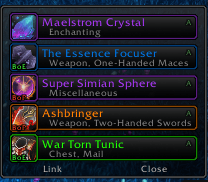
- Quality-based item highlighting (gray, green, blue, purple, etc.)
🎯 Smart with Pawn
If you have Pawn installed (addon that shows if items are better):
- Automatically rolls on upgrades (choose Need or Greed)
- Shows how much % better the item is right in the name
- Green arrow on roll buttons when it's an upgrade
- Fully configurable - turn it off if you don't need it
📊 See All Group Loot
- Monitor shows who looted what in real-time
- See raid/party loot (if you want)
- Gold, currency, items - all in one place
- Configure what to show and what to hide
🎲 Better Rolls
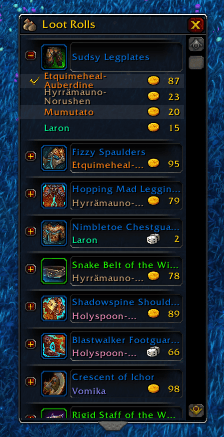
- Beautiful group loot windows
- Role icons (tank/heal/dps) next to player names
- Class colors
- Timer showing how much time left to roll
Quick Commands 💬
/lootx- open settings/lootxcache- clear cache (if something glitches)
Basic Settings 🔧
For Beginners
Just install and play! Default settings work great for most players.
If You Want to Customize
- Appearance:
/lootx→ Skins → pick what you like - Pawn Auto-Roll:
/lootx→ Group → Pawn Integration → enable "Auto roll" - Window Position:
/lootx→ unlock anchors → drag where you want - Loot Monitor:
/lootx→ Monitor → configure what to show
Pawn
- Automatic rolls on gear upgrades
- Shows % improvement right next to item name
- Example: "[+] Sword (+15%)" - and addon auto-rolls for you
Compatibility
- Auto-detects ElvUI - uses its colors and style
- Auto-detects TukUI - same thing
- Works with Masque for custom buttons
Which WoW Versions? 🎮
✅ Retail (The War Within 11.2.5+)
✅ Pandaria Classic (5.5.2+)
✅ Classic+ (1.15.8+)
Works on all versions of the game!
FAQ ❓
Q: Is it safe to use?
A: Yes! It's a regular UI addon, doesn't break anything.
Q: Do I need Pawn?
A: No! The addon works without Pawn. Pawn is only needed for auto-rolls on upgrades.
Q: Compatible with ElvUI?
A: Yes! Even better - automatically matches ElvUI style.
Q: How much memory does it use?
A: Only 2-3 MB. That's very little, FPS won't drop.
Q: Can I disable other players' loot monitor?
A: Yes! /lootx → Monitor → turn off "Show other players loot" or raise quality threshold.
Q: How to get back default windows?
A: Just disable the addon in AddOns menu.
Usage Examples 💡
For Raiders
- Enable Pawn auto-rolls so you don't miss upgrades
- Set fast fade times in monitor
- Raise quality threshold to only see epics
For Farmers
- Enable gold display in monitor
- Configure auto-loot for greens and blues
- Hide gray items
For PvP
- Minimal interface - small windows
- Fast animations
- Only your own loot
For Collectors
- Large monitor with all loot
- Altoholic integration shows how many you have
- Tracks all currencies
Support 🆘
If something doesn't work:
- Try
/reload - Try
/lootxcacheto clear cache - Check that all LootX modules are enabled
- Check for conflicts with other loot addons
What's Planned? 🚀
- Sound effects for epics/legendaries
- More ready-made skins
- Loot statistics
- Great Vault integration
- Your ideas - let us know!
Install LootX Enhanced and enjoy a modern, beautiful, and fast loot interface! 🎁✨
At-a-glance numbers
Performance highlights
- Peaked at Hot #218 on Jul 5, 2026.
- Peaked at Rising #338 on Jul 11, 2026.
- Featured on the Hot list across 6 distinct weeks.
- Shipped 7 releases in the last 30 days.
- Averaging 68 new downloads per day over the past week.
Visuals
Screenshots 2
Use real gameplay shots to assess the addon before installing.