Trend Explorer
Recent download momentum
Hourly download deltas for the last 48 hours.
About this addon
What it does
- Work in Progress
-
Some items you will need to manually add, it won't automatically add
A World of Warcraft addon for tracking Legion Remix collectibles including mounts, pets, toys, transmog sets, achievements, and housing decorations.
Features
- Comprehensive Tracking: Monitor your progress for all Legion Remix collectibles
- Auto-Updates: Automatically detects when you earn achievements, collect pets/toys, or visit vendors
- Bronze Currency Display: Shows your current Bronze amount in the addon UI
- Category Organization: Separate tabs for Achievements, Mounts, Class Mounts, Pets, Toys, Transmog, and Housing
- Smart Filtering: Filter by class and hide completed items
- Vendor Integration: Automatically scans your collection when visiting the Legion Remix vendor
- Mythic Ensemble Optimization: Clearly indicates when purchasing Mythic ensembles includes LFR/Normal/Heroic versions
Installation
- Download the addon files
- Extract to your World of Warcraft AddOns folder:
- Retail:
World of Warcraft\_retail_\Interface\AddOns\
- Retail:
- Ensure the folder structure is:
   AddOns\
   └── LegionCollector\
       ├── LegionCollector.toc
       ├── Core.lua
       ├── UI.lua
       └── Data\
           ├── Achievements.lua
           ├── ClassMounts.lua
           ├── Housing.lua
           ├── Mounts.lua
           ├── Pets.lua
           ├── Toys.lua
└── Transmogs.lua- Restart World of Warcraft or reload your UI (
/reload)
Usage
Commands
/lrc- Open the Legion Collector window/lrc scan- Manually scan your current progress/lrc reset- Reset all tracked progress
Interface
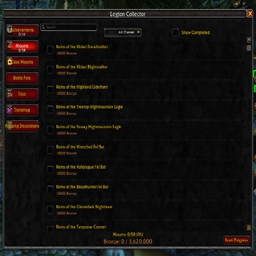
- Top Bar: Search box, class filter, and "Show Completed" toggle
- Left Panel: Category buttons with progress indicators
- Main Panel: List of items in the selected category
- Bottom Bar: Progress summary, Bronze display, and Scan button
Features Explained
Auto-Updates
The addon automatically tracks your progress when:
- Earning achievements
- Learning pets
- Collecting toys
- Visiting the Legion Remix vendor (Horos at the Infinite Bazaar)
- Currency changes
- Inventory updates
Mythic Ensemble Optimization
When viewing transmog items, the addon clearly indicates which Mythic ensembles include the LFR, Normal, and Heroic versions, preventing you from spending unnecessary Bronze.
Vendor Integration
When you visit Horos at the Infinite Bazaar, the addon automatically scans your collection to update your progress tracking.
Data Structure
The addon organizes Legion Remix collectibles into separate data files:
- Achievements.lua: Achievement-based rewards with item unlocks
- ClassMounts.lua: Class-specific mounts with spell IDs
- Housing.lua: Housing decorations tied to achievements
- Mounts.lua: Regular mounts with item and spell IDs
- Pets.lua: Companion pets with item and spell IDs
- Toys.lua: Toy items with item and spell IDs
- Transmogs.lua: Appearance sets with item IDs
Each item includes relevant IDs for tracking:
itemID: Item identification numberspellID: Spell identification number (for mounts/pets/toys)achievementID: Achievement identification number (for achievements/housing)
Troubleshooting
No Data Displaying
- Ensure all addon files are properly installed
- Try
/lrc scanto manually refresh your progress - Check that the addon is enabled in your AddOns list
- If issues persist, use
/lrc resetand scan again
UI Issues
- If the UI doesn't open on first try, type
/lrcagain - For layout issues, try
/reloadto refresh the interface
Missing Items
- The addon data is based on known Legion Remix collectibles
- If you find missing items, please report them
Support
For issues, suggestions, or contributions, please contact the addon creator or submit issues through the addon's distribution platform.
At-a-glance numbers
Performance highlights
- Peaked at Hot #2418 on Jul 17, 2026.
- Peaked at Rising #6091 on Jul 23, 2026.
- Featured on the Hot list across 6 distinct weeks.
- Shipped 1 release in the last 30 days.
- Averaging 1 new downloads per day over the past week.
Visuals
Screenshots 5
Use real gameplay shots to assess the addon before installing.