Trend Explorer
Recent download momentum
Hourly download deltas for the last 48 hours.
About this addon
What it does
v2.0.0 Released!
The new version features a completely new GUI for viewing the mob database. It has been rewritten from scratch and is able to display all of the mob entries. There is no longer a limit of 200!
KillTrack
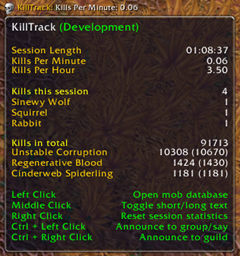
KillTrack will keep track of how many times you've killed various mobs.
The main way to see this info is on tooltips. As you hover over any killable mob, the kill count will be displayed on the bottom of the tooltip.
There is also a friendly list that you can bring up to display all mobs with their NPC id, global kill count and kills on the current character (Command: /kt list).
Specific lookups
If you want to know the number of kills you have on a specific mob, you can target the mob and use the command /kt target.
For any mob, use the command /kt lookup <identifier> where <identifier> is a name or NPC ID.
Kill Timer
Ever wanted to track how many kills you accumulate within a certain time? You can do so with KillTrack.
You simply tell it how long to track, and a window will pop up listing number of kills, time left, kills per minute and kills per second.
To start the timer, use the command /kt timer <seconds> [minutes] [hours]. You can also use the format /kt timer [num]s[num]m[num]h. With the second format, you can use any order for the arguments, /kt timer 3h50s2m will work just as well as /kt timer 50s2m3h.
For example: To start a 3.5 minute timer: /kt timer 30 3, /kt timer 30s3m or /kt timer 3m30s.
Kill Records
When you've killed a certain mob a certain number of times (1000 by default), KillTrack will notify you with a small gratulation message!
If you have the AddOn Glamour installed, it will show in the style of a guild achievement.
To change the threshold, use the command /kt threshold <threshold>, where <threshold> is the new threshold.
E.g: If you set the threshold to 100, then after you've killed a mob 100 times, it will notify you. And continue to notify you for every 100th kill.
Immediate Frame
By using the command /kt immediate (or /kt i for short), you will get a small frame that shows you how many kills you've made since running the command. This can be useful for times when you need to kill a certain number of mobs, but do not wish to reset your session statistics. Simply run /kt i and it will track how many kills you do until you close it, reopening the frame will reset the count.
The frame can also be opened from the broker plugin with Ctrl + Middle Click.
With the command /kt immediate threshold <threshold>, where <threshold> is a number, the addon will display a message on screen and play sound each time you kill that many creatures.
E.g: You open the immediate frame with /kt i and then set the threshold to 10 with /kt i threshold 10. Now each time you score 10 kills (10, 20, 30 et.c) you will see a message and hear a sound to notify you of this event. This can be useful when you need to score a certain number of kills for whatever reason (quests, item procs...).
If you have some addon tracking procs or similar you could call this from Lua with something like:
KillTrack.Immediate:Show()
KillTrack:SetImmediateThreshold(someThreshold)
To automatically start tracking.
Other commands
- /kt: Shows available commands.
- /kt print: Toggles printing all kill updates locally to chat.
- /kt printnew: Toggles printing new mob entries locally to chat.
- /kt delete <id>: Deletes entry with NPC ID <id> from database.
- /kt purge [threshold]: Clears mob entries with a kill count below [threshold].
- /kt reset: Clears ALL mobs from the database.
- /kt threshold <threshold>: Sets the kill count threshold at which the AddOn will announce kill records (E.g: /kt threshold 100 to announce at every 100rd kill).
- /kt countmode: Toggles between counting your kills only, or also counting kills made by raid/party members.
- /kt showexp: Toggles showing how much experience a mob gives (and how many kills are required to gain a new level).
Feedback
If you have any suggestions, bug reports, complains et.c, please make a new ticket.
I would prefer if you use the Issues page on GitHub instead of the ones on Curse/WoWInterface.
External links
At-a-glance numbers
Performance highlights
- Peaked at Hot #103 on Jul 18, 2026.
- Featured on the Hot list across 6 distinct weeks.
- Shipped 1 release in the last 30 days.
- Averaging 50 new downloads per day over the past week.
Visuals
Screenshots 6
Use real gameplay shots to assess the addon before installing.