Trend Explorer
Recent download momentum
Hourly download deltas for the last 48 hours.
About this addon
What it does






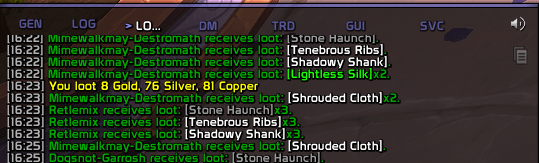
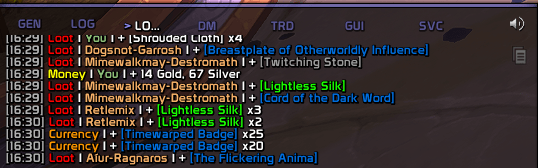
PrettyChat cleans up World of Warcraft's system messages — the lines you get for loot, currency, gold, reputation, experience, honor, and crafting — and rewrites them in a tidy, color-coded layout that's easy to scan in a busy chat window.
You can turn any message type on or off, and change its wording and colors, from the in-game settings panel or from chat with the /pc command.
What's new in 1.4.0
- New on-screen debug console.
/pc debug— or the new Debug console toggle on the General page — opens a small log window for troubleshooting. It's off by default and lasts only the current session. - The per-category Defaults button works again. Clicking Defaults on a category page now actually restores just that category to its defaults.
- Reset restores the on/off state too. A message's Reset button now puts its Enable switch back to default, not just its wording and colors.
- Updated for the current game patch (Midnight 12.0.7).
Screenshots
Without Pretty Chat
With Pretty Chat
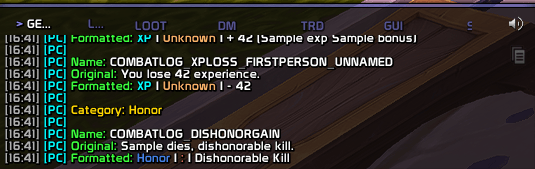
Test Mode
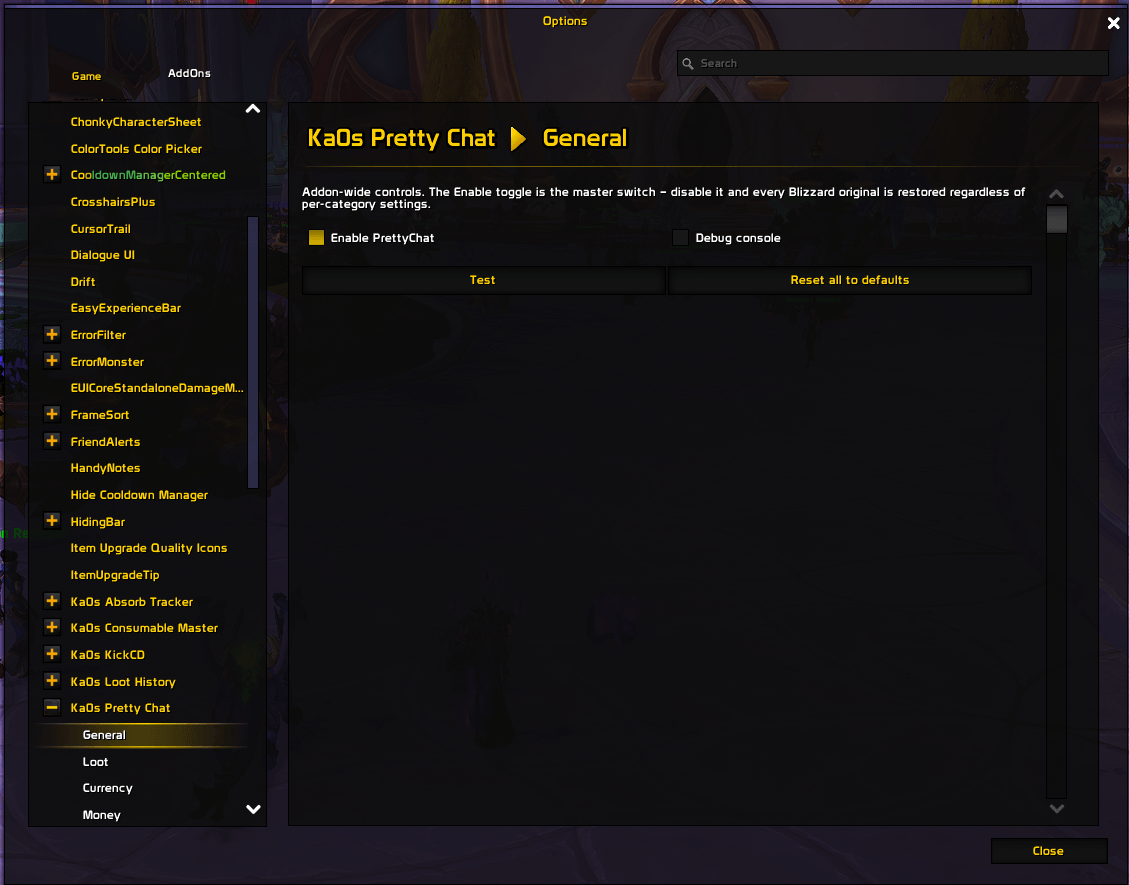
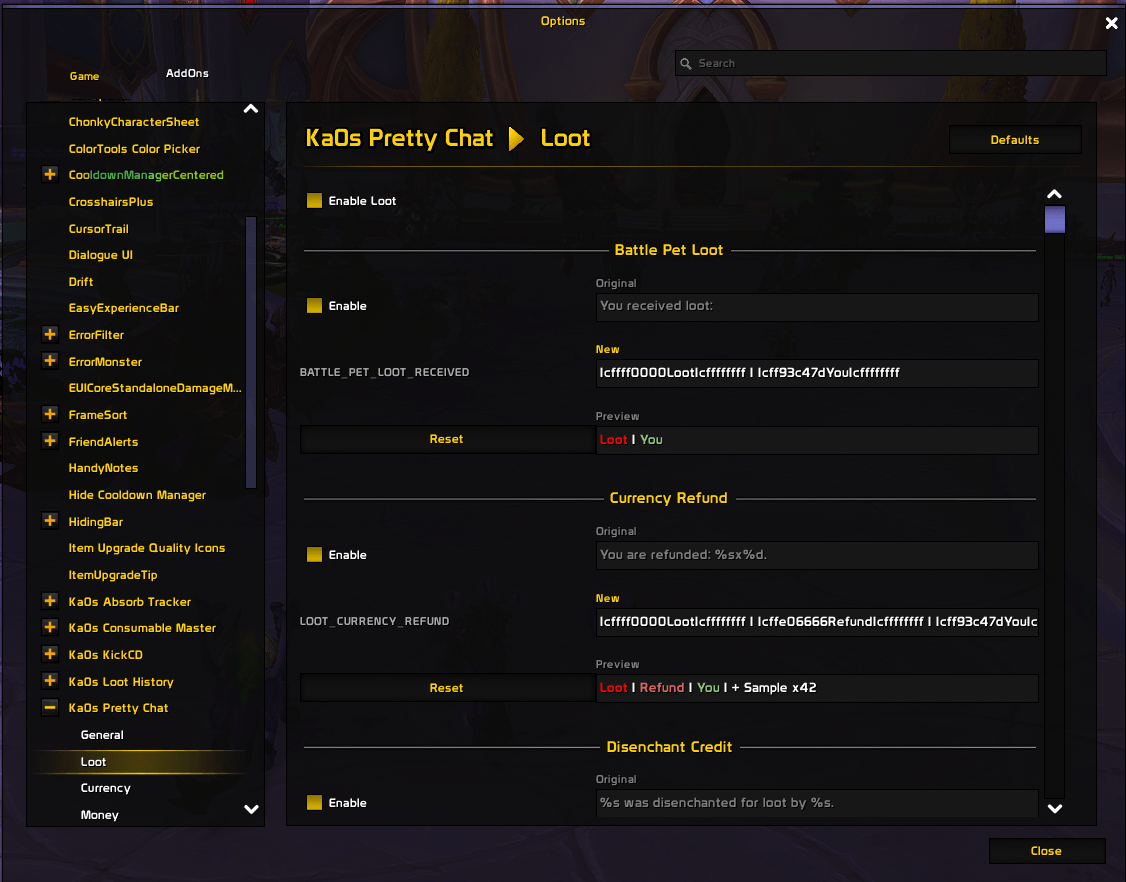
Settings Panel
Usage
Slash commands
/pc and /prettychat do the same thing. Everything PrettyChat prints to chat is tagged with a cyan [PC].
| Command | What it does |
|---|---|
/pc or /pc help |
Show the command list in chat |
/pc config |
Open the settings panel (won't open during combat) |
/pc version |
Show the installed version |
/pc list |
List every setting. Add a category to narrow it down, e.g. /pc list Loot |
/pc get <setting> |
Show one setting's current value |
/pc set <setting> <value> |
Change one setting, e.g. /pc set Loot.enabled false |
/pc reset <category> |
Restore one category to PrettyChat's defaults |
/pc resetall |
Restore everything to defaults |
/pc test |
Preview how every message looks, before and after — works even while the addon is off |
/pc debug |
Open the on-screen debug log window. /pc debug on / off start and stop logging (off by default) |
Settings panel
PrettyChat appears in the game's Settings panel under Ka0s Pretty Chat. The main page is just the logo, a short description, and the command list; the controls live on nine sub-pages, each a row of its own in the settings list:
| Tab | Covers |
|---|---|
| General | The master Enable PrettyChat switch (turn it off and every message goes back to its original wording), a Debug console toggle (shows or hides a small on-screen log window for troubleshooting), a Test button that previews every message, and Reset All to Defaults. |
| Loot | Item pickups, your own and group loot, bonus rolls, and currency from loot. |
| Currency | Currency gained and lost. |
| Money | Gold, silver, and copper: pickups, loot splits, guild bank deposits, and quest rewards. |
| Reputation | Faction standing going up and down. |
| Experience | The different ways you gain XP (rested, group, raid, and so on). |
| Honor | Honor you earn. |
| Tradeskill | Crafting items and opening locks. |
| Misc | A couple of leftovers: quest XP rewards and zone exploration. |
On each page, every message has an Enable checkbox and its own Reset button. For each one you can see the original wording, type your own replacement, and watch a live Preview update as you edit. Turn a message off and it goes back to its original.
How it works
World of Warcraft builds each system message from a fixed template. PrettyChat swaps in its own templates before the game uses them, so the change happens before the message ever reaches the chat window. That's why it works with the default chat frame and with replacements like ElvUI or Glass, with nothing to set up.
A few things worth knowing:
- The master switch always wins. Turning off Enable PrettyChat (General page, or
/pc set General.enabled false) restores every original message, whatever your other settings say. Your customizations are kept, just not applied. - Three switches, checked in order: master, then category, then the individual message. A message only uses your wording when all three are on.
- Editing wording and colors. When you write your own version of a message, keep the little
%sand%dplaceholders — that's where the item name, amount, and so on get filled in. Drop or reorder one and the line will look broken, so copy the original as a starting point. (Editing from chat works too, but you have to double every|to||.) - Getting back to defaults. One message: its Reset button, or turn it off to restore the original. A whole category: the page's Defaults button, or
/pc reset <category>. Everything: Reset All to Defaults on the General page, or/pc resetall.
FAQ
| Question | Answer |
|---|---|
| Does this work with ElvUI, Glass, or other chat addons? | Yes, with nothing to configure. PrettyChat changes the game's message templates before any chat window sees them, so whatever you use to display chat gets the tidy version automatically. |
| Why do some lines still look like the default? | Something's switched off. Check the master switch, the category, and that specific message — /pc list <category> shows them all in one place. A switched-off message always shows its original. |
| I edited a message and now it looks broken. | Your version is missing or misusing the %s / %d placeholders. Copy the original wording from the panel and edit around the placeholders, or turn the message off to restore it. |
| Can I change the colors? | Yes — the colors are part of the wording. Each message's text carries WoW color codes (|cffRRGGBB…|r), so recolor a line by editing those hex values right in its New box on the settings panel. There's no separate color picker. (Editing from chat works too, but you have to double every | to ||.) |
| How do I preview my edits without waiting for real loot? | Two ways, and both work even while the addon is switched off. On the settings panel, each message has a live Preview that updates as you type. From chat, /pc test prints a before/after sample of every message — add a category (/pc test category Loot) or one string (/pc test formatstring LOOT_ITEM_SELF) to narrow it down. |
| Where are my settings saved? | They're shared across every character on your account — one configuration for all of them. Separate per-character or per-realm settings aren't available yet; if you'd like them, open an issue. |
| What's the Debug console for? Do I need it? | No — it's just a troubleshooting aid for when you're filing a bug. /pc debug (or the General-page toggle) opens a small on-screen log window. It starts empty because logging is off by default: turn it on with /pc debug on (or the window's own Debug switch), reproduce the problem, then use the window's Copy button to grab the text for your issue. Logging is session-only — it resets every reload. |
Troubleshooting
| Symptom | What to try |
|---|---|
| Nothing changed after installing | Make sure it's switched on: check the master switch, the category, and the message (/pc get General.enabled should be true). Run /pc test — if the preview looks formatted but real chat doesn't, another addon is changing the same messages after PrettyChat. |
| A message I edited looks broken | Your wording dropped or misused a %s / %d placeholder. Restore the category with /pc reset <category>, or copy the original from the panel and edit around the placeholders. |
| The settings panel won't open | Wait until you're fully loaded in, and note it won't open during combat. If the main page opens but a sub-page doesn't, click the sub-page's row in the settings list. |
| I want a clean slate | One category: /pc reset <category>. Everything: /pc resetall, or Reset All to Defaults on the General page. |
| I opened the debug console but it's empty | The window and logging are separate switches. Opening the window (/pc debug) doesn't start logging — turn logging on first with /pc debug on, or the Debug toggle inside the window, then reproduce the problem. Use Copy to lift the log into a bug report. |
| I edited a crafting message and my change won't stick | A couple of strings (item and multi-item crafting results) live under both Loot and Tradeskill. They share one game template, so whichever of the two you edited last, after a /reload the Tradeskill version wins. Edit it in one place — the panel's Enable tooltip flags these shared strings. |
Issues and feature requests
Found a bug or want a new feature? Everything is tracked on GitHub: https://github.com/tusharsaxena/prettychat/issues. Please file it there rather than in a comment — that's where the project's to-do list lives.
Version History
| Version | Date | Highlights |
|---|---|---|
| 1.4.0 | 2026-07-12 | Added an on-screen debug console — /pc debug, or the new General-page Debug console toggle — a session-only log window for troubleshooting. Fixed the per-category Defaults button, and made a message's Reset restore its on/off state too. Updated for the current game patch. |
| 1.3.0 | 2026-05-03 | Rebuilt the settings panel: a page per category plus a General page (master Enable, Test, Reset All), a logo-and-commands landing page, and a cleaner layout for each message. Added the /pc commands (help, list, get, set, reset, resetall, test) so you can change any setting from chat, plus a [PC] tag on the addon's chat output. |
| 1.2.0 | 2026-04-24 | Added a searchable reference of the game's message strings to the settings panel. |
| 1.1.0 | 2026-02-14 | Made the game's message formats editable from the settings panel. |
| 1.0.0 | 2026-02-14 | Updated for WoW Midnight. |
| 0.0.3 | 2023-10-05 | Initial release. |
At-a-glance numbers
Performance highlights
- Peaked at Hot #1446 on Jul 21, 2026.
- Peaked at Rising #584 on Jul 25, 2026.
- Featured on the Hot list across 6 distinct weeks.
- Shipped 2 releases in the last 30 days.
- Averaging 5 new downloads per day over the past week.
Visuals
Screenshots 6
Use real gameplay shots to assess the addon before installing.