Trend Explorer
Recent download momentum
Hourly download deltas for the last 48 hours.
About this addon
What it does
iLevel
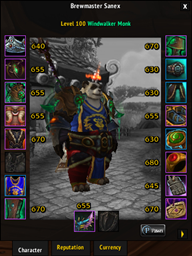
Shows equiped items itemlevel on Paperdoll frame view, nothing more, nothing less. No other features, no bloat, these days the addon can show you missing enchants, gems and upgrades and also supports Inspect frame and has only little bit of fancy stuff (Average itemlevel on InspectFrame is extra fancy).
I know there are 13 of these addons in a dozen, but this is my version. While leveling I wanted a quick and easy way to see what itemslot I had the item with lowest itemlevel equiped so I wrote this small addon without any extra features to keep it simple and light and added features along the way while trying to keep the original vision.
/ilevel ( 0 | 1 | 2 | inside | color | colormode | inspect | enchants [#] | resetenchants )
0 - Only show item levels.
1 - Show item levels and upgrades.
2 - Show item levels, upgrades and enchants and gems.
inside - Change anchoring of the item levels between INSIDE and OUTSIDE of the slot icons.
color - ENABLE/DISABLE coloring.
colormode - Change coloring based on item RARITY and itemlevel DIFFERENCE to averate item level.
inspect - ENABLE/DISABLE showing itemLevels on IspectFrame (Requires /reloadui to take effect).
enchants [#] - ENABLE/DISABLE show missing Enchants for slot number #.
- Ommit # to list slot numbers and their current settings.
resetenchants - Reset "Show missing Enchants for slots" -settings back to defaults.
- NEW v3.0: Complete rewrite of the addon! Should be more accurate on detecting itemlevels and different type of gems and other socketables.
- NEW v2.13: Added option to color the items based on the item's itemlevel difference to your average itemlevel. If item's itemlevel is below average less than 10 levels it will be colored green, 10-19 levels it will be colored orange and 20 or more levels it will be colored red. Also added support for Wrath Classic.
- NEW v2.3: Added option to show tooltips for Enchants and Gems when hovering over the itemlevel text (N.B.: This feature is OFF by default). Also added option to enable/disable the missing enchant warning per itemslot. These are only warnings of missing enchants, the addon will still show all applied enchants for all itemslots like before. By default the addon will show warnings for BfA enchantable itemslots.
- NEW v2.0: Rewrote the addon. The addon should detect all sockets (except Azerite Essences) without hardcoding and the addon should also detect all enchants, but only shows missing enchants for the slots with BfA enchants.
- NEW v1.18: Fixed Offhand Artifacts. Added Average itemlevel text for InspectFrame. Added option to color itemlevel texts with the color of itemrarity instead of default color.
- NEW v1.15: Added option to anchor item levels inside the slot icons. Fixed few bugs and the addon should now update missing texts and socketed gems more often if the data wasn't available right away when PaperDollFrame was first opened.
- NEW v1.13: Fixed the non-persistent setting bug and added support for Inspect-frame.
- NEW v1.7: Added slash command /ilevel to give you control on how much addons shows information.
- NEW v1.5: Added indicators for missing Enchants and empty Gem sockets. Please report to me if you know any missing bonusIDs for sockets in gear.
- NEW v1.3: Now shows also small green arrow next to items with unused itemlevel upgrades. Added this feature just to make my life easier with tracking item level upgrades between different item sets.
At-a-glance numbers
Performance highlights
- Peaked at Hot #3 on Jul 2, 2026.
- Featured on the Hot list across 6 distinct weeks.
- Shipped 3 releases in the last 30 days.
- Averaging 142 new downloads per day over the past week.
Visuals
Screenshots 2
Use real gameplay shots to assess the addon before installing.