Trend Explorer
Recent download momentum
Hourly download deltas for the last 48 hours.
About this addon
What it does
Burning Crusade & WotLK Gas Clouds Database for Gathermate2
This addon only holds data for GatherMate2, you must first download and install Gathermate2
https://www.curseforge.com/wow/addons/gathermate2-classic.
https://www.curseforge.com/wow/addons/gathermate2
Usage instructions:
1. Install GatherMate2
2. Install GatherMate2 Gas Clouds
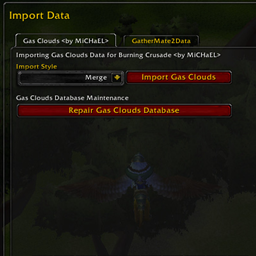
3. Go to Addon options for GatherMate2 (or type /gathermate)
4. Go to the Import option
5. Click on Gas Clouds Tab
5. Choose import style.
7. Press the Import Gas Clouds button.
Additional maintenance:
Gathermate2 for bcc is incorrectly detecting all new gas nodes as Steam Clouds, to fix this issue Gas Clouds Import section includes a button to repair the Gas Clouds Database. You can use this button to assign the correct node type to the new detected gas clouds nodes.
At-a-glance numbers
Performance highlights
- Peaked at Hot #4 on Jul 9, 2026.
- Featured on the Hot list across 6 distinct weeks.
- Shipped 2 releases in the last 30 days.
- Averaging 570 new downloads per day over the past week.