Trend Explorer
Recent download momentum
Hourly download deltas for the last 48 hours.
About this addon
What it does
Event Horizon Infall takes cooldowns and auras of abilities from your default Cooldown Manager and displays them as timeline bars. Every bar shares the same time scale, so you can see when things come back, when they overlap, and how they relate to each other.
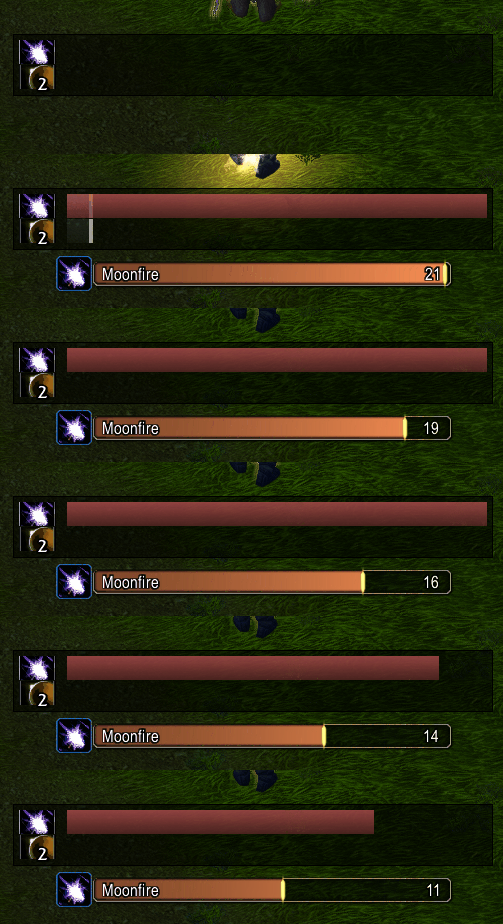
This image shows a moonkin's Moonfire debuff bar configured in both Infall (top) and the default cooldown manager (bottom) as a bar. The difference is that the default Blizzard bar shows 100% to 0% no matter the duration. The Infall frame is configured to show the next 16 seconds on a relative time scale:
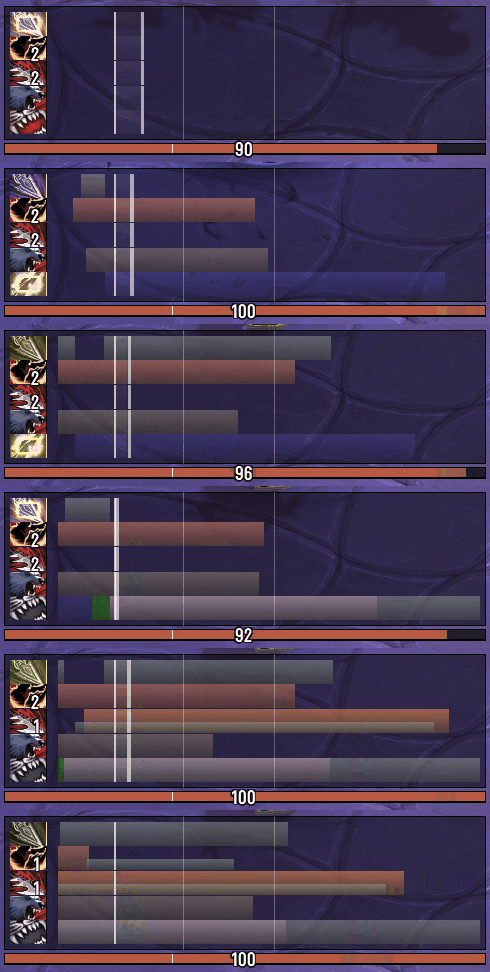
Most Infall setups will be configured to show many rotational cooldown bars, relative to each other.
The white "now" line splits past and future. Bars slide from right to left. If two cooldowns end at the same time, they'll line up. All bars move at the relative time set by the future timescale:
The original is EventHorizon by Brusalk and EventHorizon Continued by Calen. Infall is a rewrite for Midnight.
Some functionality did not make it. Some are still being iterated on.
Current Features
- Reads your Cooldown Manager: bars appear automatically, no spell setup needed
- Settings GUI (
/infall setup): layout, colours, fonts, toggles, profile options in game - De/Buff, cast, and stack pairing: visually pair debuffs, buffs, casts and stacks to cooldown bars
- Transformative spells like Bestial Wrath and Wailing Arrow, etc
- Per spec profiles: settings save and restore when you switch specs
- Charge spell support: spells with multiple charges split into lanes
- Empowered cast stages: Evoker hold to cast abilities show coloured segments per stage
- Past slide history: see what just happened to the left of the now line
- Reactive icons: icon colour changes for usable, out of mana, out of range, on cooldown
- Pandemic indicators: pulse when a buff is in its refresh window
- Spell variant display: shows names for restricted spell buffs like Roll the Bones (or similar)
- GCD and cast overlays: see your global cooldown and current casts
- Font support via LibSharedMedia: picks up fonts from Plater, Details, etc
- Movable and scalable: drag to position, make bigger or smaller
Getting Started
- Install the addon
- Blizzard Cooldown Manager will be enabled by Infall
- Type
/infall setupto configure, or go to Escape -> Options -> AddOns -> EventHorizon Infall - Bars appear!
Commands
/infall setupwill open settings/infall lock//infall unlockwill toggle frame dragging/infall scale xto set UI scale/infall reloadto rebuild bars/infall helpfor full command list
Links
Known Issues
- Past Bar: past bar with 3 charges has the middle lane expire with the bottom lane rather than independently (can be disabled)
At-a-glance numbers
Performance highlights
- Peaked at Hot #4508 on Jul 24, 2026.
- Peaked at Rising #1404 on Jun 29, 2026.
- Featured on the Hot list across 6 distinct weeks.
- Shipped 1 release in the last 30 days.
- Averaging 1 new downloads per day over the past week.
Visuals
Screenshots 6
Use real gameplay shots to assess the addon before installing.