Doom_CooldownPulse

Bags & Inventory 1 more category

A World of Wacraft addon that animates ability icons when they are available to be used after cooldown

WoW 11.2.5 Needs Update

Trend Explorer

Recent download momentum

Estimated downloads/hour over observed intervals in the last 48 hours.

Latest interval +4 /h 1h observed interval · ending Sep 11, 7 AM
Peak estimate +15 /h 1h observed interval · ending Sep 10, 7 PM
Average estimate +5.39 /h Time-weighted · 47.2h covered of 48h

Lines connect interval estimates, not hourly measurements. Unobserved time is not counted as zero or extrapolated to now.

About this addon

What it does

A note on retail support: Due to addon restrictions introduced by Blizzard in the Midnight expansion, this addon cannot be updated to support the retail version of the game. This may change if Blizzard loosens restrictions in the future. Classic versions of the addon are still supported.

What does it do?

Ever wanted to know when a certain ability will come off cooldown, but you're too caught up in a fight to notice? Doom_CooldownPulse is designed to fix that problem! It flashes the icon of the ability in the middle of your screen whenever it becomes usable again.

Great! Now.. how do I set it up?

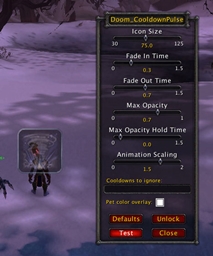
Doom_CooldownPulse requires no initial setup; just install and you're good to go! However, the options frame (which is accessable by typing "/dcp") allows very easy customization. You can change all of the following:

  • Icon size
  • Icon position (press the unlock button)
  • Fade in time
  • Fade out time
  • Max opacity (transparency)
  • Max opacity hold time
  • Animation scaling (how big/small it gets when it flashes)
  • Animation start time before cooldown reset
  • Cooldowns to ignore
  • Overlay color for pet cooldown pulses

It is intended to be very easy to customize, and your changes take effect immediately. You can see how your settings will look by pressing the "Test" button, or reset them to the default settings by pressing the "Defaults" button.

At-a-glance numbers

Performance highlights

  • Peaked at Hot #692 on Sep 11, 2026.
  • Featured on the Hot list across 5 distinct weeks.
  • Shipped 1 release in the last 30 days.
  • Averaging 133 new downloads per day over the past week.

Visuals

Screenshots 2

Use real gameplay shots to assess the addon before installing.

Discover more

Keep exploring

Similar addons you might also want to check out.

Similar in Bags & Inventory

Comparable addons in the same lane.

Titan Panel [Currencies] Multi #5
2.5M downloads

Display 100+ different currencies in Titan Panel!

SpecBisTooltip Spec Bis List Tooltip #11
3.1M downloads

Shows if the item is BIS

Warband Nexus #13
157.2K downloads

All your alts in one window: account-wide item search, Great Vault & raid lockouts, currencies, reputations, professions, gold, mount try counter, collections, and weekly to-do plans. The alt manager built for Midnight warbands.

Simple Item Levels #17
5.0M downloads

Show item levels in the character frame

XLoot #22
5.2M downloads

Core module for Loot and Looting-related UI improvements

Outfitter (Retrofit) #28
703.0K downloads

Outfit/equipment manager with quick swap toolbar and scripting. This is a unified version of Outfitter that will work in all flavors of WoW.

MoveAny (Edit Mode, Windows and Ui) #54
20.4M downloads

Move any Blizzard Ui Element

Decor Vendor: Housing & Decor Emporium #56
4.7M downloads

Your ultimate tool for discovering and organizing WoW housing decor vendors.

Plumber #61
19.1M downloads

Quality-of-life features including Expansion Summary UI, Loot Window, Instance Difficulty Selector and more.

Midnight Cheat Sheet #64
65.7K downloads

Gearing reference tool for the Midnight expansion — item levels, upgrade tracks, crest costs, consumables, enchants, and wishlists.

KeystoneLoot #66
4.5M downloads

Shows the items from the Mythic instances in a compact overview

Can I Mog It? #76
6.9M downloads

Adds tooltips and overlays to items showing if you have learned a transmog appearance.