Trend Explorer
Recent download momentum
Hourly download deltas for the last 48 hours.
Latest hour +0 Jul 26, 2 AM
Peak hour +37 Jul 27, 6 AM
Average +1 per hour
About this addon
What it does
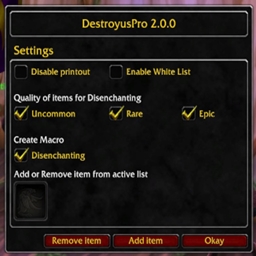
Addon searching items in personal containers which later will be disenchanted. Items which do not meet requirements are omitted from the search. Additional DestroyusPro macro automatically collect all materials from the loot window.
## Quick Start - Install addon in the WoW addons location - Login to the game and open panel using /despro command in chat window - Create macro using panel options - Open /macro panel from chat window and move addon macros to the skill bar
## Macro Type - Disenchanting - "DesProDisenchant": Disenchant items from the selected quality in the settings
## Disenchanting - Skip items which are part of set saved in EquipmentManger - Skip items from unwanted quality - Skip items from the blacklist (default list) - When whitelist is active disenchanting will be performed only on items from this list - Whitelist is activated per character - Blacklist is activated in global scope - ItemID can be added or removed from blacklist/whitelist in addon panel by drag and drop item from inventory - Not all items which can not be disenchant are predefined in default blacklist
## How open addon panel - /despro
## Other information - Be careful during using disenchanting macro - Addon should work with all languages clients - Only English localization is used - All has beed tested in default WoW UI
## Reporting issues and improvements - Issues and improvements should be registered in the GitHub
## Quick Start - Install addon in the WoW addons location - Login to the game and open panel using /despro command in chat window - Create macro using panel options - Open /macro panel from chat window and move addon macros to the skill bar
## Macro Type - Disenchanting - "DesProDisenchant": Disenchant items from the selected quality in the settings
## Disenchanting - Skip items which are part of set saved in EquipmentManger - Skip items from unwanted quality - Skip items from the blacklist (default list) - When whitelist is active disenchanting will be performed only on items from this list - Whitelist is activated per character - Blacklist is activated in global scope - ItemID can be added or removed from blacklist/whitelist in addon panel by drag and drop item from inventory - Not all items which can not be disenchant are predefined in default blacklist
## How open addon panel - /despro
## Other information - Be careful during using disenchanting macro - Addon should work with all languages clients - Only English localization is used - All has beed tested in default WoW UI
## Reporting issues and improvements - Issues and improvements should be registered in the GitHub
At-a-glance numbers
Performance highlights
- Peaked at Hot #1562 on Jul 24, 2026.
- Peaked at Rising #5753 on Jul 24, 2026.
- Featured on the Hot list across 6 distinct weeks.
- Shipped 1 release in the last 30 days.
- Averaging 11 new downloads per day over the past week.
Visuals
Screenshots 1
Use real gameplay shots to assess the addon before installing.