Trend Explorer
Recent download momentum
Hourly download deltas for the last 48 hours.
About this addon
What it does
Click-To-Cast-Tooltip is a World of Warcraft addon that displays a dynamic tooltip showing which spells, macros, or actions you can cast based on your current modifier keys (Shift, Alt, Ctrl) and mouse button.
Features
- Custom tooltip at mouse cursor showing available click-cast bindings
- Blizzard tooltip integration for unit frames
- Clique addon integration: show your Clique click-cast bindings in the tooltip
- Full support for party, raid, boss, arena, and pet frames
- Works with Blizzard, ElvUI, Cell, and other major unit frame addons
- Highly configurable appearance and behavior
Screenshots
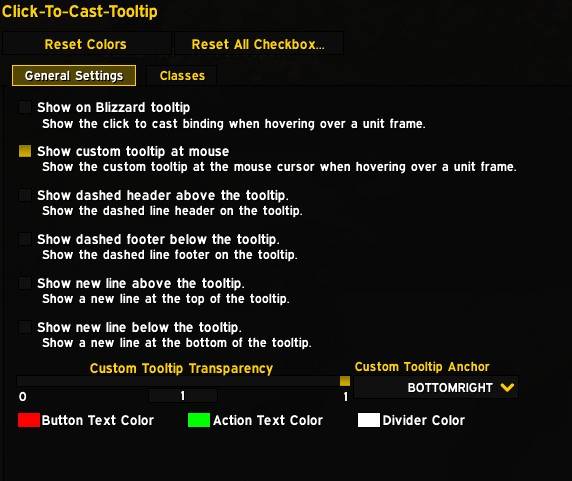
Settings Panel
Access the settings via /ctctt or through Esc → Options → AddOns → Click-To-Cast Tooltip:
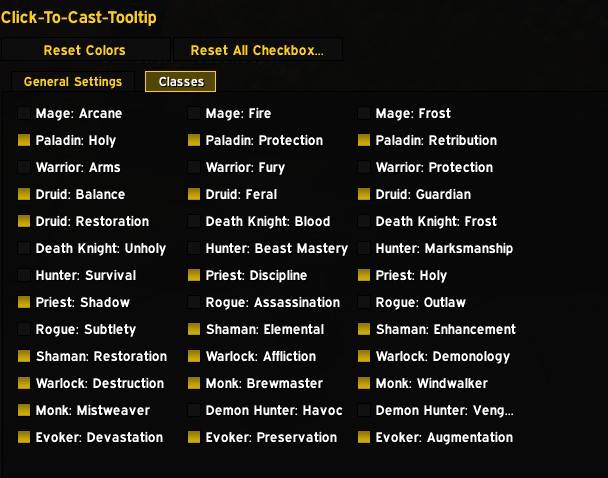
Class Color Settings
Customize colors for buttons and actions:
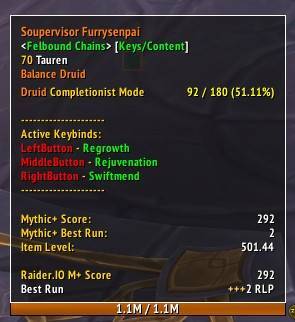
Example Blizzard Tooltip
Blizzard tooltip with all options enabled (shown with ElvUI):
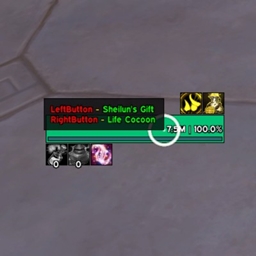
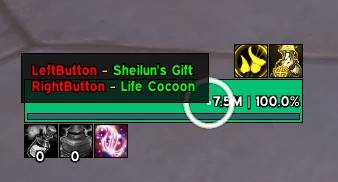
Mouseover Tooltip
Tooltip appears at your mouse cursor when hovering unit frames:
Slash Commands
/ctcttand/clicktocasttooltipOpens the options panel for the addon.
Settings Overview
All settings are available in the options panel. Here’s what you can configure:
Tooltip Appearance
- Show Custom Tooltip: Enable/disable the custom tooltip at your mouse.
- Tooltip Anchor: Set the anchor point for the tooltip (e.g., BOTTOMRIGHT, TOPLEFT).
- Tooltip Transparency: Adjust the transparency of the tooltip.
Blizzard Tooltip Integration
- Show Blizzard Tooltip: Enable/disable extra lines in the Blizzard tooltip.
- Show Header/Footer: Add dashed lines above/below the tooltip for clarity.
- Show New Line Top/Bottom: Add empty lines for spacing.
Colors
- Button Color: Set the color for mouse button names.
- Action Color: Set the color for spell/macro/action names.
- Divider Color: Set the color for header/footer lines.
Spec Toggles
- Spec-Specific Enable/Disable: Enable or disable the tooltip for each specialization.
Supported Unit Frames
- Blizzard: Player, Target, Focus, Pet, Party, Raid, Boss, Arena, and more
- ElvUI: All major unit frames, including party/raid/arena
- Cell: Party, raid, pet, spotlight, quick assist, and more
Clique Addon Support
- If you use the popular Clique addon for click-casting, Click-To-Cast-Tooltip will automatically detect and display your Clique bindings in the tooltip.
- You can choose to show only Clique bindings, only Blizzard bindings, or both (configurable in the settings).
- On first load with Clique installed, you'll be prompted to disable Blizzard bindings for a cleaner experience (one-time prompt).
How It Works
When you hover over a unit frame, the addon scans your click-cast bindings and displays a tooltip showing which actions are available for the current modifier keys and mouse button. The tooltip updates dynamically as you press or release modifier keys.
Feedback & Support
If you encounter issues or have feature requests, please open an issue on GitHub.
At-a-glance numbers
Performance highlights
- Peaked at Hot #987 on Jul 4, 2026.
- Peaked at Rising #439 on Jul 4, 2026.
- Featured on the Hot list across 6 distinct weeks.
- Shipped 2 releases in the last 30 days.
- Averaging 18 new downloads per day over the past week.
Visuals
Screenshots 7
Use real gameplay shots to assess the addon before installing.