Trend Explorer
Recent download momentum
Hourly download deltas for the last 48 hours.
About this addon
What it does
About
A fan update of cargBags_Nivaya for Mists of Pandaria.
Thanks to all addon coders who contributed to this update and Luzzifus for his original AddOn and support.
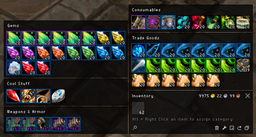
This is an inventory addon featuring item filters, new items, support for item sets, empty bagspace compression and alot more.
It is a layout for cargBags. However, cargBags 2.x is included, so you don't need to download it separately.
Features
- You can freely move the main inventory window (and the bank window), all the other containers move as you move that one.
- Containers for Consumables, Quest Items, Armor/Weapons, Trade Goods and Junk.
- Container for Blizzards Equipment Manager.
- Container for new Items (items you recently obtained).
- Empty containers are hidden, without just leaving an emtpy space.
- Easy-to-use dropdown menu to move items between containers (ctrl + alt + right-click an item).
- Option to compress empty bagspace to a single slot.
- Restack button to stack all items in your bags.
- Sell Junk (toggle on/off) to automatically vendor all grey items.
- Item sorting by rarity and item ID, so that identical items or stacks will be grouped together.
- Clicking on the "Bags" Button allows you to switch bags and to buy new bag slots (bank).
- The "New Items" Container
When you login using this layout the first time, all the items in your inventory will be marked as "new".
This is because new items will exclusively be reset when you click the "Reset New" button, which should be your first action in order to have the items filtered to their corresponding category.
The advantage of this behaviour is that items marked as new "survive" disconnects, logouts and reloading the UI.
Of course, you can toggle this filter off via the slash command (/cbniv).
The Cool Stuff Container
Initially a filter on its own, it is now simply a container for items you want to have in a special place. You can activate it by moving one or more items to it via the context menu (ctrl + alt + right-click).
Custom Containers
You can also add your very own custom containers, which behave just like the "Cool Stuff" container. By default, their priority is higher than the "New Items" container, so items assigned to one of these will never be marked as new. This priority can be lowered.
Add a container with /cbniv addbag name, remove one with /cbniv delbag name, list all existing with /cbniv listbags etc. Type /cbniv for a full list of available commands.
Configuration
Via the slash command /cbniv you can adjust the following settings:
- Enable/disable some of the filters (new items, trade goods, armor/weapons and junk)
- Adjust the overall scale.
- Toggle bank background color between black and blue.
- Toggle bank filtering.
- Toggle empty bagspace compression.
- Toggle item sorting.
By editing config.lua you can adjust the following settings:
- Item size
- Number of columns
- Fonts
- Color of bag frames
At-a-glance numbers
Performance highlights
- Peaked at Hot #548 on Jun 24, 2026.
- Featured on the Hot list across 6 distinct weeks.
- Shipped 1 release in the last 30 days.
- Averaging 6 new downloads per day over the past week.
Visuals
Screenshots 1
Use real gameplay shots to assess the addon before installing.