
Trend Explorer
Recent download momentum
Hourly download deltas for the last 48 hours.
About this addon
What it does
Requires BetterBags.
BetterBags AIO is a plugin for BetterBags that automatically organizes your items into categories for every expansion and world event in World of Warcraft. Consumables, profession materials, reputation items, collectibles, and more - all in a single addon.
Download BetterBags at Cidan/BetterBags or CurseForge.
Game Version Support
- Retail: Supported
- Classic Era (all versions): Supported
Supported Expansions
- Midnight
- The War Within
- Dragonflight
- Shadowlands
- Battle for Azeroth
- Legion
- Warlords of Draenor
- Mists of Pandaria
- Cataclysm
- Wrath of the Lich King
- The Burning Crusade
- Classic
Supported World Events
- Legion Remix
- Darkmoon Faire
- Timewalking
- Midsummer Fire Festival
- Noblegarden
- Brewfest
- Hallow's End
- Love is in the Air
- Lunar Festival
- Feast of Winter Veil
- Secrets of Azeroth
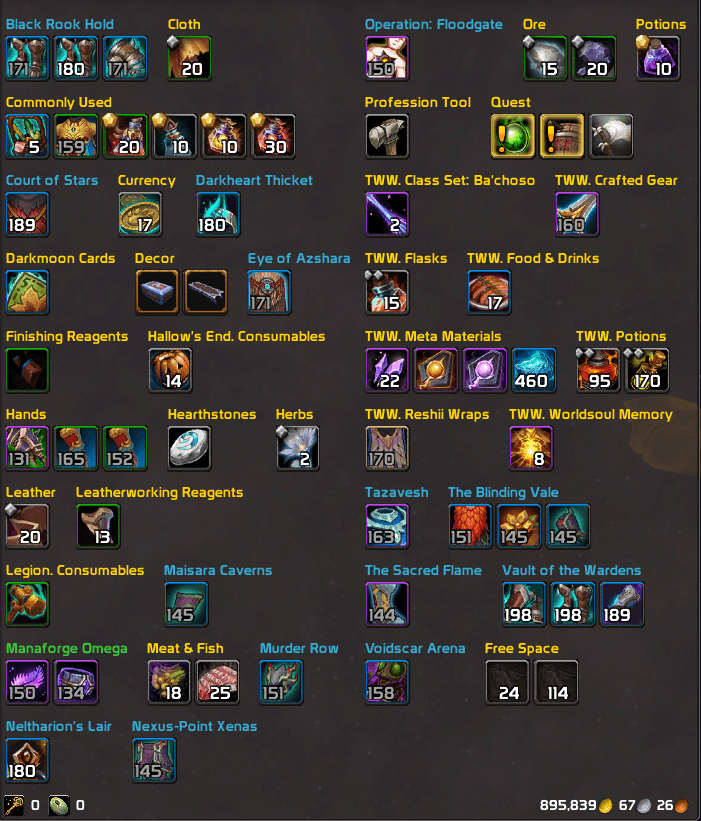
Features
- Per-character profiles - category settings and custom names are saved per profile. Switch characters or specs and keep separate layouts. Profiles can be created, copied, renamed, and deleted from the Profiles tab.
- Category Editor - move items between existing ones. Build a layout that fits your playstyle.
- Category renaming - click the pencil icon next to any category to give it a custom name and color. Type a hex code and see a live color preview. Leave the name blank to revert to default.
- Rename from your bag - Alt+Left-click any category header in your bags to instantly open the rename dialog for that category.
- Search tab - find any category across all expansions instantly. Filter by item name, item ID, or item link. Toggle or rename categories directly from search results.
- Pin & Sort - pin categories to the top of your bags in a custom order. Set per-category item sort rules or apply a global sort preset across all categories.
- Lite Mode - disables all extra features for a minimal experience. Just expansion toggles and nothing else. Requires a UI reload.
- Section Collapse - collapse and expand category sections in your bags. Temporary workaround until BetterBags adds native support.
- Abbreviations - shorten long event prefixes. Darkmoon Faire becomes DMF, Hallow's End becomes HE, Winter Veil becomes WV.
- Item ID in tooltip - optional toggle in Settings to show the item ID on any bag or equipped item tooltip. Off by default.
- Bulk actions per expansion - enable or disable all categories in an expansion at once. A live count shows how many are currently active.
- Quick access - left-click your BetterBags bag icon to find AIO Categories in the menu.
- Factory Reset - re-enables all categories, clears custom renames, resets all settings, and reloads the UI.
Filter Categories
Every expansion includes a tailored set of categories. Common ones across all expansions:
- Materials - crafting reagents, ore, herbs, cloth, leather, and meta materials
- Consumables - flasks, potions, food, augment runes, and utility items
- Crafted Items - player-crafted gear and embellishments
- Professions - reagents, recipes, knowledge items, finishing reagents, and profession tools
- Reputation - tokens, contracts, and faction reward items
- Dungeons - gear and rewards sorted by dungeon
- Raids - gear and tokens sorted by raid
- Zones - gear and items specific to expansion zones (e.g. Hallowfall, Ringing Deeps, Forbidden Reach)
- PvP - PvP gear, honor items, and arena rewards
- Mythic+ - keys, crests, and seasonal dungeon rewards
- Mounts - expansion-specific rideable mounts
- Pets - battle pets, cages, and pet supplies
- Hearthstones - hearthstones and teleportation items
- Heirlooms - heirloom gear and upgrade tokens
Expansion-specific categories also include:
- Housing (Midnight) - decor, services, and dyes
- Delves (The War Within) - curios, gear, and keys
- Covenants (Shadowlands) - covenant gear, abilities, and cosmetics
- Legendaries (Shadowlands, Legion, Battle for Azeroth)
- Garrison (Warlords of Draenor) - followers, resources, and mission items
- Ancient Mana / Artifact Items (Legion)
- Heart of Azeroth (Battle for Azeroth)
Feedback & Requests - Found missing or miscategorized items, bugs, or have suggestions? Leave a comment or join the Discord!
Other Plugins by M05final
- BetterBags - Midnight
- BetterBags - The War Within
- BetterBags - Dragonflight
- BetterBags - Shadowlands
- BetterBags - Battle for Azeroth
- BetterBags - Legion
- BetterBags - Warlords of Draenor
- BetterBags - Mists of Pandaria
- BetterBags - Cataclysm
- BetterBags - Wrath of the Lich King
- BetterBags - Burning Crusade
- BetterBags - Classic
At-a-glance numbers
Performance highlights
- Peaked at Hot #743 on Jul 19, 2026.
- Peaked at Rising #809 on Jul 4, 2026.
- Featured on the Hot list across 6 distinct weeks.
- Shipped 1 release in the last 30 days.
- Averaging 24 new downloads per day over the past week.
Visuals
Screenshots 5
Use real gameplay shots to assess the addon before installing.




