Trend Explorer
Recent download momentum
Hourly download deltas for the last 48 hours.
About this addon
What it does
This addon is no longer actively maintained. I will update the TOC but no support will be provided. Please make your own fork if needed.
Bag Customizer for ElvUI
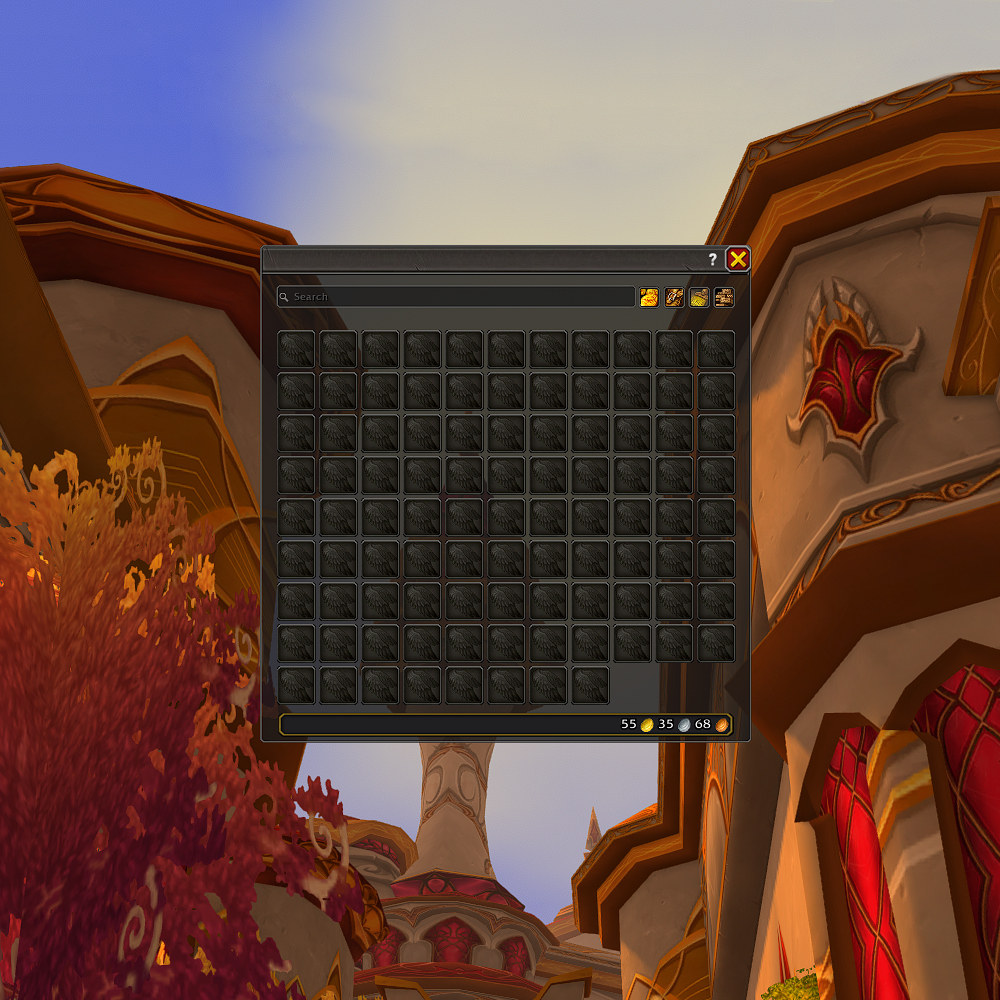
Make your ElvUI bags look like the default WoW bags - or create your own awesome custom designs!
About
Do you love the ElvUI bags functionality but would prefer the bags to look more like the default ones, or just be more customizable overall?
This addon is just for you!
Enjoy the default blizz-like theme, the rounded ElvUI theme or the Northrend theme, edit them, or create your own!
Here's what you can expect: a masque-like feature that allows reshaping the inventory slots and adding borders to them, being able to adjust the transparency of the bag window and add textures/background images, move the search bar and buttons, reposition the gold text and more!
You can disable or enable each feature of the addon independently of each other.
Features
Bag appearance features:
- Window Body: Customize the Inventory background color, Top Texture, UI Texture (none by default) and Art Texture (none by default)
- Layout: Customize the bag Close Button Texture, Close Button Position, Extra Bag Height, Search Bar and buttons settings
- Item Slots: Change the look of the inventory slots and their borders
- Gold & Currencies: Style and position gold display and currency frame
- Borders: Add borders to various elements, disable the default ElvUI Bag borders
Utility features:
- Feature toggling: Each feature can be toggled on/off independently
- Preset Themes: The addon comes with 3 presets (possibly more in the future), with "Blizzard Modern" preset enabled by default
- Theme Manager: You can save, load, delete, export or import themes
undefined
Installation
- Download the latest release package (
.zipfile) - Extract the
BagCustomizer_for_ElvUIfolder into yourWorld of Warcraft\_retail_\Interface\AddOns\directory - Restart World of Warcraft or Reload your UI (
/reload) - Ensure both ElvUI and Bag Customizer for ElvUI are enabled in the AddOns list
Getting Started
- Try the Default Theme: It should already be applied to your bags automatically
- Explore More Themes: Type /bcfe in chat and check out the "Themes and Profiles" tab for more pre-made designs
- Customize Everything: Use the "Advanced" tab to fine-tune specific elements
- Save Your Creations: Once you're happy with your settings, save them as a theme
undefined
Good to Know
- To avoid needing to reload, have your bags open when applying themes or changing settings
- Settings are stored in your ElvUI Profile - export them if you want to use across different profiles
- The Bank and Warbank are not supported
- Each feature can be independently enabled/disabled
Recommended ElvUI Settings
For a more authentic default-bag look, consider these ElvUI settings:
- Currency format: Icons only or Icons and Text(short)
- Gold format: Blizzard Style
- Show Coins checkbox Enabled
- Bags Button size 39~44
- Bags Button spacing ~4
- Item Count, Info, Level fonts: Arial Narrow or Friz Quadrata TT
undefined
Custom Files
Want to use your own textures? Add them to the appropriate folder in: \Interface\AddOns\BagCustomizer_for_ElvUI\Media\
Each texture type has specific folder locations and recommended dimensions - check the addon's "Advanced" tab for full details.
Requirements
- ElvUI
undefined
Known issues:
- When switching ElvUI profiles, a reload will be needed to ensure the customizer works properly
Need Help?
If you have questions or run into issues, post in the Curseforge comments. For bug reports, please enable the relevant debugging option in the Debug tab first and provide relevant logs.
undefined
Disclaimer
This addon contains modified UI textures from World of Warcraft (owned by Blizzard Entertainment) and ElvUI. These assets are used with the purpose of creating visual consistency with the original interfaces and remain the intellectual property of their respective owners. This addon is not affiliated with or endorsed by Blizzard Entertainment or the ElvUI team.
World of Warcraft™ and Blizzard Entertainment® are trademarks or registered trademarks of Blizzard Entertainment, Inc. in the U.S. and/or other countries.
License
This project is licensed under the GNU General Public License v3.0
At-a-glance numbers
Performance highlights
- Peaked at Hot #4416 on Jul 3, 2026.
- Peaked at Rising #5173 on Jun 27, 2026.
- Featured on the Hot list across 6 distinct weeks.
- Shipped 1 release in the last 30 days.
- Averaging 0 new downloads per day over the past week.
Visuals
Screenshots 14
Use real gameplay shots to assess the addon before installing.