Az Gather Hud

Herbalism 4 more categories

Hud for gathering. /gh, /agh, /azgatherhud, /gatherhud for bar to appear for options

WoW 11.2.7 Needs Update

Trend Explorer

Recent download momentum

Estimated downloads/hour over observed intervals in the last 48 hours.

Latest interval 0 /h 1h observed interval · ending Sep 11, 3 PM
Peak estimate +1.01 /h 0.989h observed interval · ending Sep 10, 3 AM
Average estimate +0.0211 /h Time-weighted · 47.4h covered of 48h

Lines connect interval estimates, not hourly measurements. Unobserved time is not counted as zero or extrapolated to now.

About this addon

What it does

AZ Gather HUD

NOTE--Must download an addon to Hide addon buttons. I use HidingBar##

Note--if conflicting with other addons-->Turn off HUD and /reload in game chat, then Turn on HUD

Note--Questie and other addons that put icons on minimap will be invisible but will still interact with mouse. Go to Questie minimap options and turn off icons. 

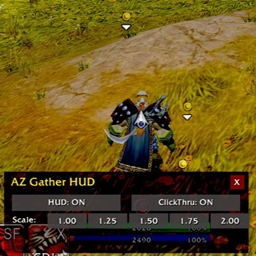
AZ Gather HUD turns your minimap into a transparent, rotatable HUD overlay so you can “see through” the map and focus on blips only (tracking dots). It’s built for resource hunting—herbs, ore, chests, etc.—and it also shows party/raid member positions around you in HUD view (their standard minimap dots), which makes fanning out and converging on nodes way easier.

What it does (fast)

  • HUD mode: moves the minimap to screen center, sets alpha = 0 (you literally see the world behind it), and rotates with your facing for that classic HUD feel.

  • Blip-only: because the map is fully transparent, tracking blips (nodes, mail, vendors, etc.) and party/raid dots float over the world like AR markers.

  • Click-through toggle: let mouse clicks pass through the HUD (no accidental map grabs), or disable click-through to drag the HUD anywhere.

  • Scale presets on the on-screen bar: 1.00 / 1.25 / 1.50 / 1.75 / 2.00 (HUD only; your normal minimap scale is restored when HUD is off).

  • Keeps your UI tidy: clock, mail, and other stay anchored at the corner; they don’t come with the HUD.

  • Safe restore: leaving HUD mode restores your original minimap placement, zoom, mask (round), scale, alpha, and rotation setting.

Slash commands

All four open the same handler; no args opens the HUD control bar:

  • /azgatherhud

  • /gatherhud

  • /agh

  • /gh

Supported arguments:

  • on — Enable HUD mode.

  • off — Disable HUD and restore the normal minimap.

  • status — Print current settings (enabled, size, shape, clickthru, scale).

  • reset — Hard restore the minimap (use if you’ve really mangled positions).

  • size <pixels> — Set HUD map size (e.g., /agh size 250).

  • square | round — Change HUD minimap mask.

  • clickthru on|off — Pass clicks through the HUD (on) or allow dragging (off).

  • place <POINT> <x> <y> — Re-anchor HUD (e.g., /gh place CENTER 0 -120).

  • scale <number> — Set HUD minimap scale (e.g., /agh scale 1.25).

  • ui show | ui reset — Show or reset the on-screen HUD control bar.

  • Extra convenience toggle: /azgbar — Show/hide the HUD bar window.

Typical flow

  1. Type /agh → HUD bar appears.

  2. Click HUD: ON → the transparent, rotating HUD pops in.

  3. Set ClickThru to ON if you want world clicks to pass through; set it OFF to drag the HUD to your exact spot.

  4. Tap a Scale preset (1.25 or 1.5 are sweet spots).

  5. Go track herbs/ore/chests. Your tracking blips and party dots float over the world so you can beeline to resources and coordinate with your group.

At-a-glance numbers

Performance highlights

  • Peaked at Hot #5143 on Aug 12, 2026.
  • Peaked at Rising #4907 on Aug 12, 2026.
  • Featured on the Hot list across 5 distinct weeks.
  • Shipped 1 release in the last 30 days.
  • Averaging 1 new downloads per day over the past week.

Visuals

Screenshots 1

Use real gameplay shots to assess the addon before installing.

Discover more

Keep exploring

Similar addons you might also want to check out.

More by user_neqi7im8zdat59im

Same creator, different utilities.

Similar in Herbalism

Comparable addons in the same lane.

GatherMate2 #183
35.0M downloads

Collects Herbs, Mines, Gas Clouds, Archaeology, Treasure and Fishing locations and adds them to the worldmap and minimap

FarmHud #211
4.9M downloads

Turns your minimap into a hud for gathering resources!

WoWGatheringNodes #904
535.7K downloads

Retail & Classic Node Database and custom object injector for Gathermate2, Carbonite

Grind Tracker #1179 #1340
10.8K downloads

A lightweight session tracker for grinders and gatherers. Tracks kills, XP, coin, and item loot value in real-time using Auctionator pricing. Remove mispriced items from the loot log with instant recalculation. Toggle any stat on or off to suit your style.

GatherSlave #1258 #412
1.8K downloads

All-in-one gathering tracker addon, showing your tools, buffs and performance.

PathMaker #1296 #686
3.5K downloads

PathMaker – Generate or create your own farming routes with or without a clean minimap UI.

Track Resources #1545
204.7K downloads

Tracks mining and herb resource location points

Night's Farmtracker #1666 #285
819 downloads

Tracks items looted during farming sessions and shows their vendor and auction house value in real time.

Skill Helper #1761
213.9K downloads

Addon to allow quick viewing of Profession Skill Bars, Access to quick use Skill Buttons,

Come & Get It // Herb, Ore, and Treasure Chest Location Announcer #2210 #4168
43.7K downloads

Found an herb you can't pick, a mineral vein you can't mine, or a locked treasure chest with no Rogue in sight? Right-click it, and Come & Get It creates a message you can use to share or broadcast the coordinates. Being a hero has never been so easy.

MidnightGather #2258 #326
1.0K downloads

Auto-records herb & ore nodes and builds efficient farming routes, with a return-to-route arrow. Lightweight, zero dependencies, 6 languages.

FarmMap #2299 #1360
6.7K downloads

FarmMap is a gathering addon that automatically records herb, ore, fish, and wood node locations on your minimap and world map as you harvest them.