Trend Explorer
Recent download momentum
Estimated downloads/hour over observed intervals in the last 48 hours.
Latest interval +2.99 /h 1h observed interval · ending Sep 12, 2 PM
Peak estimate +19.9 /h 1h observed interval · ending Sep 11, 3 PM
Average estimate +3.43 /h Time-weighted · 47.2h covered of 48h
Lines connect interval estimates, not hourly measurements. Unobserved time is not counted as zero or extrapolated to now.
About this addon
What it does
asDotFilter (Midnight)
asDotFilter (한밤)
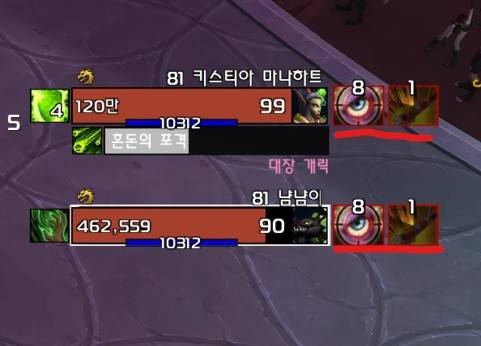
Debuff tracker for boss and focus
Main Features
- Track Player-Cast Debuffs : Show debuffs which shows on namplates + Debuff list
- Debuff Refresh Indicator: Displays a white border when the debuff timer falls below 30% (Pandemic window), indicating it's time to refresh.
- Supports WoW's Default Boss Frames/Focus Frames
- Supports asUnitFrame
Configuration
- You can change options by navigating to
ESC>Options>AddOns>asDotFilter. - Require
/reloadafter configuration change - The maximum number of debuffs to display (Default: 3).
- The time threshold at which the remaining cooldown begins displaying in 0.1-second increments (Default: 3 seconds).
- Show nameplates' debuff only. (Default: On).
- Hide bloodlust debuffs (Default: On).
Debuff Display Options
- Debuff List Only: Displays only debuffs added to the Debuff List (editing required).
- Nameplate Debuffs + Debuff List (Default): Adds the Debuff List to standard nameplate debuffs.
- Show All My Debuffs: Displays all remaining debuffs in addition to standard nameplate debuffs.
asDotFilter (한밤)
보스/주시 디버프를 추적
주요 기능
- 플레이어 시전 Debuff 추적 : 기본 이름표 표시 디버프 + 디버프 목록
- Debuff 리필 시점 알림 : 30% 시간이 남아 디버프 리필이 필요하면 테두리를 하얀색으로 표시
- 와우 기본 보스 프레임/주시 프레임 지원
- asUnitFrame 지원
사용자 설정
ESC>설정>애드온탭에서asDotFilter를 찾아 옵션을 변경할 수 있습니다.- 설정 변경 후
/reload필요 - 최대 표시 디버프 개수. (기본 3개)
- 남은 쿨을 0.1초 단위로 보여줄 최소 시간 (기본 3초)
- 블러드 디버프는 숨김 (기본 On)
디버프 표시 방식 조정
- 디버프 목록만 : 디버프 목록에 추가된 Debuff 만 표시, 목록 편집 필요
- 이름표 디버프 + 디버프 목록(기본) : 이름표 표시 디버프에 디버프 목록 추가
- 내 디버프 모두 : 이름표 표시 디버프에 나머지 디버프 모두 표시
At-a-glance numbers
Performance highlights
- Peaked at Hot #217 on Sep 12, 2026.
- Peaked at Rising #1091 on Aug 25, 2026.
- Featured on the Hot list across 5 distinct weeks.
- Shipped 4 releases in the last 30 days.
- Averaging 28 new downloads per day over the past week.
Visuals
Screenshots 1
Use real gameplay shots to assess the addon before installing.