Trend Explorer
Recent download momentum
Hourly download deltas for the last 48 hours.
About this addon
What it does
Displays icons for ready spell.
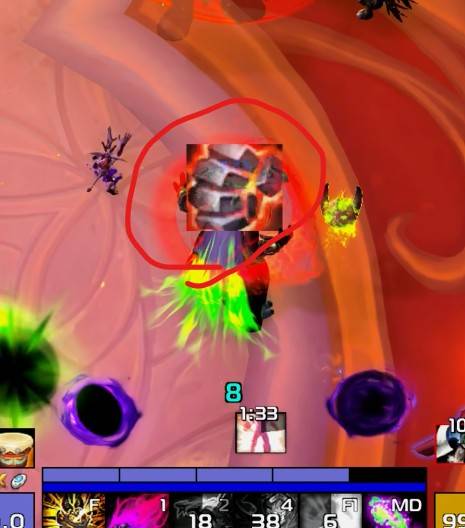
Displays cooldowns for trinkets, racial abilities, Healthstones, and potions.
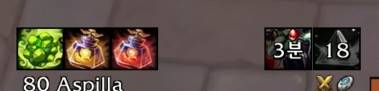
Key Features
- Skill, Trinket, Potion, and Racial Ability Availability Alerts: Displays an alert in the center of the screen when a registered skill on
cooldown managerandasPowerBar, an equipped trinket, a primary combat/survival potion, or a racial ability becomes available for use. - This feature utilizes updated APIs implemented after the Midnight expansion; consequently, skills, which have the Global Cooldown (GCD), may experience slight notification delays.
- Trinket Cooldown Display (Right): Displays cooldowns for usable trinkets when equipped.
- Racial Ability Cooldown Display (Right)
- Combat Potion Cooldown Display (Left): Displays the cooldown for major combat potions.
- Survival Potion Cooldown Display (Left): Displays the cooldown for major survival potions.
- Healthstone Cooldown/Count Display (Left): Only displayed when a Healthstone is in your inventory.
- Skill Cooldown Tracking (Bottom of Target Frame): Designed to track specific skills that are not shown in the
Cooldown Manager. (No skills registered by default; defensive or utility skills can be added.)
Configuration
Accessible via
ESC>Options>AddOns>asCooldownPulse.Icon size for skill ready alert (Default: 60, 0 for off).
Adjusts transparency when out of combat (Default: On).
Toggle display of trinket/racial cooldowns (Default: On).
Icon size for trinket/racial cooldowns (Default: 28).
Toggle display of potion/Healthstone cooldowns (Default: On).
Icon size for potion/Healthstone cooldowns (Default: 28).
Toggle display of skill cooldown tracking (Default: On).
Icon size for skill cooldown tracking (Default: 28).
The time threshold at which the remaining cooldown begins displaying in 0.1-second increments (Default: 3 seconds).
Ready alert for asPowerBar spell (Default: On).
A
/reloadis required after changing sizes.You can register skills for cooldown tracking via
ESC>Options>AddOns>asCooldownPulse>Spell List.To find the
Spell ID, using an additional addon like ID Tip is recommended.
- Repositioning: Enter the
/asconfigcommand in the chat window. - Reset Position: Enter the
/asclearcommand in the chat window to reset to default settings.
Contact Information
- Korean Users: Visit the Inven asMOD Forum.
- English Users: Visit the asMOD YouTube Channel or GitHub.
asCooldownPulse (한밤)
준비된 스킬 아이콘으로 알림
장신구, 종특, 생석, 물약 쿨 표시
주요 기능
- 스킬, 장신구, 물약, 종특, 사용가능 알림:
재사용 대기시간 관리자또는asPowerBar에 등록된 스킬, 착용중인 장신구, 전투/생존 대표 물약, 종특 사용가능시 화면 중앙에 알림 - 한밤 이후 변경된 API 를 사용한 기능으로 글쿨이 있는 스킬의 경우 늦게 알림이 될 수 있습니다.
- 장신구 쿨 표시(우측): 사용가능 장신구 착용시 장신구 쿨 표시.
- 종특 쿨 표시(우측)
- 전투 물약 쿨 표시(좌측) : 대표 물약 쿨만 표시
- 생존 물약 쿨 표시(좌측) : 대표 물약 쿨만 표시
- 생석 쿨/사용 가능 개수 표시(좌측) : 생석을 지니고 있을때만 표시
- 스킬 쿨 추적 (타겟 프레임 하단) :
재사용 대기 관리자에 표시 안되는 스킬을 추적하기 위한 설정, (등록 스킬 없음 생존기등 추가 가능)
설정
ESC>설정>애드온>asCooldownPulse에서 설정 가능스킬 사용가능 알림 아이콘 크기 (기본 60, 0 이면 기능 끄기)
비전투시 투명도 변경 (Default On)
장신구/종특 쿨 표시 여부 (Default On)
장신구/종특 쿨 사이즈 (Default 28)
물약/생석 쿨 표시 여부 (Default On)
물약/생석 쿨 사이즈 (Default 28)
스킬 쿨 추적 표시 여부 (Default On)
스킬 쿨 추적 사이즈 (Default 28)
남은 쿨을 0.1초 단위로 보여줄 최소 시간 (기본 3초)
asPowerBar 등록 스킬을 알림 (기본 On)
크기 변경후
/reload필요ESC>설정>애드온>asCooldownPulse>Spell List에서 쿨 추적할 스킬 등록 가능Spell ID확인이 필요하여 ID Tip등 추가 애드온 사용
- 위치 이동 :
/asConfig명령어 채팅창에 입력 - 위치 초기화 :
/asClear명령어 채팅창에 입력, 기본 설정으로 초기화
문의처
한글 유저:인벤 asMOD 포럼방문 (https://www.inven.co.kr/board/wow/5288)영문 유저:Youtube asMOD 채널방문 (https://www.youtube.com/@asmod-wow),Github방문 (https://github.com/aspilla/asMOD/)
At-a-glance numbers
Performance highlights
- Peaked at Hot #187 on Jul 1, 2026.
- Peaked at Rising #633 on Jul 2, 2026.
- Featured on the Hot list across 6 distinct weeks.
- Shipped 4 releases in the last 30 days.
- Averaging 17 new downloads per day over the past week.
Visuals
Screenshots 2
Use real gameplay shots to assess the addon before installing.