Trend Explorer
Recent download momentum
Estimated downloads/hour over observed intervals in the last 48 hours.
Latest interval 0 /h 1h observed interval · ending Sep 12, 2 PM
Peak estimate +1.99 /h 1h observed interval · ending Sep 11, 1 PM
Average estimate +0.188 /h Time-weighted · 48h covered of 48h
Lines connect interval estimates, not hourly measurements. Unobserved time is not counted as zero or extrapolated to now.
About this addon
What it does
asCombatInfo (Midnight)
asCombatInfo (한밤)
Enhances the Cooldown Manager.
Key Features
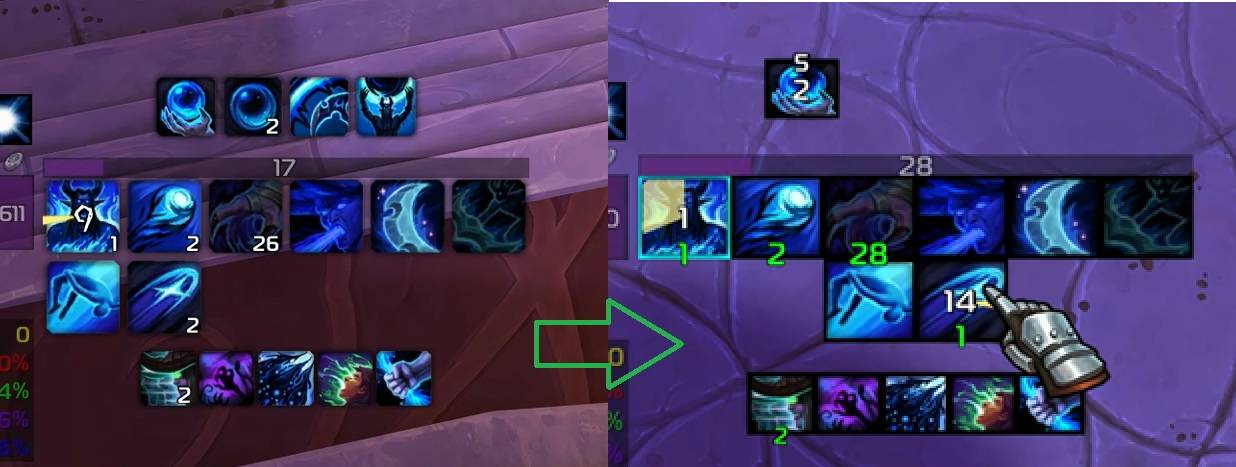
- Icon/Border Shape Modification * Charge Count Repositioning: Moved to the bottom and color changed to green.
- Hotkey Display: If duplicate skills are registered (e.g., Stances or Druid forms), the skill in the lower-numbered slot takes priority.
- Center Alignment for 2-Row Icons
- Font Replacement: Changes the font to the default WoW font.
- Buff/Debuff Borders: Adds a blue border during active buffs/debuffs.
- Buff Bar Skinning: Modifies the appearance of buff bars and displays them in class-specific colors.
- Combat Assistance Skill Highlighting

- Buff Bar Alignment (Top/Bottom) Top alignment has higher priority.
- Recommended for use with
asPowerBar.
Configuration
Adjustable via ESC > Options > AddOns > asCombatInfo
Common Settings
Transparency change out of combat(Default: On)Display hotkey(Default: On)Alert assisted spell(Default: Off)
Bar Settings
Change buff bar(Default: On)Buff bar class color(Default: On)Top aligned bar(Default: Off)Bottom aligned bar(Default: Off)Hide bar name(Default: Off)
Buff Settings
Aligned buff(Default: Off)Border width(Default: 2)Icon size rate(Default: 8, the height is 80% of the width)Milliseconds threshold (0.1s cooldown increments)(Default: 3s)
Spell Settings
Border width(Default: 2)Icon size rate(Default: 9, the height is 90% of the width)Milliseconds threshold (0.1s cooldown increments)(Default: 3s)
Contact Information
- Korean Users: Visit the Inven asMOD Forum.
- English Users: Visit the asMOD YouTube Channel or GitHub.
asCombatInfo (한밤)
쿨다운 메니저를 강화
주요 기능
- 아이콘/테두리 모양 변경
- 충전 횟수 하단 이동 및 녹색 변경
- 단축키 표시 : 태세/드루이드 폼 관련 같은 스킬이 중복해서 등록된 경우 Slot 번호가 작은 단축키 기준으로 단축키 표시
- 2열 아이콘 가운데 정렬
- 폰트를 와우 기본 폰트로 변경
- 강화/약화 버프시 파란색 테두리 추가
- 버프바 외형을 변경하고 직업 색상으로 표시
- 전투보조기능 스킬 강조
- 버프바 정렬 (위/아래) 위 정렬이 우선순위 높음
asPowerBar와 같이 사용하는 것을 추천
설정
esc >> 설정 >> 애드온 >> asCombatInfo 에서 설정 가능
공통 설정
비전투 시 투명도 변경(기본 On)단축키 표시 여부(기본 On)지원 스킬 알림(기본 Off)
바 설정
버프 바 변경(기본 On)버프 바 직업 색상(기본 On)위로 정렬 바(기본 Off)아래로 정렬 바(기본 Off)바 이름 숨기기(기본 Off)
버프 설정
버프 정렬(기본 Off)테두리 두께(기본 2)아이콘 크기 비율(기본 8, 높이가 가로길이의 80%)남은 쿨 소수점 최소 시간(기본 3초)
스킬 설정
테두리 두께(기본 2)아이콘 크기 비율(기본 9, 높이가 가로길이의 90%)남은 쿨 소수점 최소 시간(기본 3초)
문의처
한글 유저:인벤 asMOD 포럼방문 (https://www.inven.co.kr/board/wow/5288)영문 유저:Youtube asMOD 채널방문 (https://www.youtube.com/@asmod-wow),Github방문 (https://github.com/aspilla/asMOD/)
At-a-glance numbers
Performance highlights
- Peaked at Hot #808 on Aug 13, 2026.
- Peaked at Rising #1903 on Aug 12, 2026.
- Featured on the Hot list across 5 distinct weeks.
- Shipped 1 release in the last 30 days.
- Averaging 4 new downloads per day over the past week.
Visuals
Screenshots 1
Use real gameplay shots to assess the addon before installing.