Trend Explorer
Recent download momentum
Hourly download deltas for the last 48 hours.
About this addon
What it does
Database of Russian comments for the Wolf Hat addon.
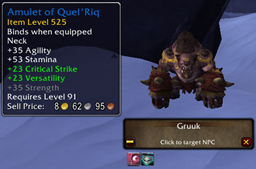
Wolf Hat is a real helper for all adventurers in Azeroth! It provides an extensive database of comments about items, achievements, and mobs, allowing players to easily find the information they need. To access comments, simply click Ctrl+Right mouse button on the item you are interested in.
Besides,
The addon supports many languages, and to use them you need to download the corresponding language bases. After installing the language base, a tab with comments in the selected language will be automatically added to the main addon. This makes the game more convenient and exciting,
because now you can receive tips and tricks from other players in your native language!
Main features of the addon:
- User-friendly interface: To receive comments about an item of interest, just right-click on it while holding down the Control key. This allows you to quickly and easily access information without having to go to the browser.
- Multilingual support: The addon supports databases in different languages, which can be downloaded separately. This makes it accessible to the international community of players.
- Automatic integration: When installing a language base, a tab with comments in the appropriate language is automatically added to the main addon.
This makes it easy to switch between languages and allows users to easily find information in their preferred language.
- Helpful Comments: The database contains a variety of comments from other players, including tips on using items, strategies for achieving goals, and descriptions of mob locations.
How to install:
1. Download the main addon [Wolf Hat] and install it in the AddOns folder in the World of Warcraft directory.
2. Download the required language databases and install them in the AddOns folder in the World of Warcraft directory to add tabs with comments in the desired languages.
3. Restart the game and the addon will be ready to use.
Advantages:
- Time saving: Quickly obtain information directly in the game interface.
- Interactive community: Opportunity to learn the advice and opinions of other players.
- Ease of use: Easy integration and intuitive access to data.
This addon will be a useful tool for both beginners and experienced players,
thanks to its ability to make the gameplay more understandable and informative.
At-a-glance numbers
Performance highlights
- Peaked at Hot #2228 on Jul 15, 2026.
- Peaked at Rising #2996 on Jul 1, 2026.
- Featured on the Hot list across 6 distinct weeks.
- Shipped 1 release in the last 30 days.
- Averaging 0 new downloads per day over the past week.