Trend Explorer
Recent download momentum
Hourly download deltas for the last 48 hours.
About this addon
What it does
Watch PVPXTV on TWITCH for World of Warcraft mayhem
Demo videos of all PVPXTV addons on YOUTUBE

WarCult
WarCult WoW PvP addon minigame. Get killing blows and cult experience points in any PvP and sacrifice them at the X to earn cult levels and ranks. By default WarCult tracks your own killing blows. However, there is an option in addon settings "Group KB Included". When enabled, killing blows from other players in your party or raid subgroup will be counted as well as your own. So whether you're a damager, tank or healer, you can join the war cult and level up!
Optional audio alerts announce killing blows, enable in addon settings. WarCult kill count frame displays killing blows (center), cult experience points (top), kill streak and 50 kills challenges (bottom), and current week's sacrifice zone (mouseover). Frame is initially centered. To move the frame, hold down keyboard SHIFT and LEFT MOUSE button the X to drag the frame to desired position. Your world map displays an X in cult zones. When you are grounded within the X on map, frame also displays your cult level and rank. The X on the frame is faded white, but lights up yellow when standing in an X or briefly after a killing blow.
Killing blows and cult experience points gained in any PvP are automatically sacrificed on entering the current week's sacrificial X. This increases your cult level and progression to next rank. The more you progress, the more killing blows and cult experience points are required to progress.
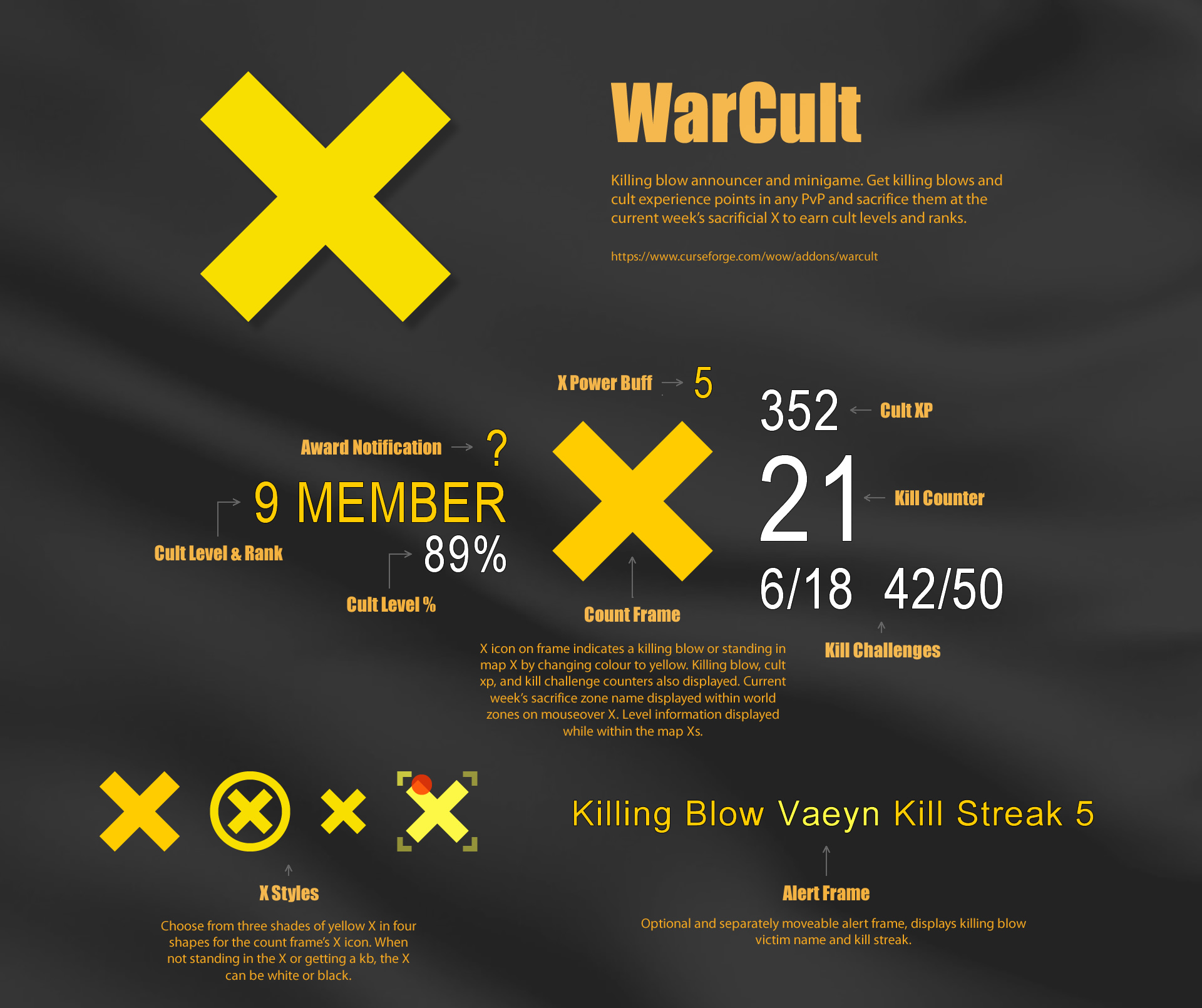
X icon on kill count frame indicates a killing blow or standing in map X by changing colour to yellow. Killing blow, cult xp, and kill challenge counters also displayed. Current week's sacrifice zone name displayed within world zones on mouseover X. Level information displayed while within the map Xs. Optional alert frame briefly displays killing blow victim and kill streak.
- Killing blows will be counted as a KB when KB detection is possible and successfully validated.
- Kill count frame is always visible and initially centered. To move the frame, hold down keyboard SHIFT and LEFT MOUSE button the X to drag the frame to desired position.
- Alert frame is visible after a killing blow and is centered by default. Enable the alert frame in settings, and move the frame to desired position by holding down keyboard SHIFT and LEFT MOUSE button frame center to drag the frame.
- Adjust frame size, opacity, and X style in addon settings.
- Audio announcer is initially disabled. Enable audio for killing and/or sacrifice in addon settings.
- Audio announcer uses the Dialog sound channel, set to preferred volume in WoW's settings.
- Combine with TopTarget to display an icon on your targeted enemy nameplate, highlighting it as a group targeted enemy.
- For WoW retail battlegrounds, arenas and world PvP.
Cult Zones
On the world map you'll see a yellow X in the cult zones below. Every week a cult zone is designated as the sacrifice zone, displayed within world zones on mouseover X. Get killing blows and cult xp in any PvP, and then on ground enter the X in a sacrifice zone to exchange killing blows and xp for cult level progression.
- Elwynn Forest, Eastern Kingdoms
- Redridge Mountains, Eastern Kingdoms
- Durotar, Kalimdor
- Northern Barrens, Kalimdor
- Hellfire Peninsula, Outland
Killing Blows
Killing blows will be counted as a KB when KB detection is possible and successfully validated. When you get a killing blow on an enemy player, the kill counter increases by 1. These kills can be sacrificed at the current week's sacrifice X for level progression, reducing the kill counter to zero. By default WarCult tracks your own killing blows. However, there is an option in settings to "Include Group KB". When enabled, killing blows from other players in your party or raid subgroup will be counted as well as your own. So whether you're a damager, tank or healer, you can join the war cult and level up!
Cult XP
Displayed above the kill counter, cult experience points are earned via PvP activity or standing in the current week's X. They can be sacrificed for cult level progression, reducing xp to zero. The methods below earn you cult xp in varying amounts.
Gain XP
- Stand in the current week's sacrifice X and get xp over time.
- Sacrificing killing blows at the X grants the 'X Power' buff with 5 charges. While buffed, a killing blow consumes one charge and gives xp.
- Kill streak killing blows give incrementally increasing xp.
- Kill streak milestones 10, 20, 30, 40, 50+ give increasing xp.
- Completing the kill streak and 50 kills challenges gives increasing xp.
- Collect spirit, medal, and trophy awards for a chance to receive increasing award xp per killing blow.
- Honorable kills by you and other group members give xp.
Lose XP
- Death penalty, a random chance to receive an xp death penalty subtracted from current xp. Cultists just starting out are exempt from the death penalty.
Kill Challenges
WarCult has two repeating kill challenges, displayed below the kill counter. They both reward bonus cult xp on completion.
Kill Streak Challenge
Your current kill streak/best kill streak is displayed on left below killing blow counter. Equal your best kill streak to complete the challenge for xp reward.
50 Kills Challenge
Your kills progression/kills required is displayed on right below killing blow counter. Equal the required kills to complete the challenge for xp reward.
X Icon
When not standing inside a map X, the X icon on the count frame is white and faded (adjustable), but flashes yellow after a killing blow. Stand in the X in the designated zone to sacrifice kills and earn cult level progression. When standing on ground inside the X on map, the frame X icon is yellow. The X is divided into 4 sub sections. The X indicates the sub section player is inside, or indicates if player is at one of the X corners or X center point. If enough players are available, one of them can stand in center, 4 at corners, and the rest between the center and corners to form a player X.
- If you want to see your exact position standing in the X, select the 'Track X' style in the addon's settings.
- Left or right mouse button press the X to display your WarCult performance, when standing in the X.
Cult Level & Ranks
Increase your cult level and earn ranks by sacrificing killing blows and cult experience points at the X in designated zone. The higher your level, the more killing blows and cult xp needed to progress.
Level number and percent progress to next level is displayed on the left of the WarCult count frame when standing on ground in an X. The ranks below are displayed when you reach the required level.
- Supreme: Level 100
- Mythical: Level 90
- Legendary: Level 80
- Eminent: Level 70
- Illustrious: Level 60
- Elite: Level 50
- Paragon: Level 40
- Exalted: Level 30
- Revered: Level 20
- Honored: Level 10
- Member: Level 1
Cult Awards
Your determination and cult loyalty will be recognized with prestigious collectible award items and xp. The more items you collect, the higher your award bonus xp. View your award items count by standing in an X and left or right mouse button press the X icon.
- Spirit: 10% chance to be awarded for sacrificing killing blows in the X.
- Medals: 5% chance to be awarded for getting a killing blow on an enemy player.
- Trophies: 1% chance to be awarded for completing a kill challenge.
Watch Demo Videos of All PVPXTV Addons on YouTube
- WarCult is the movable kill counter frame at player's unit frame. Optional kb text and audio alerts. See image demos.
- TopTarget is the red cornered bracket on targeted enemy nameplate, highlighting group targeted enemy.
PVPXTV
At-a-glance numbers
Performance highlights
- Peaked at Hot #1133 on Jul 13, 2026.
- Peaked at Rising #935 on Jul 13, 2026.
- Featured on the Hot list across 6 distinct weeks.
- Shipped 1 release in the last 30 days.
- Averaging 1 new downloads per day over the past week.
Visuals
Screenshots 6
Use real gameplay shots to assess the addon before installing.