
Trend Explorer
Recent download momentum
Hourly download deltas for the last 48 hours.
About this addon
What it does
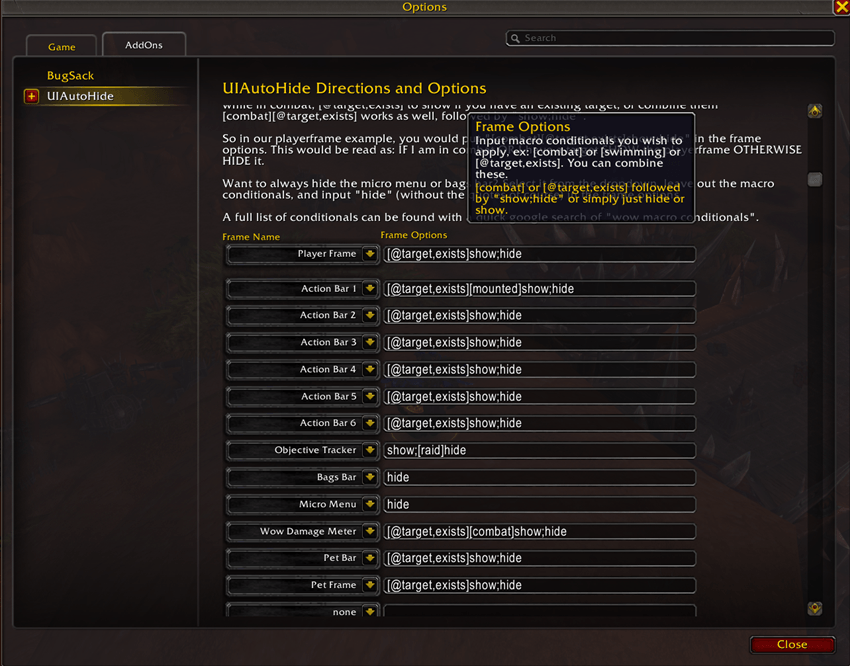
Allows you to modify frames visibility via macro conditionals (just like elvui bars do!)
Say you want to hide the player frame unless you have a target, [combat][@target,exists] assigned to the playerframe will do the trick.
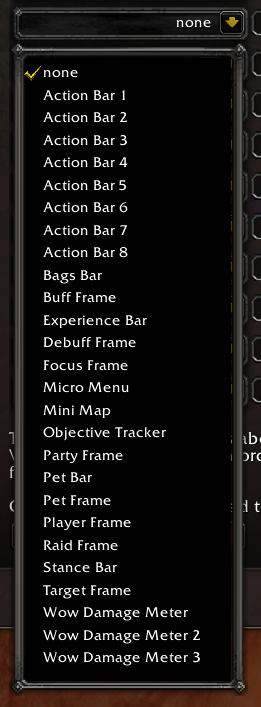
Want to hide the minimap, bagbar, or micromenu? Easily doable with this addon.
More features coming soon!
To access the options you have to hit ESC > OPTIONS > ADDONS > UIAutoHide. (the slash commands are not working right now and I havent figured it out!)
You can view a list of conditionals here: Macro conditionals - Warcraft Wiki - Your wiki guide to the World of Warcraft
You can show/hide the menu (micro menu), the bar bag, most of the bars, the new wow combat dps meter, the minimap, the objective tracker, and more!
This is a must for any minimalist ui enjoyer!
At-a-glance numbers
Performance highlights
- Peaked at Hot #2136 on Jul 23, 2026.
- Peaked at Rising #4971 on Jul 23, 2026.
- Featured on the Hot list across 6 distinct weeks.
- Shipped 1 release in the last 30 days.
- Averaging 6 new downloads per day over the past week.
Visuals
Screenshots 8
Use real gameplay shots to assess the addon before installing.