Trend Explorer
Recent download momentum
Hourly download deltas for the last 48 hours.
About this addon
What it does
Release v12.0.1 - Mar 27, 2026
v12.0.5
* Bliz will enable the /outfit macro in v12.0.5 so UFO will be able to support outfits
v12.0.1
UFO continues to display spell cooldowns and it continues to cast spells, both in and out of combat. However, because of #77, it can't start a new cooldown display during combat. Any displays triggered before combat will display normally.
v12.0.0.pre-patch.01
* BUGFIX: Single Button Assist can prevent placing UFOs
* "Right-click to open config" now uses ACE3's floating config panel. Thanks ACE!
* verified on Midnight PTR 12.00.01
v12.0.0.pre-patch
- mandatory toc bump for 12.0.0 pre-patch - no other changes required?! The Addon Apocalypse spared me. No lamb's blood needed.
v11.2.7.c
Full Changelog: https://github.com/ScottIngram/UFO/compare/v11.2.7.b...11.2.7.c
- save & load a snapshot of UFO locations on the action bars for alts -- because setting up alts in Remix got old fast
v11.2.7
Full Changelog: https://github.com/users/ScottIngram/projects/6/
- NEW #36 - long flyout wrapping
- BUG #60 - isUsable() filters out mounts while in no-mount zones
- BUG #65 - flyout in catalog on the collections panel is occluded
v11.2.5c
- NEW feature #64 - designate a PRIME_BTN via shift-click
- bugfix #63 - UfoProxy complains invalid nil type
- bugfix #58 - most recent button uses wrong tooltip
- enhancement #62 - add tooltip to the [UFO] buttons
- enhancement #57 - support localized config window
v11.2.5a
BUGFIX - config for some users still has FIRST_BTN #61
v11.2.5
- NEW - config: most recent button becomes primary
- NEW - config: support modifier keys with keybindings
- NEW - config: disable label on the action bar
- NEW - let user move buttons the current toon can't use
- NEW - support the "summon favorite random mount" button
- BUGFIX - the [UFO] button on the collections window is broken
- BUGFIX - moving a mount corrupts the data - code self heal the data
- BUGFIX - UFOs on action bar #1 vanish
- BUGFIX - dragging an item in the vendor window throws error
New Contributors - THANK YOU!
- Update zhCN.lua or Suggested missing content by @kaineoa in https://github.com/ScottIngram/UFO/pull/30
- Update ruRU.lua by @Hubbotu in https://github.com/ScottIngram/UFO/pull/42
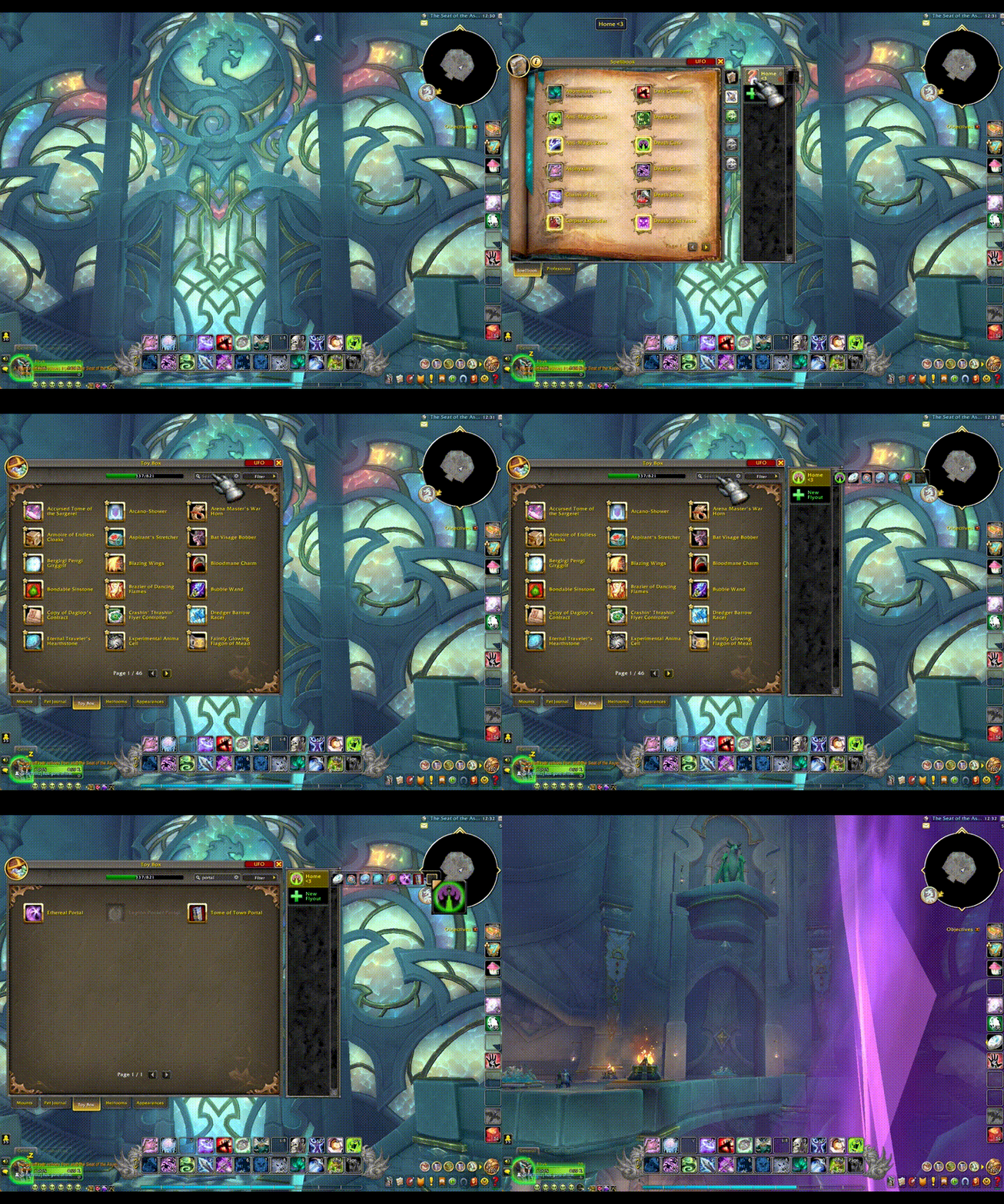
UFO lets you create custom actionbar flyout menus similar to the built-in ones for mage portals, warlock demons, dragonriding abilities, etc. But with UFO, you can include anything you want:
- Spells
- Items
- Mounts
- Pets
- Macros
- Trade skill Windows
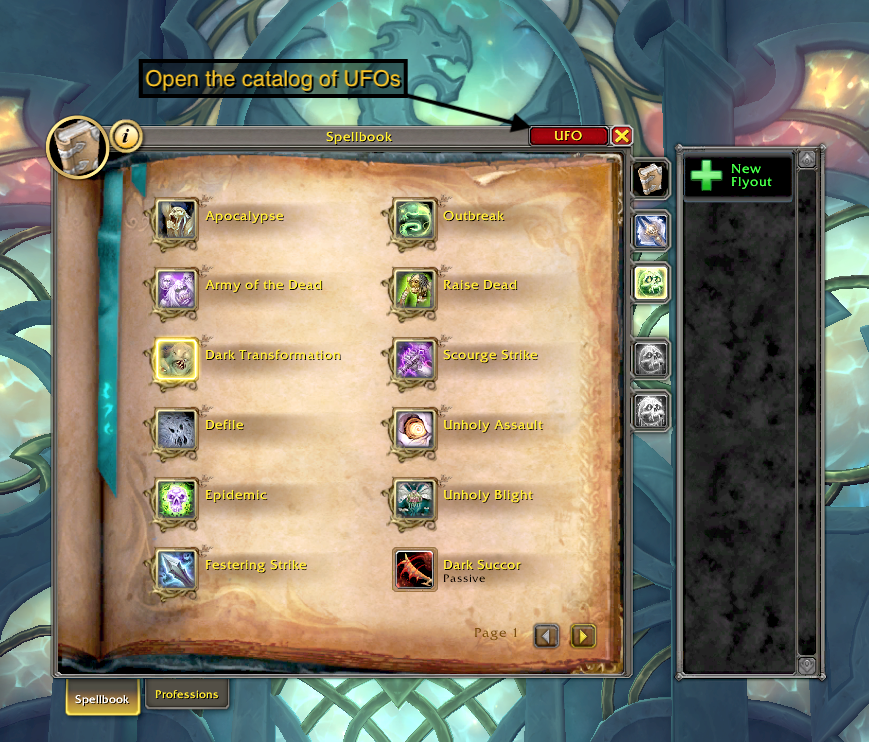
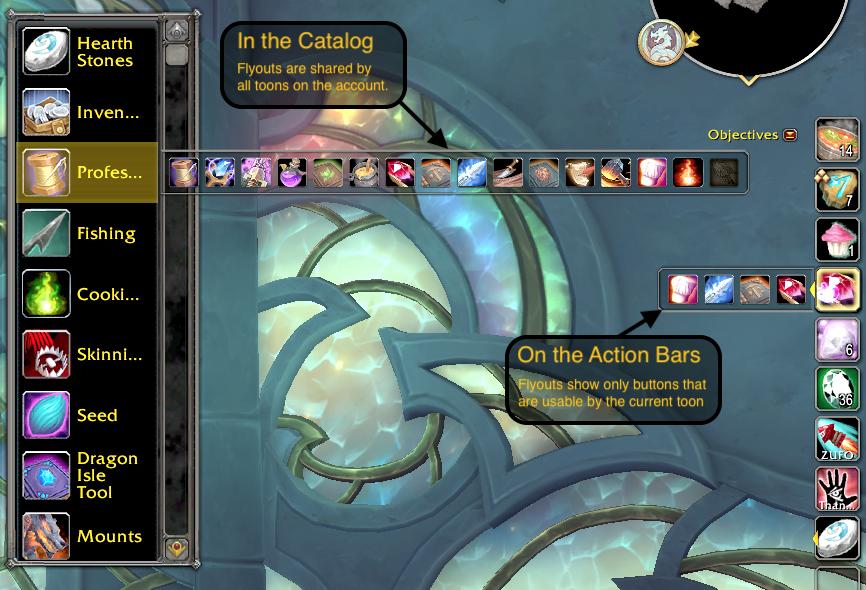
UFO adds a flyout catalog UI onto the side of various panels (Spellbook, Macros, Collections) to let you create and organize multiple flyouts. These can be shared between all characters on your account.
From there, you can drag your flyouts onto your action bars. Each toon keeps their own distinct record of which flyouts are on which bars. Furthermore, placements are stored per spec and automatically change when you change your spec.
In the options screen, you can individually configure the left / middle / right / etc mouse buttons to:
- Open the flyout (the standard behavior)
- Trigger a Random button
- Trigger the First button or Most Recent button
Random favorite mounts, pets, or hearthstones, anyone?
There is VERY limited (let's call it beta) "support" for a few action bar and other addons:
- Bartender4
- ElvUI
- LargerMacroIconSelection adds a search bar to the icon picker.
- Want more? [[Make a request]](https://github.com/ScottIngram/Ufo/issues/new?labels=3rd party addon)
Q: How do I open UFO?
A: Any of the following will open the UFO Catalog where you can create and organize your custom flyouts:
- Type
/ufo - Click the [UFO] button in the upper right corner of the: Spellbook / Collections Panel / Macros Panel
- Click "UFO" in the Addon Compartment (the new menu Blizzard added in Dragonflight to the upper right corner of the minimap).
Q: What if one toon places an ability / item / etc. only they can use onto a flyout shared with other toons?
A: A flyout on the actionbars will only show buttons that are usable by the current toon. However, in the catalog, all buttons will be visible.
Q: Do I have to set up my flyouts on the action bars over and over for each spec?
A: The first time you change to a different spec, UFO will copy your current flyout positions to the new spec. From that point, they are separate and must be changed independently.
Q: Does it work in combat?
A: Yes. Except summoning a battlepet companion. Oh noes.
Tips & Tricks:
- Random Mounts, Pets, or Hearthstones - Load up a UFO with nothing but your favorite mounts and use the random-click feature. Ditto for pets and hearthstones,
- Icon of First Button - If you choose the "?" icon while defining your flyout, UFO will show the icon of the first button in the flyout.
- Reuse UFOs Between Toons - because UFO will hide buttons that a toon can't use, feel free to load up one flyout with every profession and profession related abilities or items (finesse flasks, campfire, fishing bobbers, Tuskarr harpoon, etc).
- One-Button Make & Consume - For mages (or similarly, warlocks) make a flyout with a consumable mana bun as the first button and the Create Mana Bun spell as the second. On login, the bun won't exist and the UFO will instead show Create Mana Bun. Using the Right-Click feature, clicking on the UFO will create the bun and immediately update itself so that clicking will eat it. For warlocks, the same approach works for health stones. In fact, you can reuse the same flyout with both create bun and create healthstone for all toons and only the usable spell will be visible.
Many thanks to Sébastien Desvignes and his addon FloFlyout which was the basis for my work here.
At-a-glance numbers
Performance highlights
- Peaked at Hot #1372 on Jul 16, 2026.
- Peaked at Rising #3691 on Jul 16, 2026.
- Featured on the Hot list across 6 distinct weeks.
- Shipped 1 release in the last 30 days.
- Averaging 2 new downloads per day over the past week.