Trend Explorer
Recent download momentum
Hourly download deltas for the last 48 hours.
About this addon
What it does
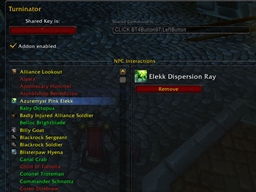
Turninator is designed to speed up the turning in or acceptance of quests through the use of a keybind shared with the "Interact with Target" command and, optionally, any one other command such as an action bar button. The simplest way to put it is that one of the keys I normally mash in combat, I can now mash on out of combat to speed up npc interactions and questing. It can also make it easier to use quest items on their target npcs.
As an example, I use ` key with Turninator on my characters. This key is also bound to an action bar button with one of my offensive abilities. That key will work like normal action bar button except when I've targeted, while out of combat, an NPC that the addon believes is interactable. At that point the keybinding is changed from the usual action bar button ability to the games Interact with Target command. Hitting the key initiates a conversation dialog with the npc and the keybind changes once again, this time to a Turninator command. This command can be used to move more quickly through the npc dialogs; turning in any quests they offer which you have completed and/or accepting any new quests they offer. Exiting out of the dialog, the keybind will change again to Interact with Target if I'm still targeting the same npc. If I deselect that target, or select a new one which doesn't meet the same criteria, the keybind reverts back to the original command which on my characters was the action button.
Please note that bindings cannot be changed if you are in combat.
To start using the addon, go to the options ui and select the key you wish to use. Even if its already bound to something else, you'll see we save the name of that command so we can share it and set it back when done.
Some of the most useful functionality is supported via the chat command interface. Type /turninator or /tr followed by one of the following commands:
UseItem binding will be set to use the named item whenver the target has same name as current target; for example, to use Enchanted Salve on Wounded Hyjal Defenders Interact treat npcs with same name as targeted npc as interactable from now on; for example, if a quest giver is dead this would override our normal behavior of not changing the binding to interact Ignore treat npcs with same name as targeted npc as not being interactable from now on; for example, any mob which you know you don't want to interact with and which you may have targeted when entering combat. the purpose here is to give you a way to prevent having a key locked to interact by the start of combat Forget removes targeted npc from UseItem, Interact and/or Ignore lists Config takes the user straight to the options ui page Off disables the addon, shared key now only being used by original command On enables the addon, resume sharing key with original commandAny problems or issues with the addon are best reported via a ticket at http://www.wowace.com/addons/turninator/tickets/.
At-a-glance numbers
Performance highlights
- Peaked at Hot #505 on Jul 24, 2026.
- Peaked at Rising #4769 on Jul 24, 2026.
- Featured on the Hot list across 6 distinct weeks.
- Shipped 1 release in the last 30 days.
- Averaging 38 new downloads per day over the past week.
Visuals
Screenshots 1
Use real gameplay shots to assess the addon before installing.


