
Trend Explorer
Recent download momentum
Hourly download deltas for the last 48 hours.
Latest hour +0 Jul 26, 12 AM
Peak hour +2 Jul 26, 10 AM
Average +0 per hour
About this addon
What it does
Task Manager automatically tracks daily and weekly quests across all your alts. You choose what to track, and Task Manager will show you a list with a summary of characters that have completed each.
Getting started:
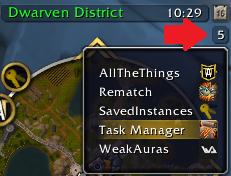
- Open the main window by clicking Task Manager in the addon compartment (top-right of the minimap, see screenshot below). You can also use the command /task show
- Use the + button to add a task you want to track. You can rename it and assign a category if you'd like.
- Standard tasks can be manually marked as completed or not.
- Quest tasks will automatically track when the specified QuestID is completed on each alt.
- Boss tasks will automatically track when the specified raid/dungeon boss has been killed on each alt. Useful for mount farming. Currently you can only pick a boss from your recent raid/dungeon lockouts.
- After adding new task(s), you will need to login to all your alts for their status to be updated.
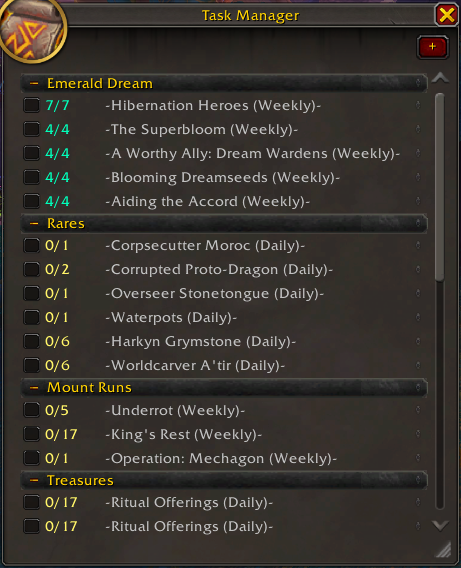
On the main window:
- The checkbox will show whether the current character has completed that task.
- The numbers next to it will show how many alts have completed that task (not counting ignored characters).
- To edit or remove a task, right-click on it to get an options menu.
- Click the task title to see a list of characters and completion status.
Advanced Tips:
- You can use the QuestID of hidden tracking quests, such as rares or treasures. The addon AllTheThings can help find these QuestIDs in its tooltips.
- You can ignore characters by right-clicking their name to get an options menu. You can also shift-click their name as a shortcut.
- You can re-order your tasks by using the drag-and-drop icon on the right side.
To open the Task Manager:
The main window:
At-a-glance numbers
Performance highlights
- Peaked at Hot #500 on Jul 2, 2026.
- Peaked at Rising #583 on Jul 2, 2026.
- Featured on the Hot list across 6 distinct weeks.
- Shipped 3 releases in the last 30 days.
- Averaging 12 new downloads per day over the past week.
Visuals
Screenshots 2
Use real gameplay shots to assess the addon before installing.