Trend Explorer
Recent download momentum
Hourly download deltas for the last 48 hours.
Latest hour +0 Jun 2, 11 AM
Peak hour +0 Jun 4, 9 AM
Average +0 per hour
About this addon
What it does
SmartTooltip
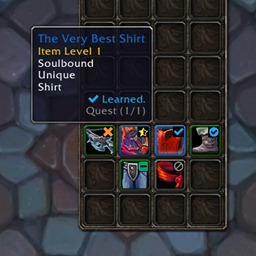
SmartTooltip is a lightweight and highly configurable addon that gives you complete control over your tooltip positioning in World of Warcraft. Say goodbye to tooltips blocking important information - position them exactly where you want relative to your mouse cursor!
Features
🎯 Positioning & Anchors
- Cursor-Based Positioning: Tooltips are anchored to your mouse cursor, ensuring they move with you.
- 9 Anchor Points: Choose exactly where the tooltip appears relative to your cursor (e.g., Top Left, Center, Bottom Right).
- Precise Offsets: Fine-tune the horizontal and vertical distance from the cursor (-100 to +100 pixels).
⚔️ Combat Focus
- Hide in Combat: Automatically hide tooltips when entering combat to keep your screen clean.
- Spell Visibility: Option to keep spell and ability tooltips visible even in combat, so you can still check your cooldowns.
🗺️ Minimap Integration
- Quick Toggle: Left-click the minimap button to instantly Enable/Disable the tooltip.
- Easy Config: Right-click to open the settings panel.
- Draggable: Place the button anywhere on your minimap border.
⚙️ Enhanced Options Panel
- Master Switch: Completely disable the addon functionality with a single checkbox.
- Live Preview: Interactive test area that updates in real-time as you adjust settings.
- User Friendly: Clean and organized settings menu.
🌍 Full Localization Support
- Fully Translated: Supports English, Portuguese (Brazil), German, French, Spanish, Chinese (Traditional & Simplified), Korean, Russian, and Italian.
Usage
Minimap Button
- Left Click: Toggle Tooltip On/Off
- Right Click: Open Settings
- Drag: Move Icon
Chat Commands
/stor/smarttooltip- Show help/st config- Open configuration panel
Configuration
Access via ESC → Options → AddOns → SmartTooltip or the Minimap Button.
Compatibility
- ✅ World of Warcraft Retail (Midnight)
- ✅ Compatible with other UI addons (ElvUI, etc.)
Support & Feedback
Found a bug or have a feature request? Please report issues on our CurseForge project page.
Enjoying SmartTooltip? Please leave a review and share with your guild! 💚
At-a-glance numbers
Performance highlights
- Peaked at Hot #3524 on May 25, 2026.
- Peaked at Rising #4606 on May 6, 2026.
- Featured on the Hot list across 5 distinct weeks.
- Shipped 1 release in the last 30 days.
- Averaging 1 new downloads per day over the past week.
Visuals
Screenshots 4
Use real gameplay shots to assess the addon before installing.