Trend Explorer
Recent download momentum
Hourly download deltas for the last 48 hours.
About this addon
What it does
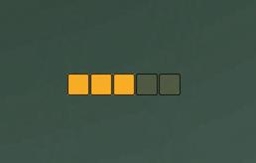
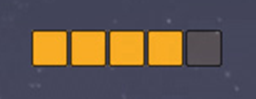
A simple Holy Power display that shows how many charges you have.
To move the display boxes, Alt+drag the leftmost box.
Slash command: /shp
/shp color - Opens a window to let you change color of the holy power frame.
/shp scale <number> - Sets the scale of the bar. Numbers between 0.5 and 3 are recommended. Sample usage: /shp scale 1.5
/shp alpha <number> - Sets the alpha value of holy power charges. Default value is 1.0, values must be between 0.2 and 1.0.
/shp nocombat on|off - Whether the boxes should be shown outside combat or not.
/shp hidedefault on|off - Whether the blizzard default holy power frame should be hidden or not.
/shp reset - Resets the addon settings back to the default. Useful if you for example accidentally dragged the frame outside the screen.
More of the simple-series:
Simple Combo Points
Simple Chi
Simple Shaman Resources
Simple Shadow Orbs
Interested in translating my addons? Send me a PM!
At-a-glance numbers
Performance highlights
- Peaked at Hot #1180 on Jun 30, 2026.
- Featured on the Hot list across 6 distinct weeks.
- Shipped 1 release in the last 30 days.
- Averaging 8 new downloads per day over the past week.
Visuals
Screenshots 2
Use real gameplay shots to assess the addon before installing.