Trend Explorer
Recent download momentum
Hourly download deltas for the last 48 hours.
About this addon
What it does
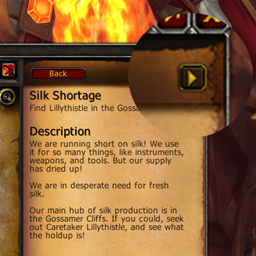
A World of Warcraft addon that uses the 9.1 TTS API to read quest text aloud. Right-click the play button to access the settings.
Commands- /qtts play: Start reading the quest
- /qtts stop: Stop reading the quest
- /qtts settings: Open the settings panel
How can I add additional voices?
The add-on automatically lists all voices installed on your system. If you find free third-party voices, you can try installing them. If they are compatible, they should appear in the list. Please note that the availability of voices is beyond the scope of this add-on.
For anyone who would like to use Natural voices (those used by Windows Narrator), check this
I used this to add more voices (saw many others that search for that)
However keep in mind that that has nothing to do with the addon. Adding the voices there make them to be usable for other programs on windows. So WoW can load it which means the addon can use it too.
(but be carefull when adding things to your registry - you CAN produce problems there for you)
The TTS randomly stops working
This may happen if the Windows TTS process is not active. Opening the "Speech" settings in Windows should fix the problem. (credits: BiktiBikti)
Credits- FangOfAsgard: keybind and dynamic voice
- MrMartiniMo: reading pause between title and text
- BelegCufea: narrator option, RegisterAddOnSetting fix
- Jeremy M. (20€)
- James M. (5€)
- Demo: https://youtu.be/2d9iuRfHpEk
- Project on Curse: https://www.curseforge.com/wow/addons/questtts
- Project on Wago: https://addons.wago.io/addons/questtts
- Project on GitHub: https://github.com/z0fa/WoWQuestTTS
- Donate: https://paypal.me/z0fa
At-a-glance numbers
Performance highlights
- Peaked at Hot #57 on Jun 30, 2026.
- Featured on the Hot list across 6 distinct weeks.
- Shipped 4 releases in the last 30 days.
- Averaging 43 new downloads per day over the past week.