Trend Explorer
Recent download momentum
Hourly download deltas for the last 48 hours.
About this addon
What it does
NeedToKnow: Simple, effective timer bars
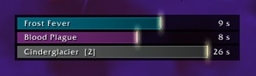
Track specific buffs, debuffs, and cooldowns with bars that always appear in the same place in the same color. NeedToKnow is great for short buffs and debuffs you use a lot. For example, a rogue could show bars for Slice and Dice, Rupture, and Garrote.
- Easy to set up
- Works with spells, abilities, items, totems, procs, and internal cooldowns
- Track more than one spell or ability with one bar
- Works with Retail and Classic WoW
Other features
- Save setups for different specializations
- Track by name or spell ID
- Show cast time indicator to see when to refresh buffs and debuffs before they finish
- Make bars deplete at same rate to see which will finish first
- Blink bars when buff or debuff missing
- Track buffs on raid members without having to focus them
Instructions
General options are available in the Blizzard interface options menu. You can type "/needtoknow" or "/ntk" to lock/unlock the addon. To configure individual bars, right click them while unlocked. Bars work while locked. If you only see full bars that aren't changing in response to anything, they are unlocked! Just type /ntk to lock them and get them working for you.
You can enable more groups of bars by going into the Interface settings off the main menu and choosing the AddOns tab.
When entering your settings, be careful with your spelling and capitalization. Also remember that buffs and debuffs sometimes have different names than the items and abilities that apply them. The Death Knight ability Icy Touch, for example, applies a DoT called Frost Fever.
On each bar you can enter in multiple buffs/debuffs deliminated by commas. They are prioritized according to order.
i.e. "Rake, Lacerate" - If both are applied, will display Rake until it expires and then it will track Lacerate
i.e "Curse of Recklessness, Curse of Exhaustion, Curse of Shadows" - Good way to track single instance curses
If you wish to use SpellID, make sure you are using the correct one!
FAQ
Why won't NeedToKnow work for me? I set it up but the bars just sit there at full, not moving or tracking anything.
- The bars only time things when the addon is locked. Type "/needtoknow" or "/ntk" to lock/unlock the addon. You can also use the buttons in the AddOns tab of the Blizzard Interface Options menu.
Why won't NeedToKnow track this buff/debuff? It works for other things.
- Check your spelling and capitalization. Also remember that buffs and debuffs sometimes have different names than the items and abilities that apply them. The Death Knight ability Icy Touch, for example, applies a DoT called Frost Fever. If you're using a SpellID, make sure you have the correct one.
How do I track multiple buffs or debuffs on a single bar?
- Enter the name of each buff/debuff separated by commas. They are prioritized according to order. For example, "Rake, Lacerate" will display Rake until it expires and then it will track Lacerate. "Curse of Recklessness, Curse of Exhaustion, Curse of Shadows" is a good way to track single-instance curses.
How do I get more bars?
- You can enable more groups of bars by going into the Interface settings off the main menu and choosing the AddOns tab. If four groups of six bars isn't enough for you, consider another timer bar addon. Also consider rethinking your UI.
How do I get NeedToKnow to track my own DoTs but not those applied by other members of my class?
- Select "Only show if cast by self" in the bar's configuration menu.
If you like NeedToKnow, you might also like:
- Engraved - Track combat resources with Warcraft rune art
- NephilistNameplates - Simple, effective nameplates
- DownInFront - Hide UI clutter
At-a-glance numbers
Performance highlights
- Peaked at Hot #272 on Jul 1, 2026.
- Featured on the Hot list across 6 distinct weeks.
- Shipped 1 release in the last 30 days.
- Averaging 37 new downloads per day over the past week.
Visuals
Screenshots 6
Use real gameplay shots to assess the addon before installing.