Trend Explorer
Recent download momentum
Hourly download deltas for the last 48 hours.
Latest hour +18 Jul 26, 2 AM
Peak hour +54 Jul 27, 1 AM
Average +7 per hour
About this addon
What it does
MythicPlusTimer
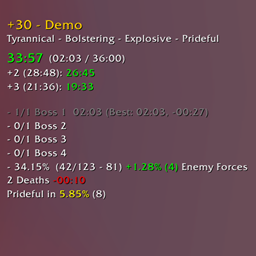
Custom Mythic+ timer appearance
Features
- Restyles Mythic+ timer
- Shows time since start counting upwards and time left
- Shows +2/+3 timer
- Shows enemies percentage with 2 decimals
- Shows absolute numbers for enemy forces progress (optional, disabled by default)
- Shows the enemy forces of the current pull (optional, disabled by default)
- Option to show the enemey forces as bar
- Shows the completion time and your best time per objective (optional, enabled by default; The best time is either per level+affixes (default) or level or dungeon)
- Death Counter - time lost caused by player deaths (optional, disabled by default)
- Death Counter tooltip that shows who died and how often
- Object/Dungeon completion time is shown in chat (optional, enabled by default)
- Shift + Click on the timer sends a time left information message to the party chat
- Shows the enemy forces progress in the enemy tooltip
- Automatically inserts the keystone (optional, enabled by default)
- Shows progress needed until next reaping (optional, enabled by default)
- Shows affixes as text or as icons (default is text)
- Timer is still visible after the dungeon is completed
- Demo data is shown for unlocked timer (if not currently in a mythic+)
- Available informations are shown at the start timer
- Hides the default objective tracker (optional, enabled by default)
- Options to change the color of the texts
Commands
/mpt toggle- Lock/Unlock timer frame/mpt config- Opens the config page
At-a-glance numbers
Performance highlights
- Peaked at Hot #449 on Jul 27, 2026.
- Featured on the Hot list across 6 distinct weeks.
- Shipped 1 release in the last 30 days.
- Averaging 127 new downloads per day over the past week.
Visuals
Screenshots 5
Use real gameplay shots to assess the addon before installing.


