Trend Explorer
Recent download momentum
Hourly download deltas for the last 48 hours.
About this addon
What it does

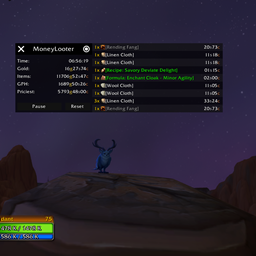
A lightweight and blazingly-fast 🦀 World of Warcraft addon designed to track your gold farms. Track both raw gold and the gold value of looted items thanks to amazing addons like Auctionator or TradeSkillMaster, with reload protection so you don't need to worry about disconnections.
New in 1.8: Performance improvements, internal profiler and cache system
EMA‑based GPH calculation: GPH (Gold Per Hour) is now computed with an EMA (Exponential Moving Average), smoothing spikes. During the first 30 seconds, an adaptive alpha is applied in the calculation to prevent sudden spikes.
Two new cache systems:
- Item cache: A cache that persists only during the active session (a /reload clears it) and dramatically reduces calls to WoW’s internal APIs.
- Price cache: A cache that also persists only during the active session but has a one‑hour expiration time. It prevents unnecessary calls to other addons APIs, as price updates are uncommon during farming sessions. To purge the cache, simply run /reload to delete it completely.
These caching systems trade a small amount of extra memory for significant performance gains.
Core refactor: A general refactor was performed on the addon, mainly in the Core module. This brings performance improvements and simplifies the code for easier maintenance.
Internal profiler: I can now track performance regressions and improvements reliably (and everyone can, just use /ml profiler to toggle on/off the profiler).
Translations: Translations were added for languages that previously had no localization. They were generated with gpt‑oss. While not perfect, providing them is better than nothing (esES, esMX, enUS, ruRU already had manual translations).
New in 1.5: OribosExchange, RECrystallized and Auctioneer
Added support for OribosExchange, RECrystallized and Auctioneer.
Restored the fallback system: In the past I disabled this system because with certain items (mainly in Retail), when TSM didn't find a price or that price was below the filter, Auctionator could return unrealistically high prices due to lack of auction data.
I've received a few requests, mainly from players of the classic versions, to be able to use Auctionator while they have TSM active and since it is a "bug" that occurs very rarely, I'm reactivating this system and I'll see if I receive any complaints over time.
Note: Auctioneer is disabled since the addon is broken and orphaned. I would like to enable it (and complete the implementation) in the future if the developers fix it. Auctioneer is now enabled and working (at least in Retail) using "Best" for the prices ("Median" by default).
New in 1.1: Summary Mode

Now you can see your loot summary in a clear and organized manner. You can toggle between the loot summary and the loot list by right clicking the toggle button (right click again to come back).
Thanks to loksinss (Issue #12) for the idea :)
New UI and MoneyLooter 1.0

I've been working for a few days on a new UI to get rid of the old look of the previous one but keep it simple and performant, and with the release of the 1.0 here it is!
This new version comes with this flawless UI and a lot of bug fixes!
I might still change a few things, but for now I'm happy with the result 🙂
Installation
Download the latest release from Wago, CurseForge, WoWInterface or GitHub using your favourite addon manager.
Manual Installation
- Download the latest release from the releases page.
- Extract the contents of the zip file into your
World of Warcraft\VERSION\Interface\AddOnsdirectory. - Launch World of Warcraft and enable the addon in the AddOns list.
Compatibility Status
| Version | Status |
|---|---|
| Retail | ✅ |
| Cataclysm Classic | ✅ |
| Classic Era | ✅ |
| Classic Hardcore | ✅ |
| Season of Discovery | ✅ |
| Mists of Pandaria | ✅ |
✅ = Compatible
❔ = Untested
❌ = Not compatible
Note: Since Wrath and TBC no longer have official servers and are causing some issues with CurseForge, I will no longer be supporting these versions but I will continue packaging the TOC files in the addon.
Price source order
- TSM
- Auctionator
- Auctioneer
- OribosExchange (only Retail)
- RECrystallize (only Retail, available in Wago)
It's a cascading fallback system, if TSM doesn't find a price, it will look for it in Auctionator, then in Auctioneer, etc. When it finds a valid price, it doesn't continue searching in other addons.
For example, if it finds a valid price in TSM, it won't search in Auctionator or other addons.
Usage
Once installed login in to the game or /reload your interface and you will see MoneyLooter ready to be used.
You can alternate between /ml or /moneylooter for chat commands. In the following examples I will use /ml.
    /ml: Toggle show/hide addon window
    /ml show: Show MoneyLooter
    /ml hide: Hide MoneyLooter
    /ml info: Shows information about the addon

    /ml custom: Sets a custom TSM string to be used in the price calculation. If empty, returns the custom TSM string it's currently using.

    /ml forcevendorprice: This command forces the merchant's selling price to always be used, skipping addons. It's a toggle.

    /ml mprice: Sets the minimum price threshold for a given quality.
        mpricex: All available qualities.
        mprice1: Quality 1 - Common - White
        mprice2: Quality 2 - Uncommon - Green
        mprice3: Quality 3 - Rare - Blue
        mprice4: Quality 4 - Epic - Purple
    * The rest of the qualities will use the vendor price, if they have it.
The price format for mpricex is a number followed by g(old), s(ilver) or c(opper). If you only specify the number, gold will be used by default.
    /ml mprice1 50 s
    /ml mprice2 5000
    /ml mprice3 500 g
    /ml mprice4 5 c
Configuration
Important: MoneyLooter values items using the TradeSkillMaster, Auctionator, Auctioneer, OribosExchange and RECrystallized addons. If all are available, it will always use TSM. It's a cascading system, first it will check TSM, if it's not available then Auctionator, etc. and finally, if neither is available, it will use the vendor value. I've done it this way because, in my opinion, TSM offers the most accurate and up-to-date prices (if you use the TSM custom string correctly, although for the current expansion, 'dbmarket' is a reliable source of information, it's not so true for old content, transmogs, etc).
MoneyLooter by default sets the minimum prices to 0 for all item qualities. Also, the TSM string it uses is 'dbmarket'. If you want to change this setting you can do the following:
TSM Custom String: Type /ml custom 'TSMCustomString'
For example:
/ml custom check(dbmarket - 1000g, 95% dbmarket, 50% dbmarket)
In this example, MoneyLooter will use TSM (if available) with the custom price string 'check(dbmarket - 1000g, 95% dbmarket, 50% dbmarket)' to value your items (I'm not recommending this custom string, it's just an example 🙂).
If you want to return to the default settings use:
/ml custom dbmarketTSM Minimum price threshold: Type /ml mprice1 '1234 (g|s|c)'
For example:
/ml mprice2 5500 g
In this example, MoneyLooter will use 5500 gold as minimum threshold for items with quality 2 (Uncommon).
If you want to return to the default settings use:
/ml mpricex 0See Usage and check available qualities.
This setting are account-wide so you only have to set it once and you can use it on all your characters.
Note: For accurate item pricing using Auctionator, ensure you have scanned the auction house with it recently.
Why?
Why not? 🙂
History
I developed this addon at the end of BFA, during the Shadowlands pre-patch for personal use and every time I come back to the game I use it, almost always unchanged or making slight changes because the Blizzard interface API has changed.
I've used it in Retail, Classic, Classic Era, Classic Hardcore and SoD, but until now I've kept it for personal use (although the GitHub repository was always public). With the release of TWW I decided to almost completely rewrite the addon code to make it much easier to extend the functionality, debug and make it even more efficient.
So after several days of hard work (never look at that code you wrote all those years ago and thought it was fine), I've decided to make it public, because every time I come back to the game I look for addons to track my farms and I never find anything that I really like.
Plus, I think even if I leave the game, it would cost me little to no effort to keep it updated (I hope - I can confirm after more than a year without playing that the addon needed 0 maintenance, aside from toc updates).
Contributing, Translating and Issues
Contributions are welcome! If you have any suggestions, bug reports, or feature requests, please open an issue on the Issues page.
Feel free to report issues or doubts 😊
You can also help translate MoneyLooter! You can find the translations files inside the locales folder.
License
This project is licensed under the MIT License - see the LICENSE file for details.
At-a-glance numbers
Performance highlights
- Peaked at Hot #21 on Jul 13, 2026.
- Featured on the Hot list across 6 distinct weeks.
- Shipped 2 releases in the last 30 days.
- Averaging 361 new downloads per day over the past week.
Visuals
Screenshots 4
Use real gameplay shots to assess the addon before installing.